 Aabahran
A MUD client built for Aabahran.
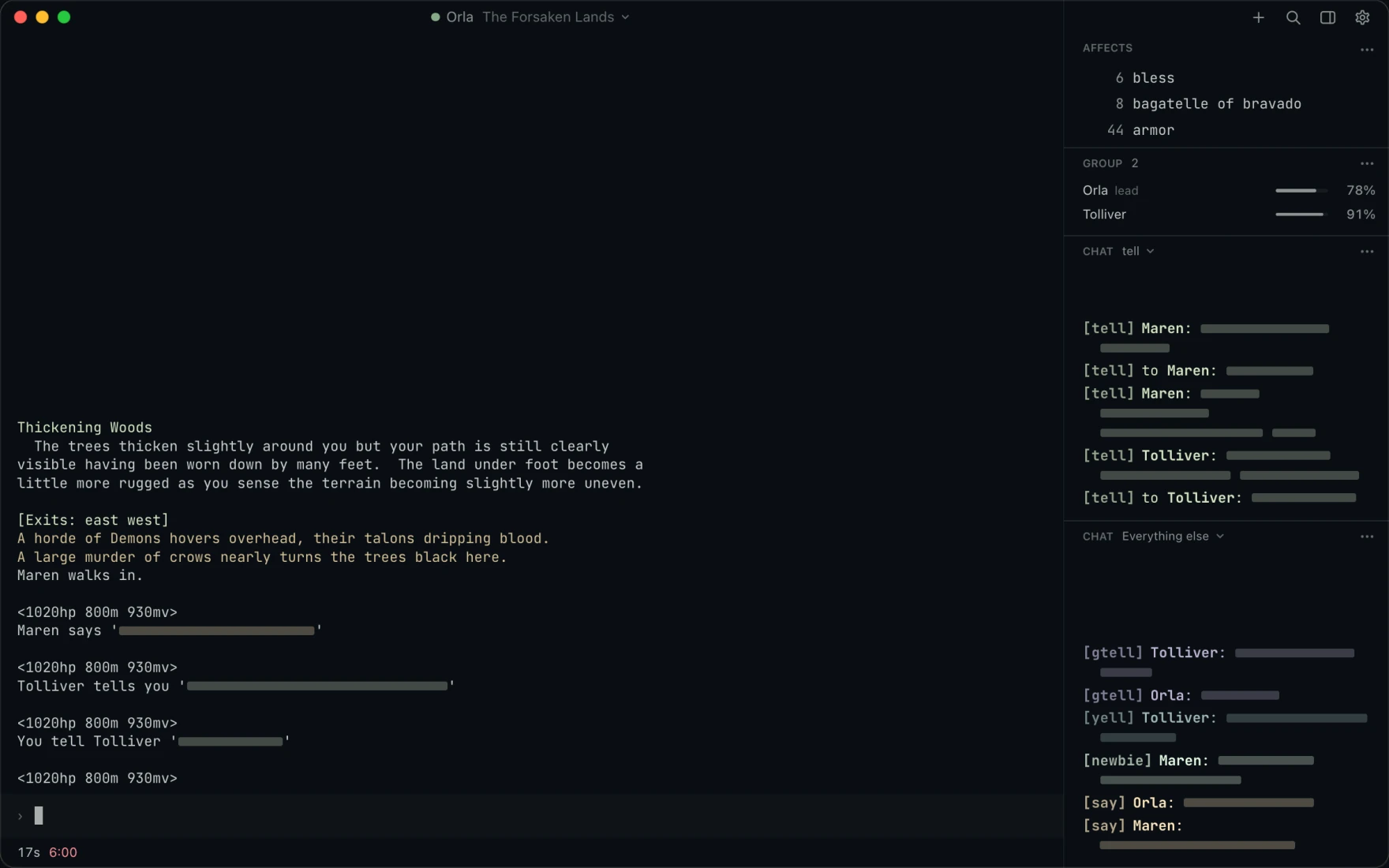
Vosh keeps your game text, prompt, map, affects, group and chat together in one quiet window, in the colors of the theme you pick. It runs on macOS, Windows and Linux, and works with any MUD that speaks telnet and GMCP.
Your prompt
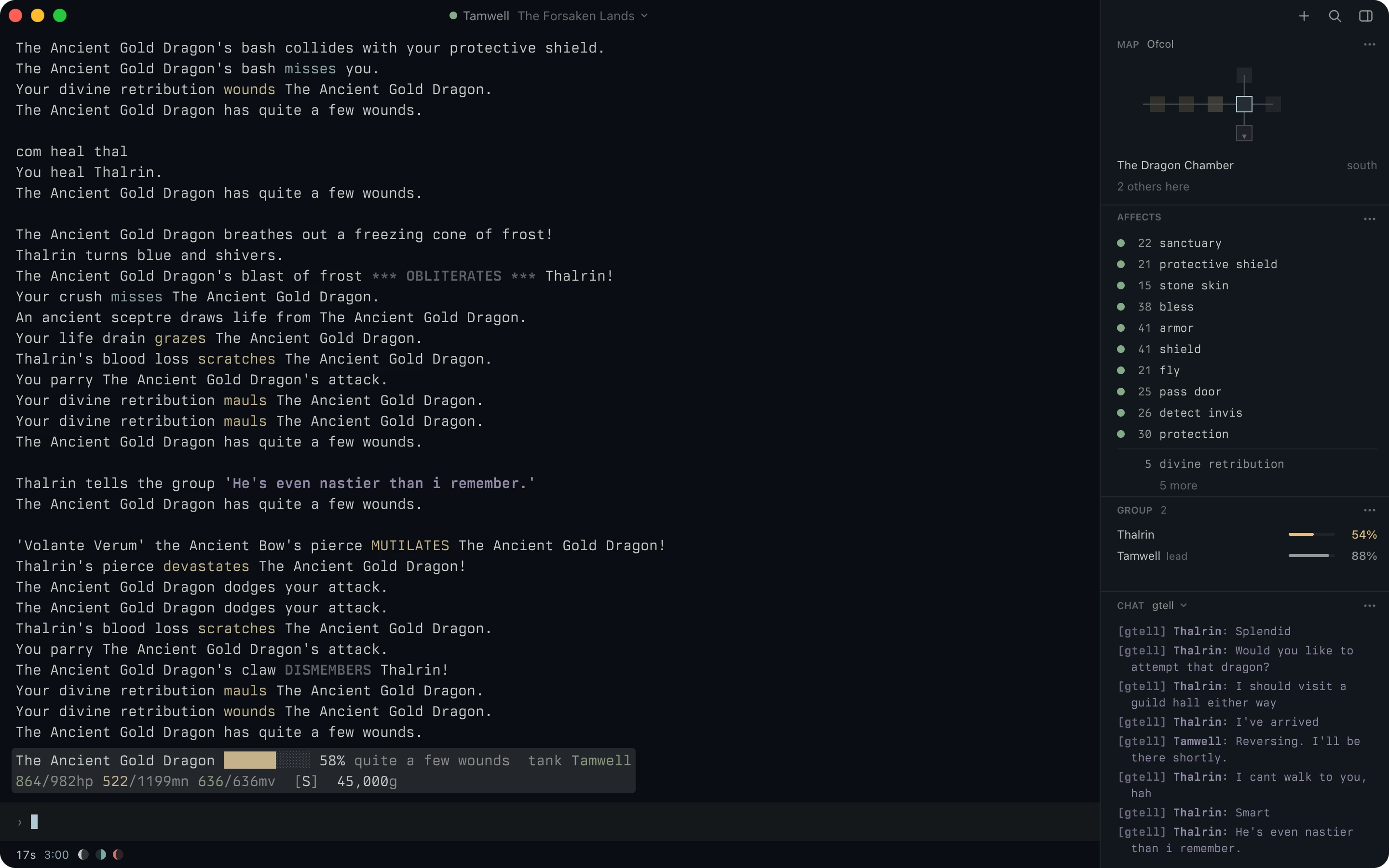
Keep your prompt in sight.
Vosh pins your prompt above the command line, so your health and the tank stay in view while the fight scrolls past.
The terminal
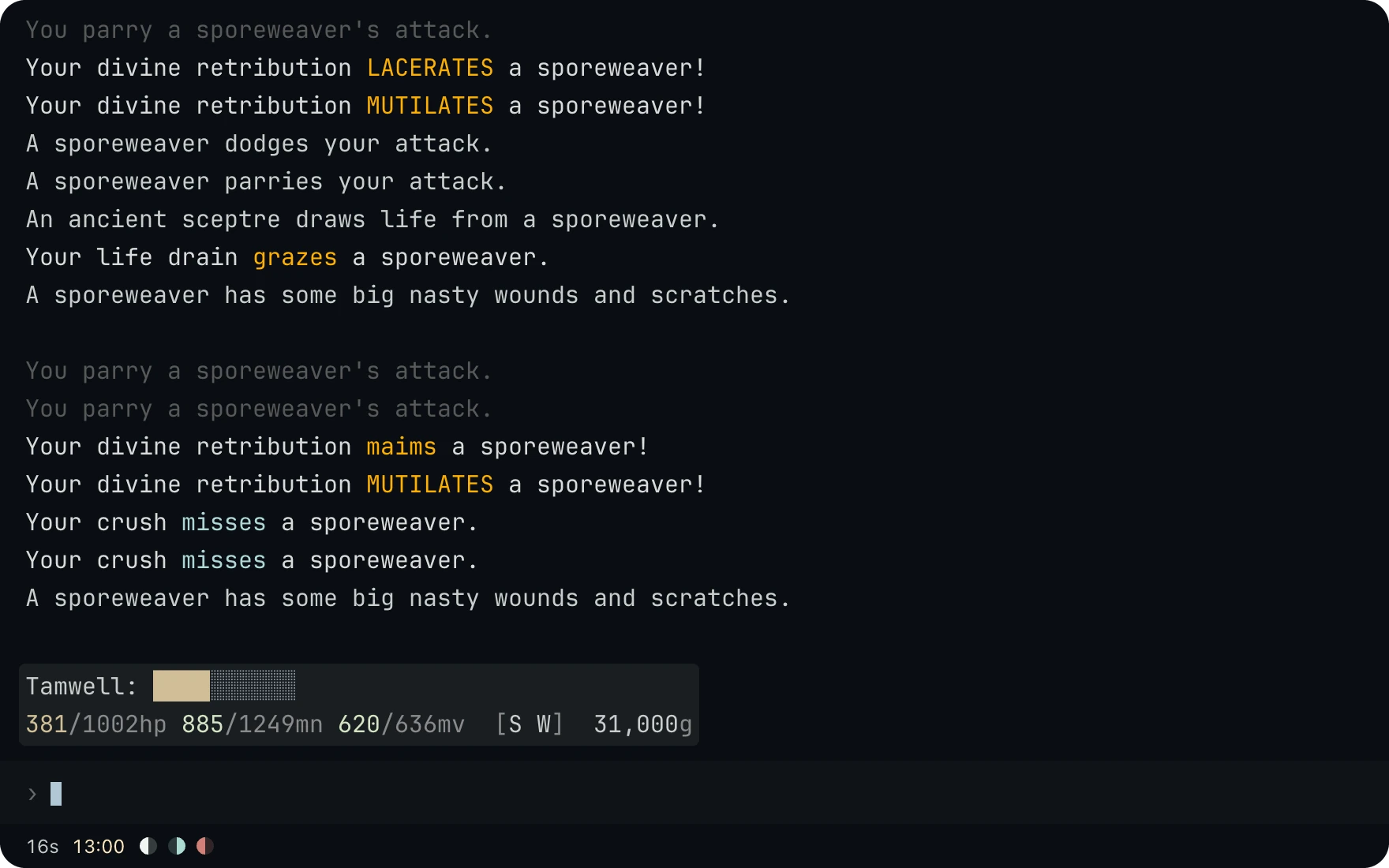
Read a long fight at a glance.
Collapse repeated lines shows a line the game repeats once, with a count in front, and the terminal draws every style the game sends.
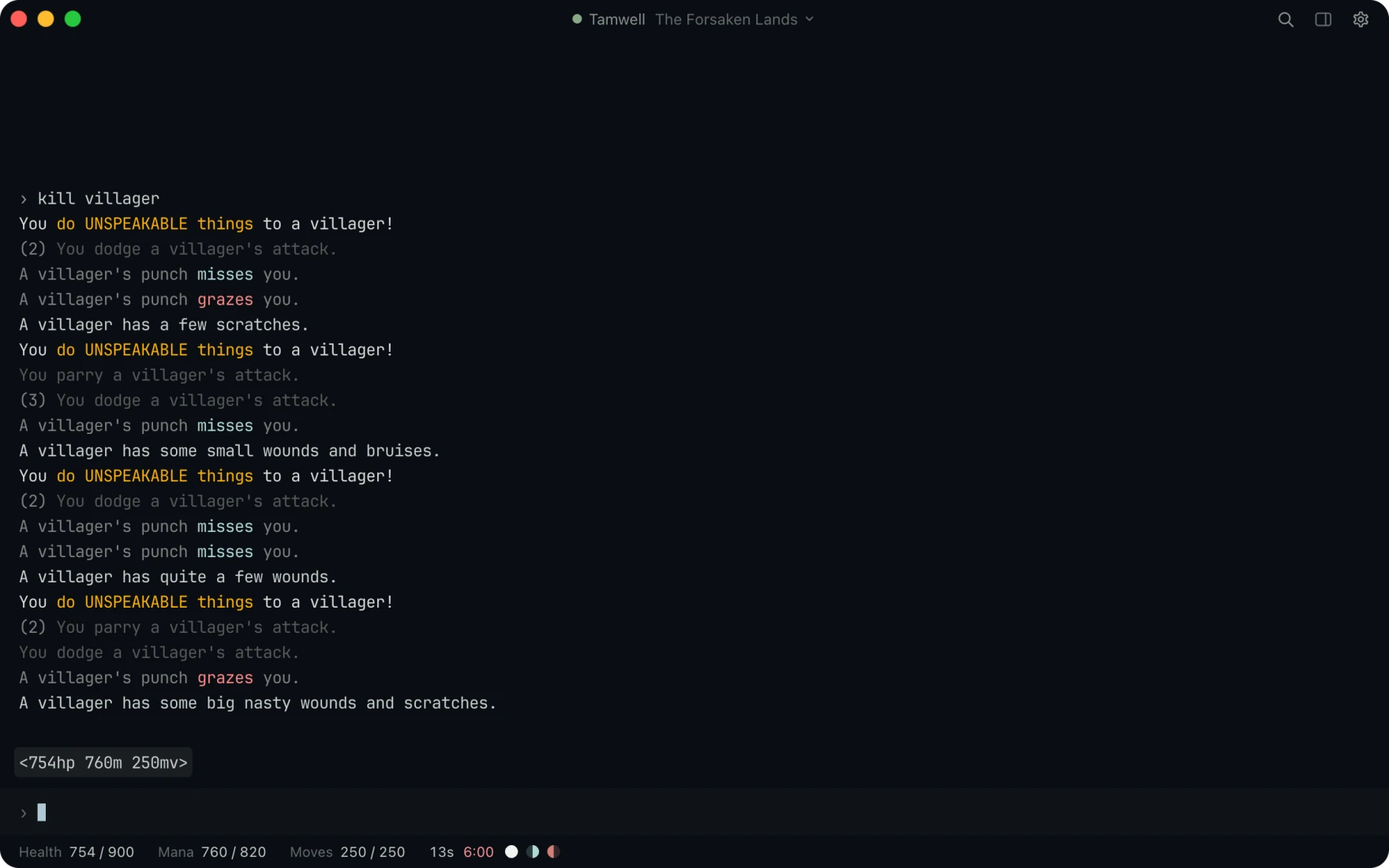
- One line for a run of dodges. Collapse repeated lines shows a repeated line once, with its count in front.
- Every hit in view. Attack lines keeps each hit and miss on its own line, and the presets you turn on color the damage.
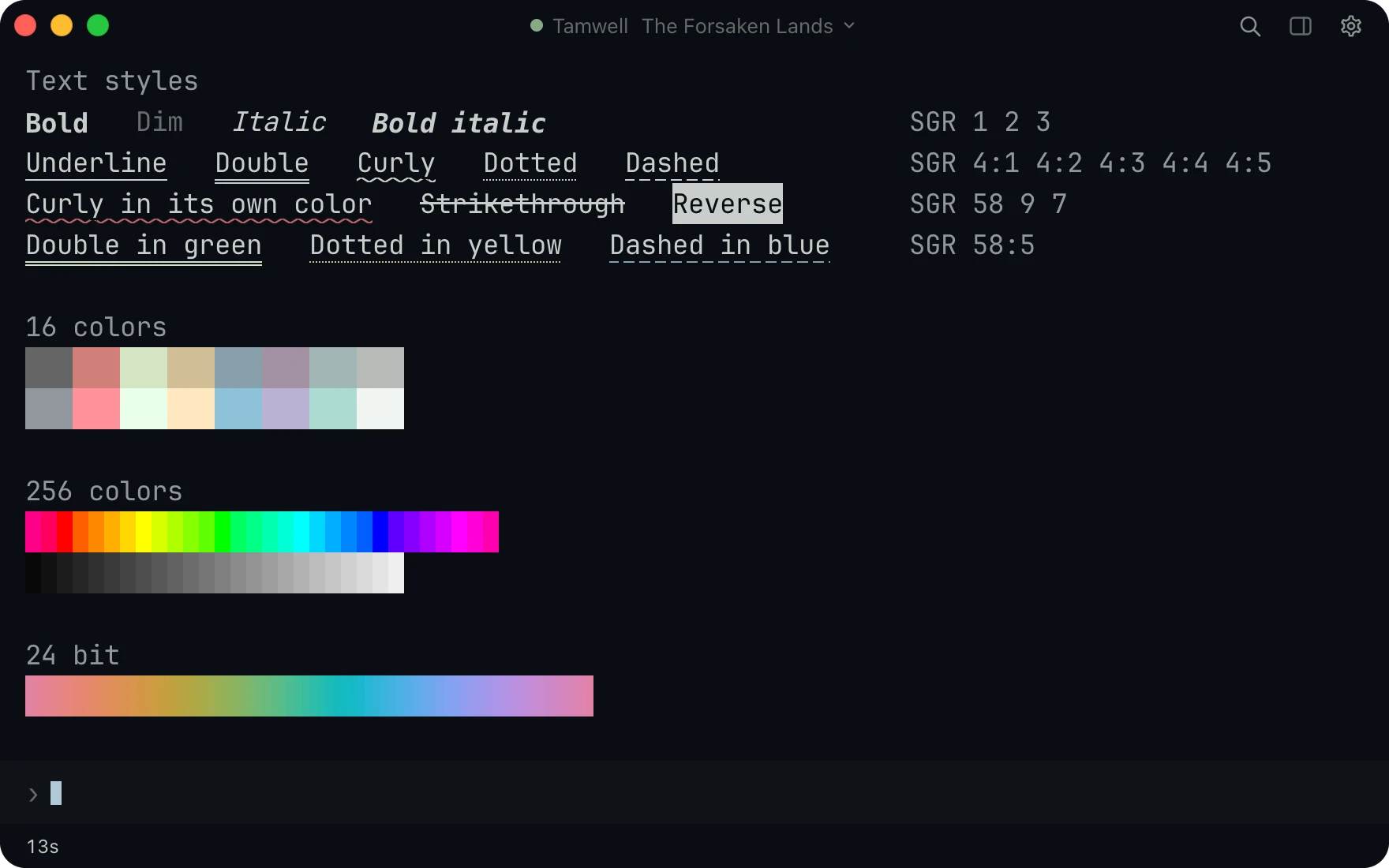
- Read every style the game sends. Bold, dim, italic, strikethrough, reverse and blinking text all draw as sent.
- Full color. All five underline kinds in any color, and 256 and 24 bit color.
Your prompt
Draw your own prompt.
Vosh can draw your prompt in place of the game's. Click any part of it to change how it shows, add any value the game sends, and color the numbers you watch most.
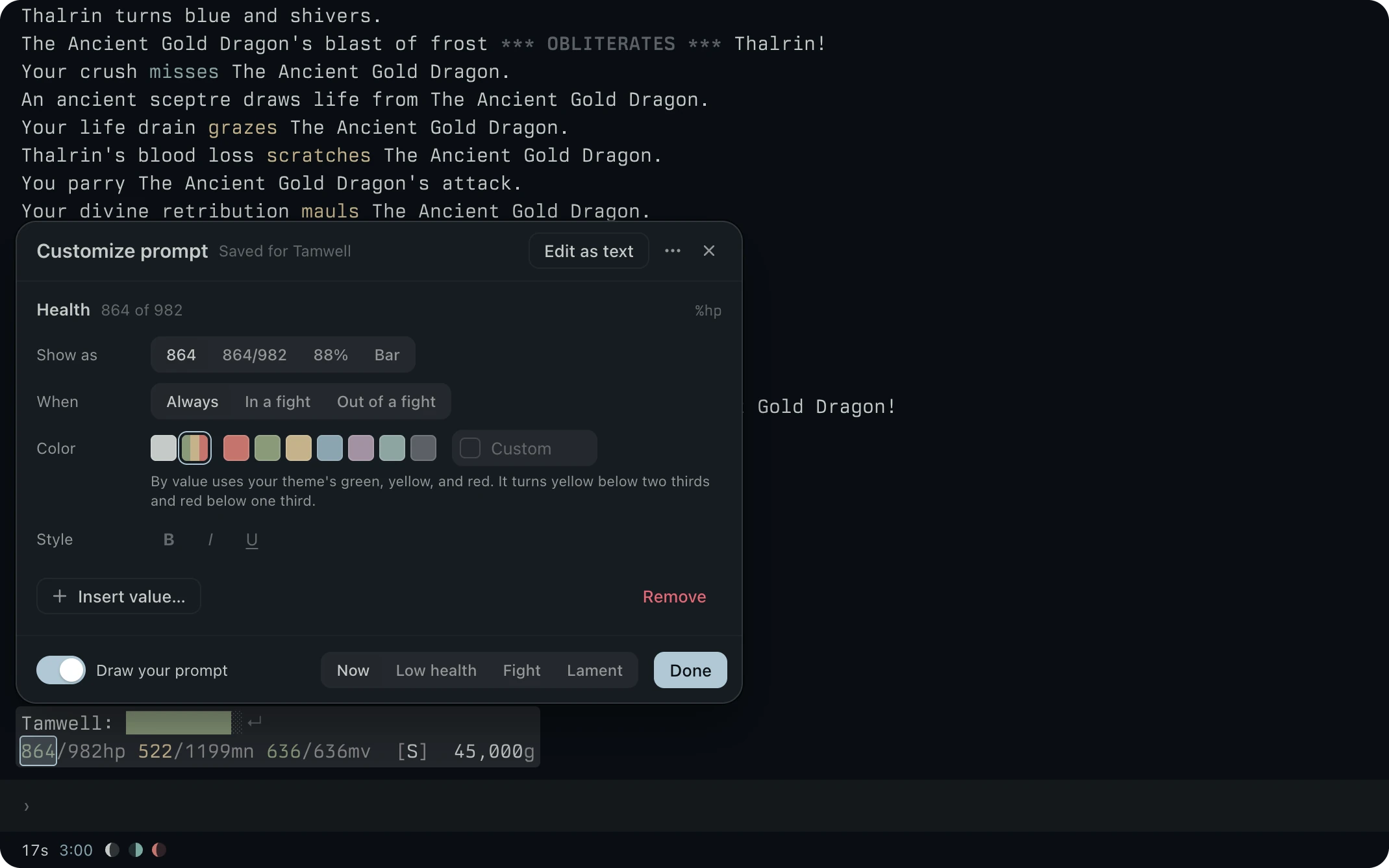
- Click a part to change it. Health can show as 864, 864/982, 88% or a bar, and coloring it by value turns it yellow below two thirds and red below one third.
- Show it when it matters. Any part can show always, only in a fight, or only out of one.
- Saved per character. Each character keeps its own prompt, and Edit as text is there if you prefer the codes.
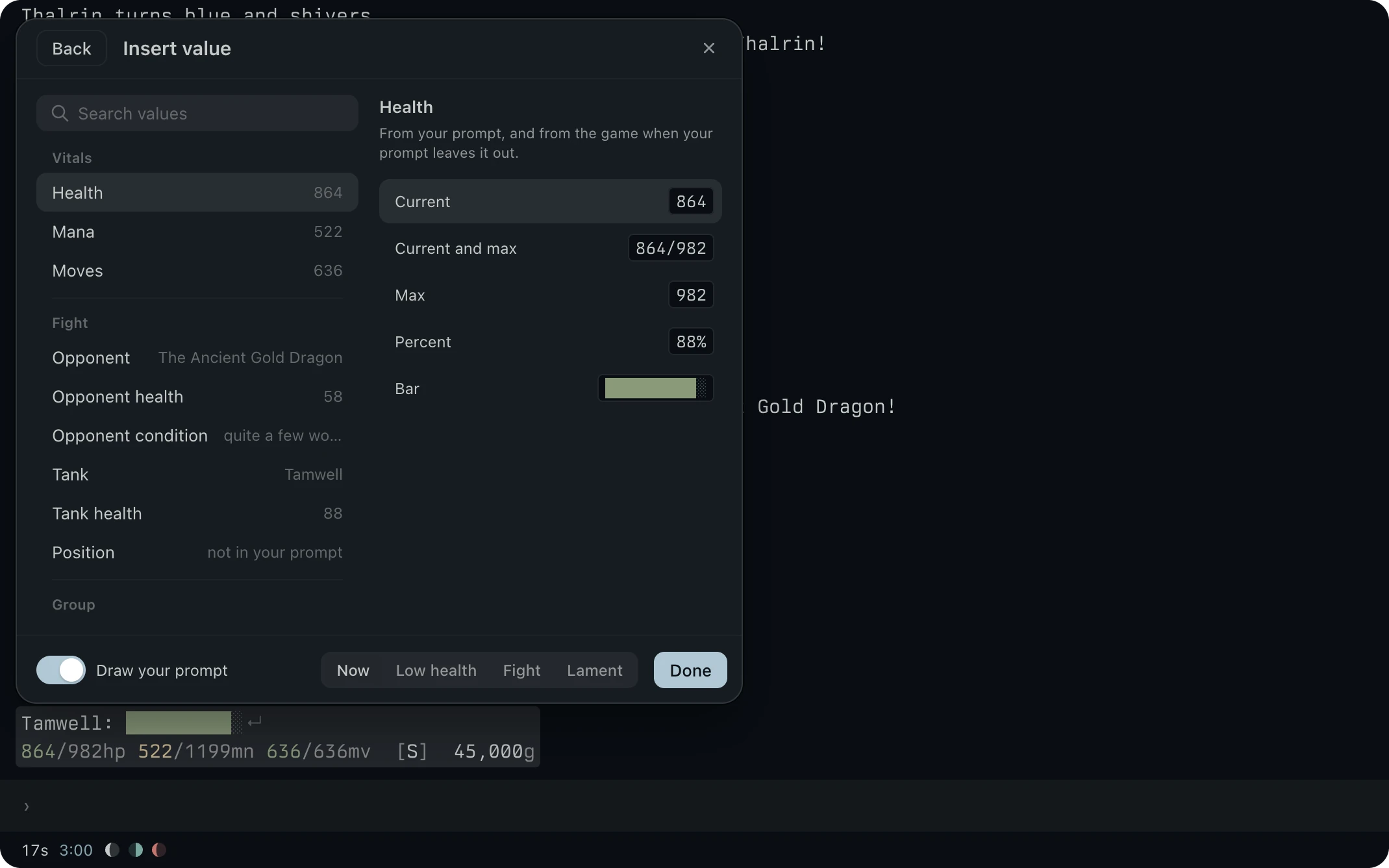
- Add any value the game sends. Insert value lists your vitals, your fight, your group and more.
- See it before you add it. Every value shows its live reading in each form it can take.
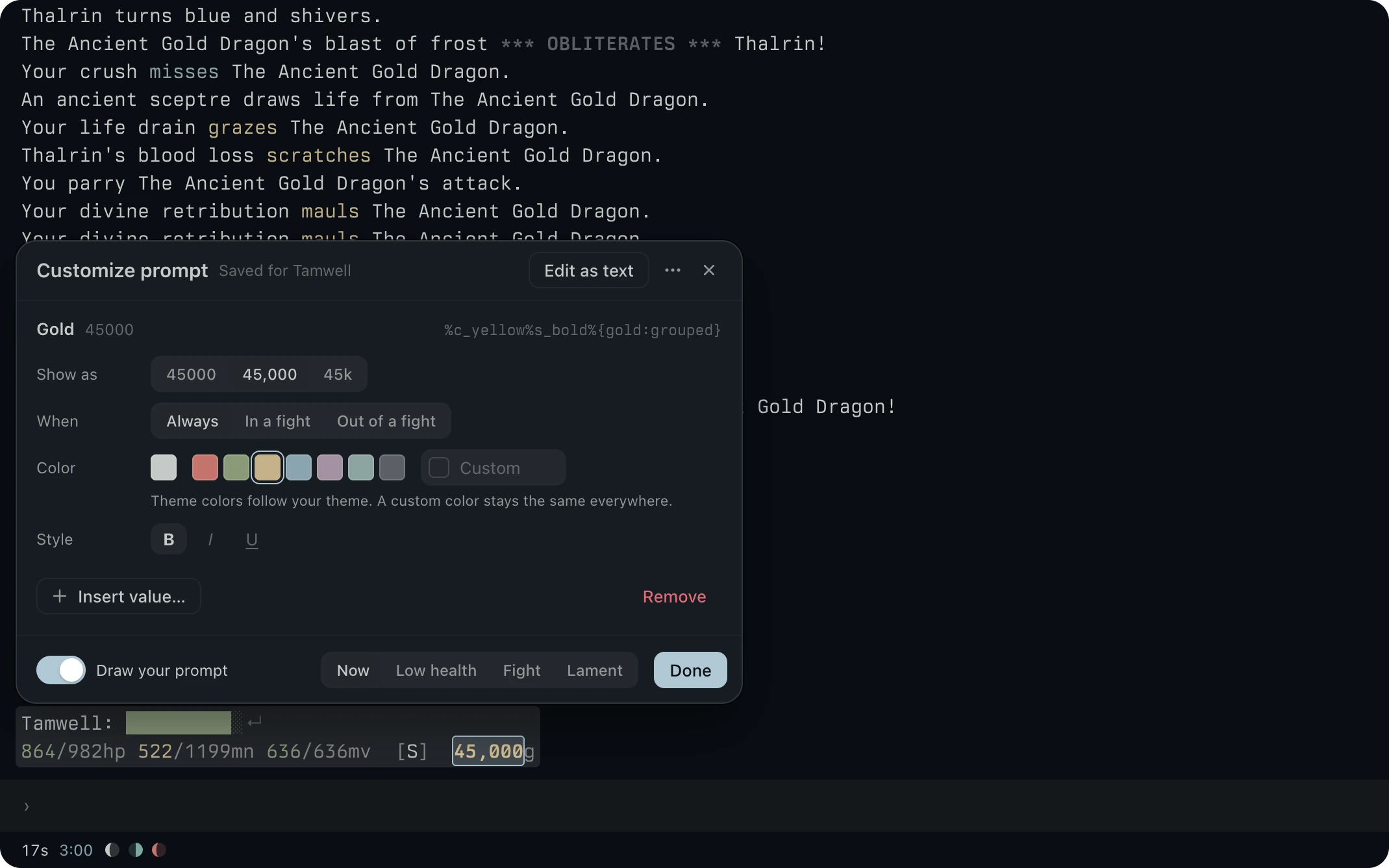
- Make it stand out. Pick a theme color and bold, italic or underline for any part.
- Watch it change. Your pinned prompt redraws as you click, so you see the result in the fight itself.
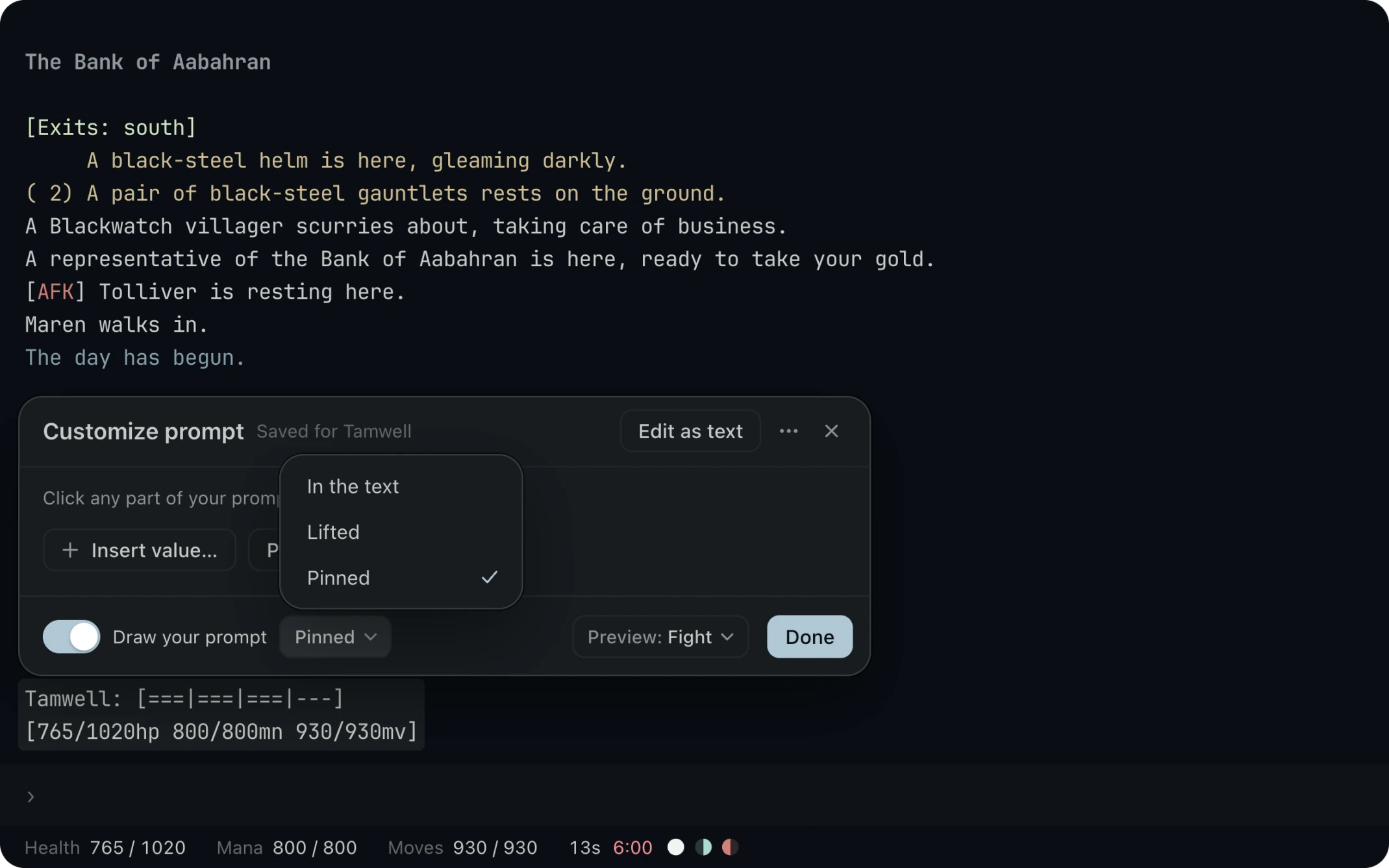
- Place it from the card. Pick where your prompt shows at the foot of Customize prompt.
- Preview it in a fight. Preview shows your prompt as it reads with a fight under way, even while you stand in the bank.
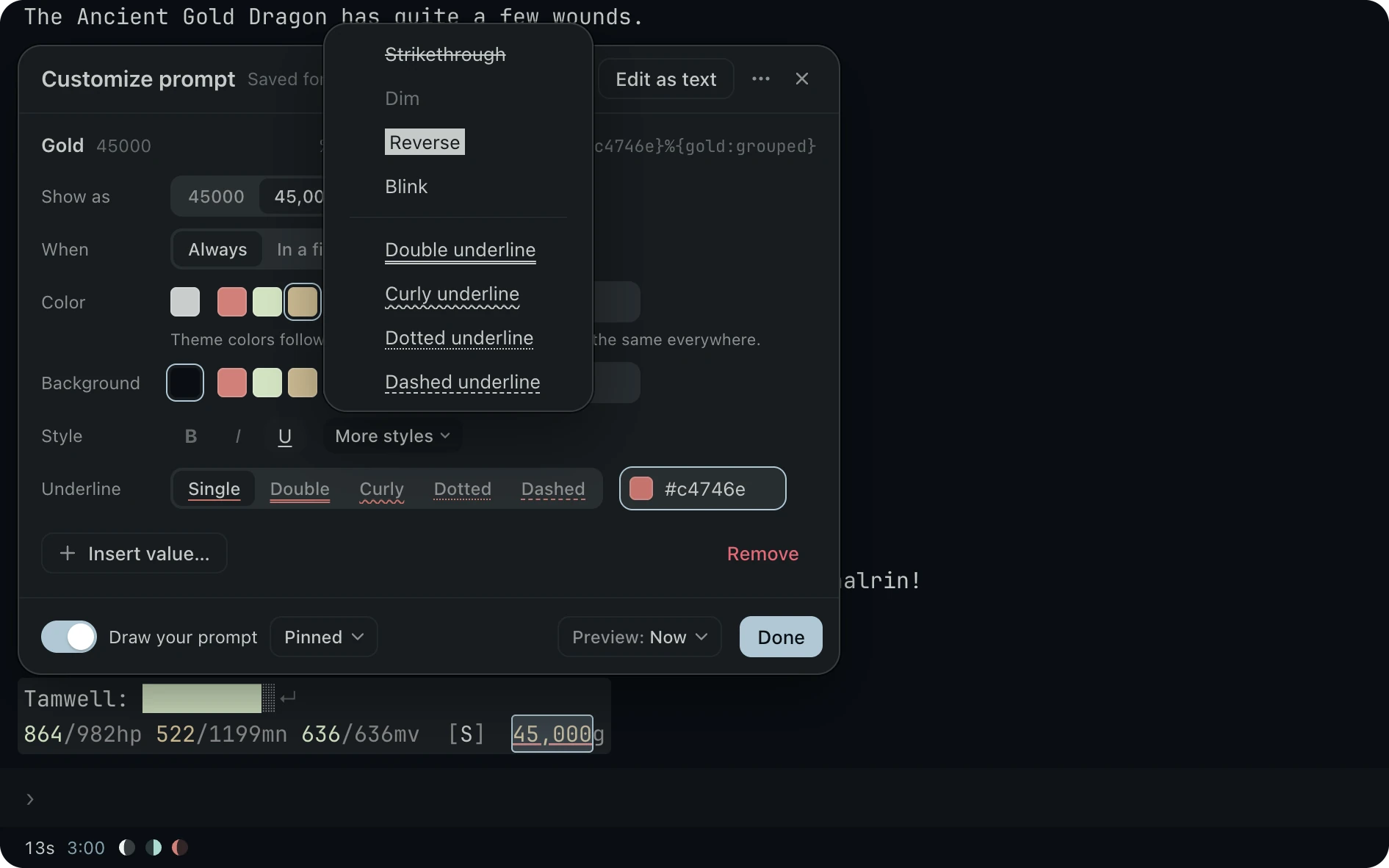
- Underline any part your way. Turn on Underline to pick its kind and its color.
- More styles. Open More styles for strikethrough, dim, reverse and blink.
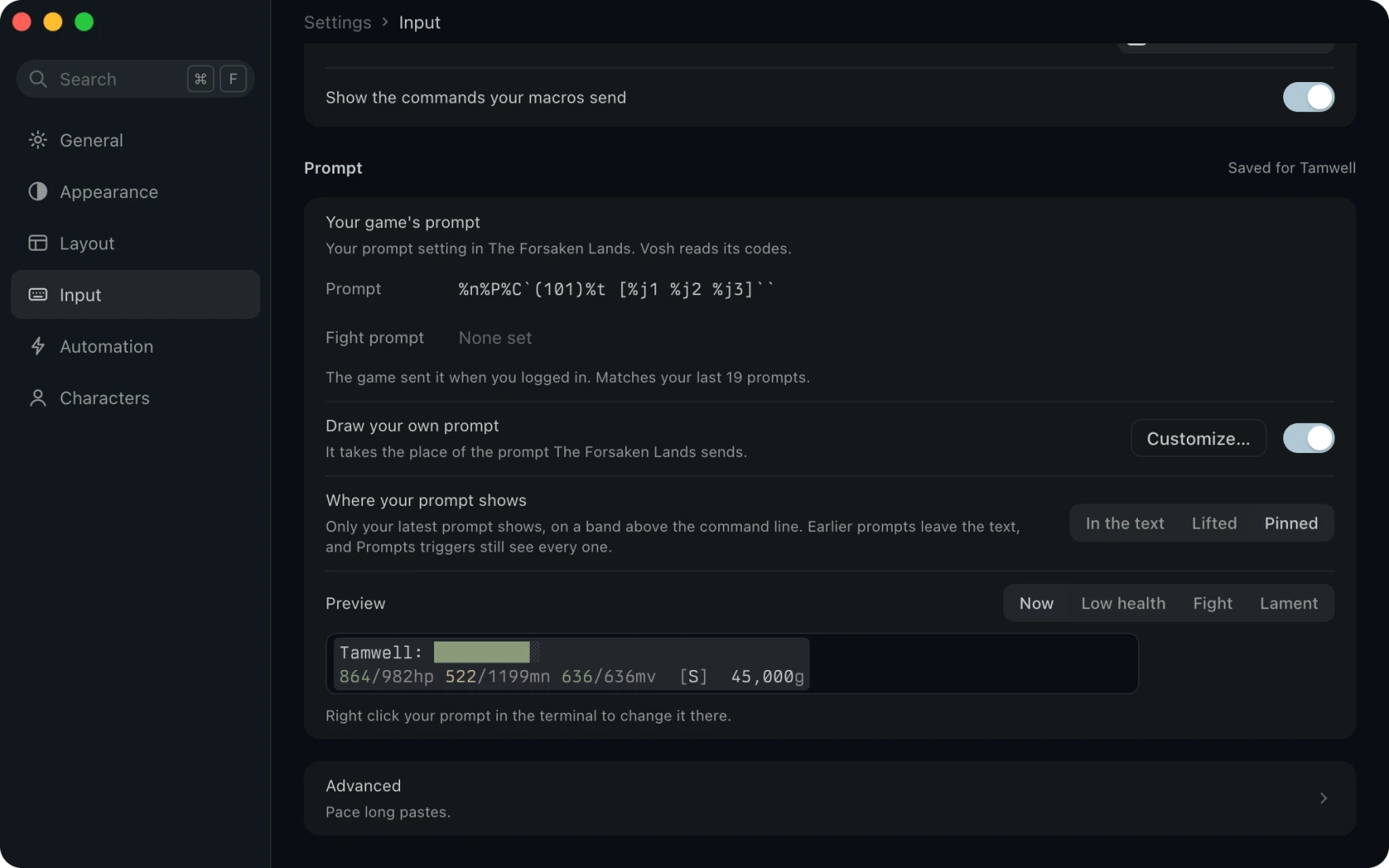
- Set it up in Settings. Input shows the prompt your game sends and lets you draw your own in its place.
- See it live. The preview draws your prompt with your live values.
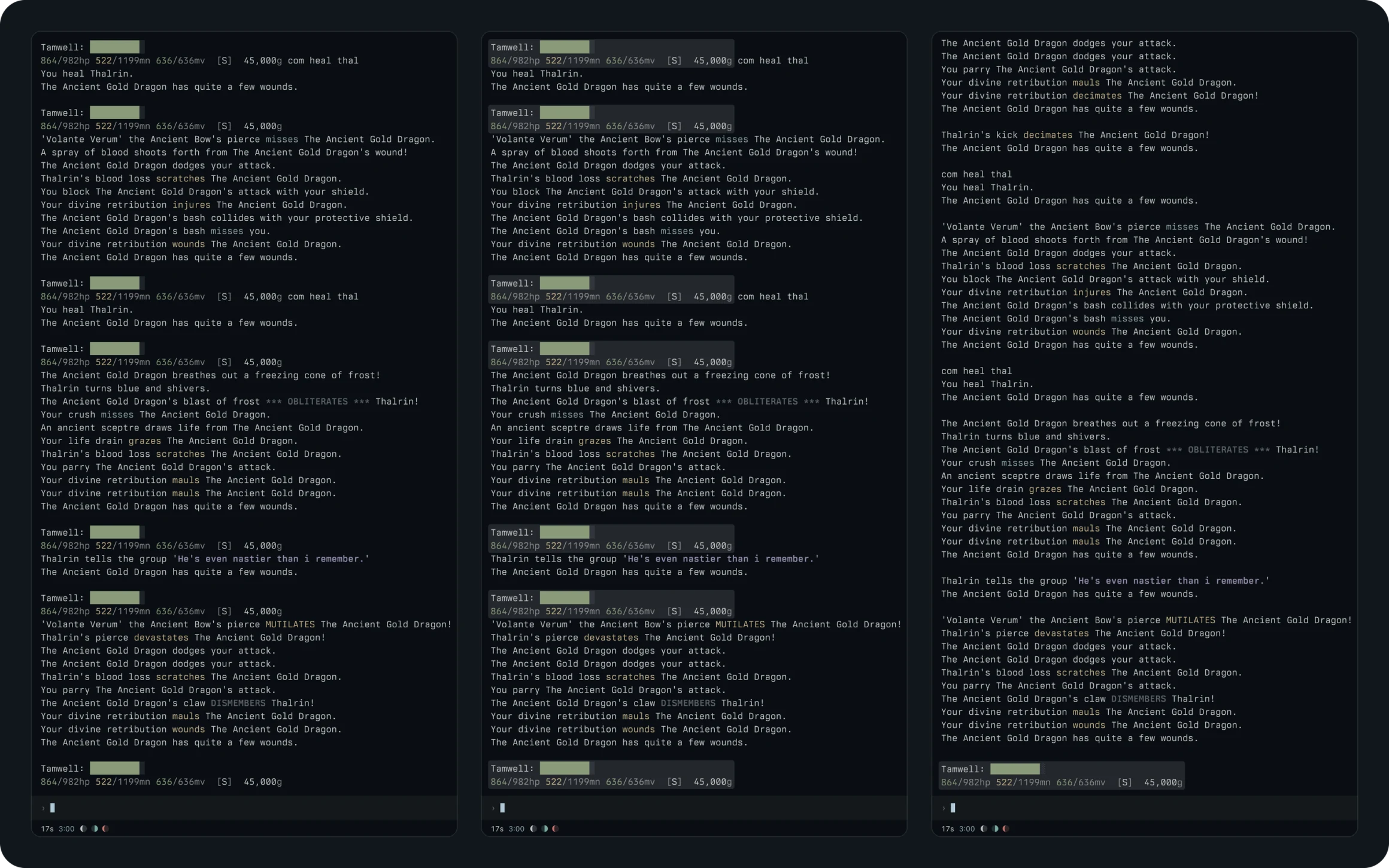
In the text
Every prompt stays where the game sent it.
On a band
Each prompt lifts onto its own band, so it is easy to find as you scroll.
Pinned
Only your latest prompt shows, above the command line, and the panel can drop its vitals to give your panes the room.
Automation, Presets
Color the fight as it happens.
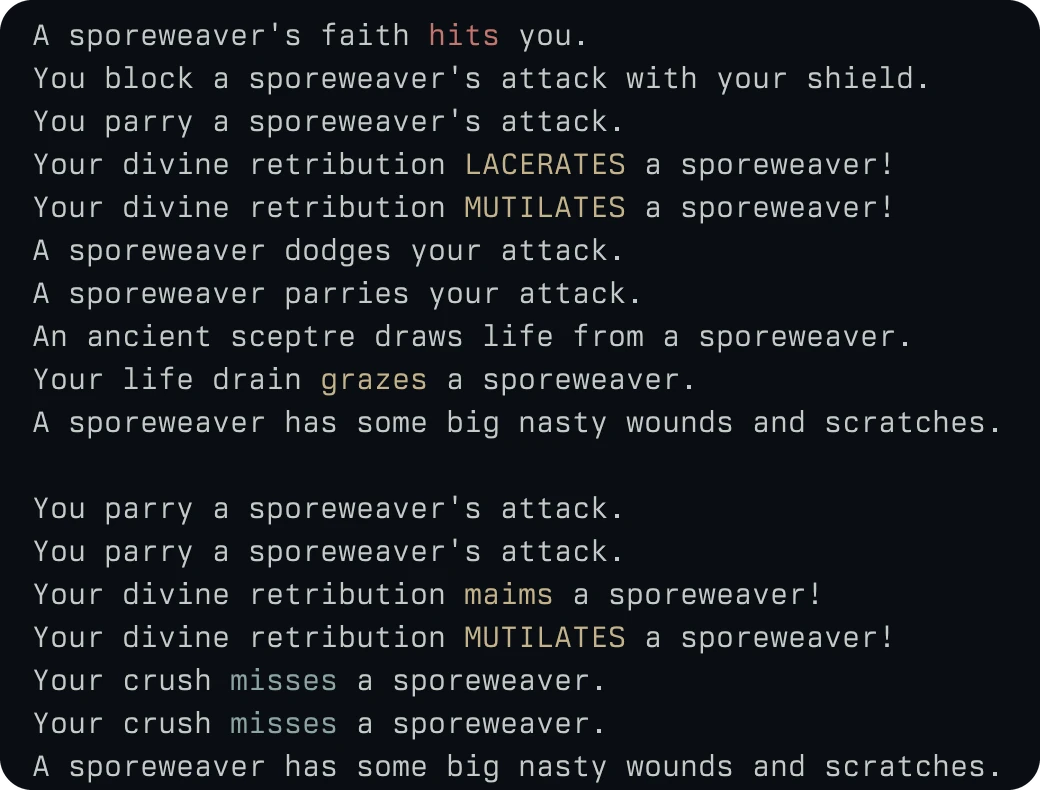
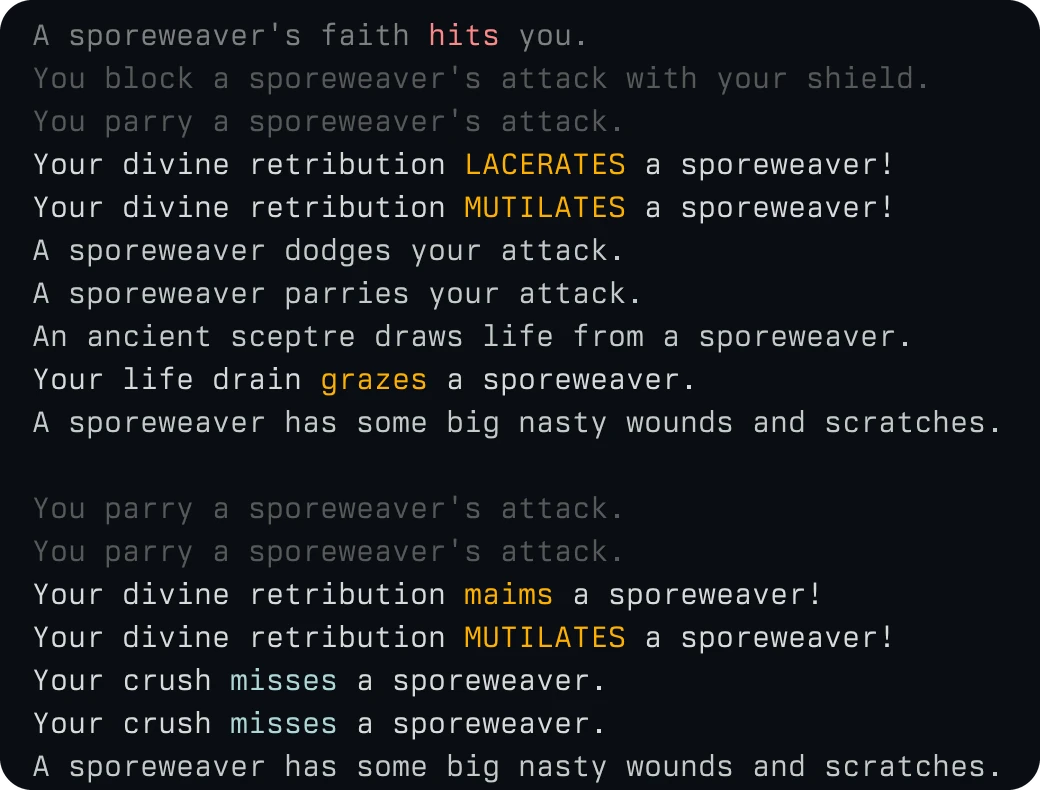
Vosh ships presets for Aabahran that color combat as it happens. Drag across the same seventeen lines to see four of them at work. Your parries dim, your damage turns amber, and the hit you take shows in red.
First run
Start with a short list.
A new install starts with every preset off. Get started walks you from your first connection to your prompt, and you turn on only the colors you want.
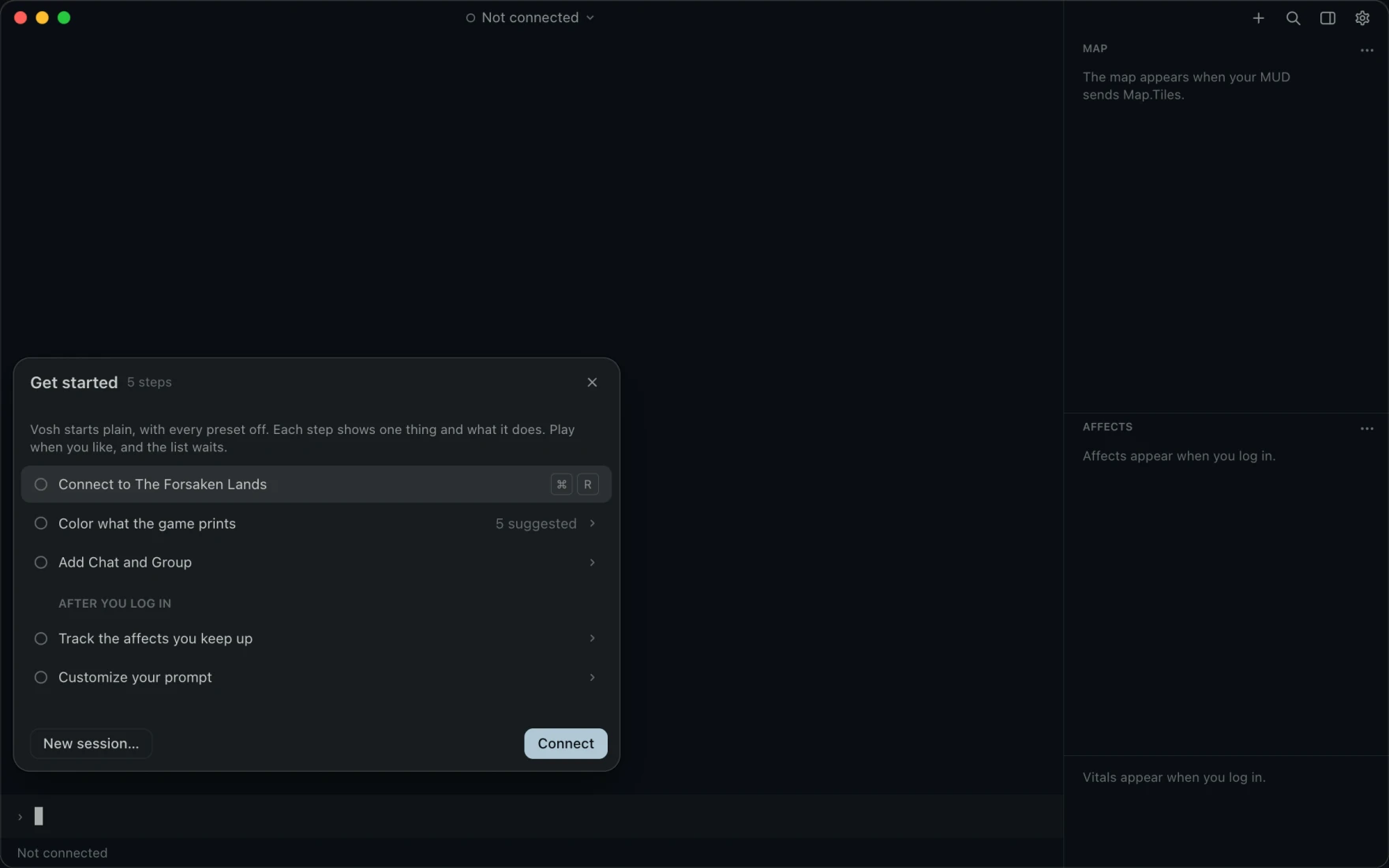
- Five steps. Get started takes you from your first connection to The Forsaken Lands to customizing your prompt.
- Nothing on by default. Every preset waits until you turn it on, so the game reads as it always has until you choose.
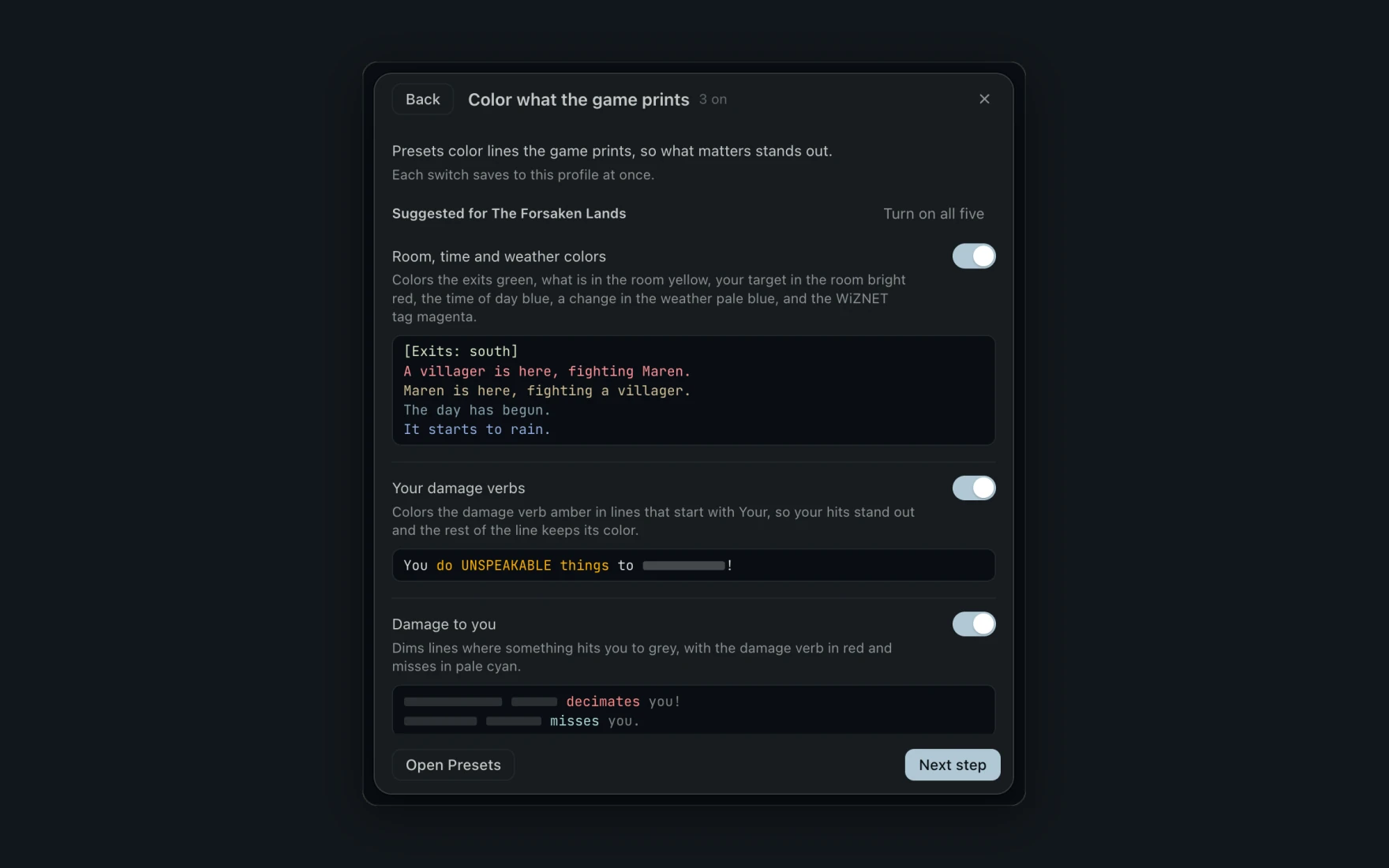
- See what each one colors. Each suggested preset shows the lines it colors before you switch it on.
- Saved at once. Its switch saves as you flip it, with no button to press.
Let Vosh handle the repetitive parts.
Triggers, aliases, macros, timers and presets share one list and one editor. Build them in Settings, or right from the command line while you play.
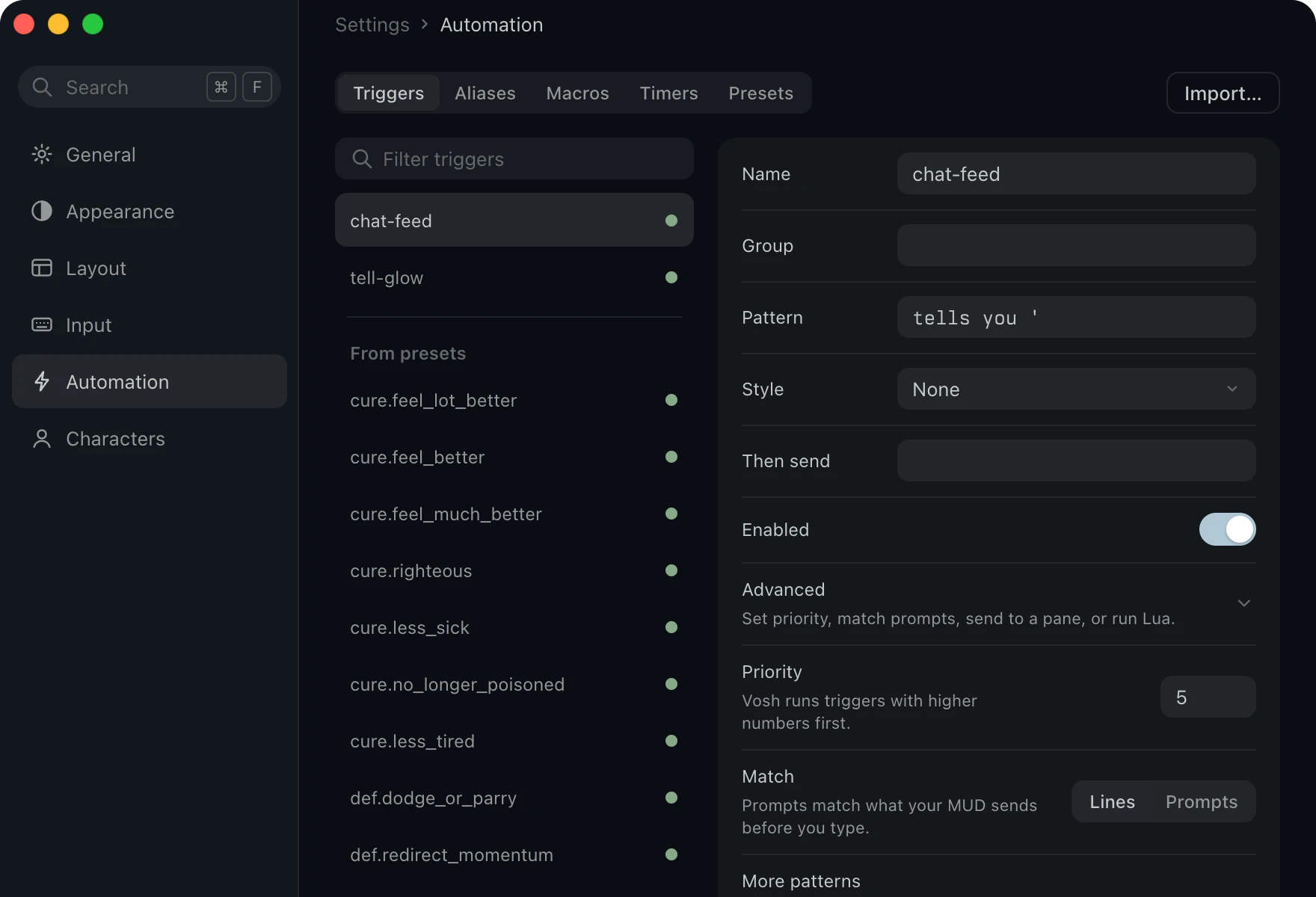
- Act on any line. A pattern matches by Text, Starts with or Regex, and each match can highlight, wash, replace or hide the line.
- Answer it. Then send runs commands on every match, with
$1to$9bringing in what the pattern caught. - Group them. A switch on each group turns all of its triggers on or off at once.
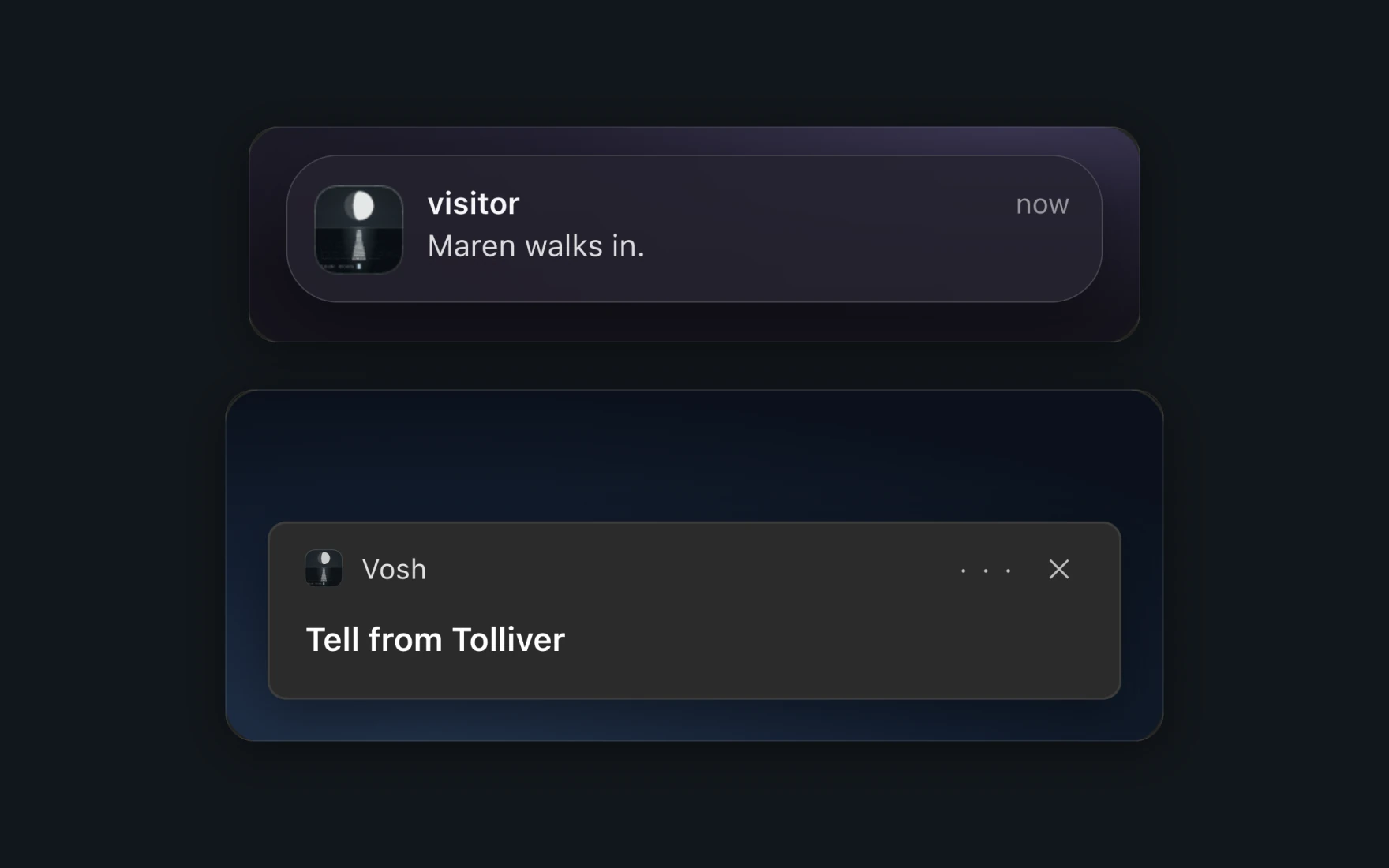
- Hear what happens while you are away. An alert on a trigger posts a banner, plays a sound or bounces the icon while Vosh sits behind your other windows.
- Ready to go. Five alert presets ring for a tell, your name, an attack, low health or a dropped link.
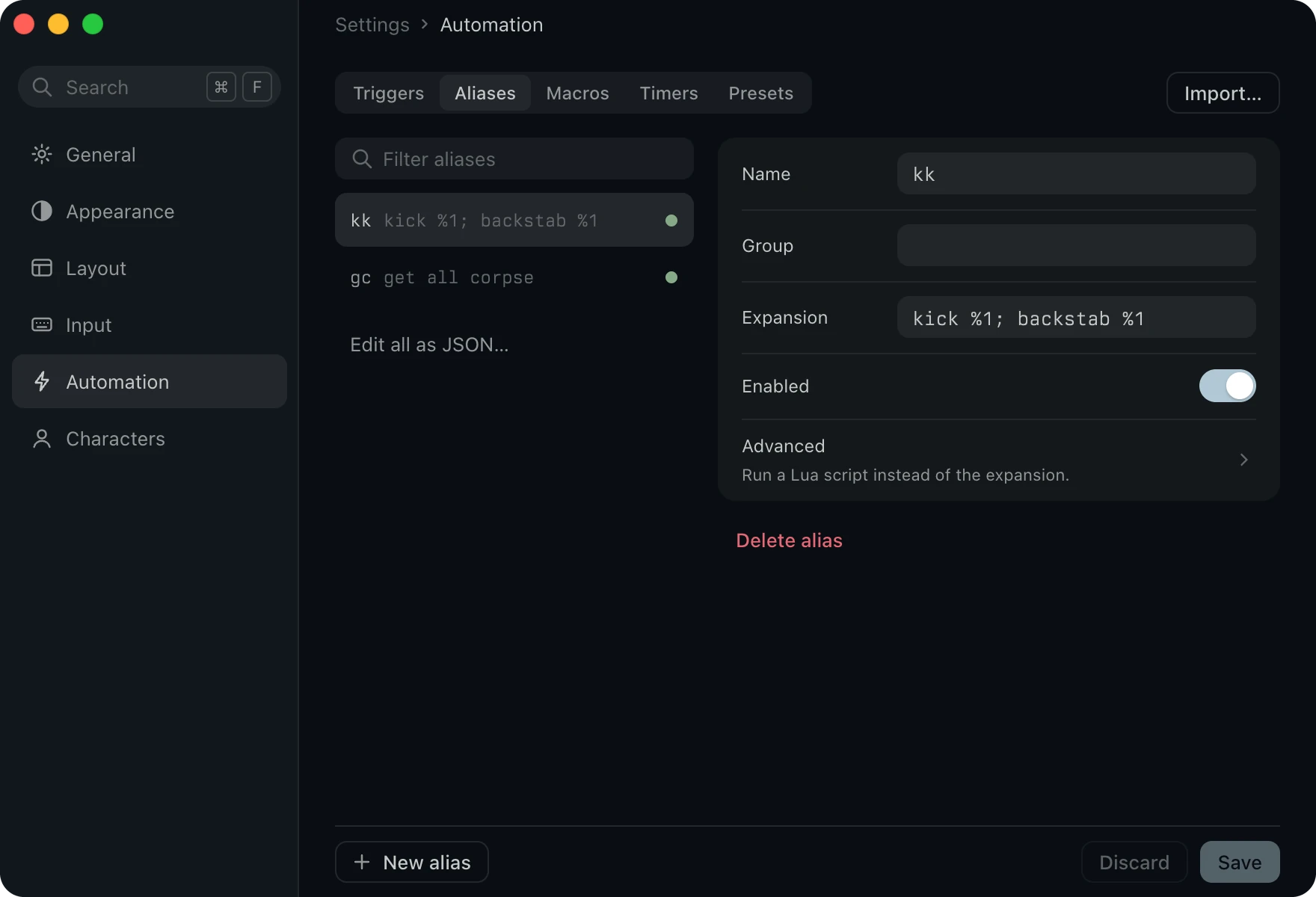
- Type less. An alias turns a short word into a command, and
%1to%9carry the words you type after it. - Make one as you play.
#alias gc get all corpseworks from the command line, and#recordturns what you type into an alias. - Bind a key. A macro sends its command when you press F1, Ctrl+N or any key you choose.
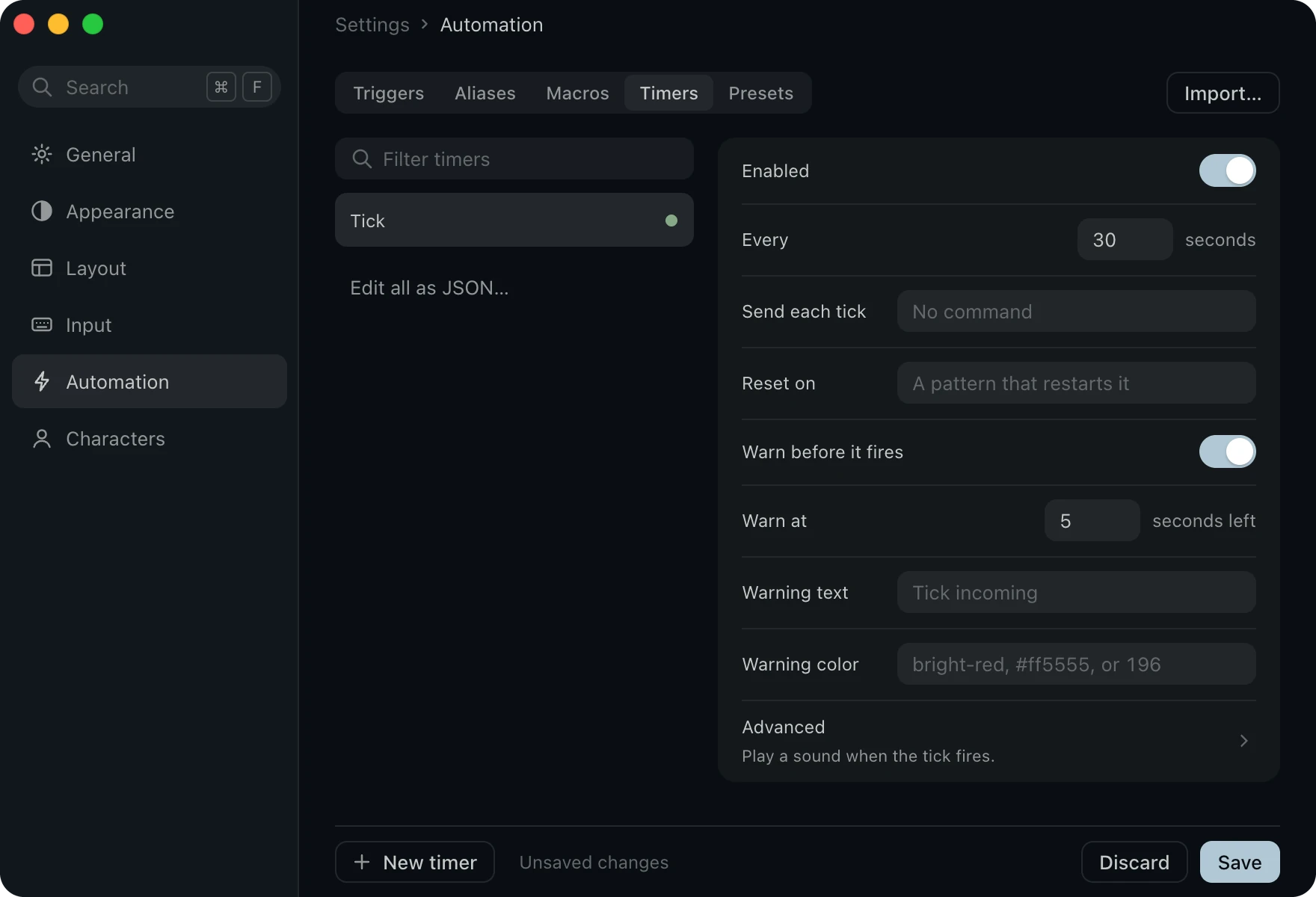
- Follow the tick. The game decides when a tick lands, so once Aabahran ticks, Vosh waits for it.
- Get a warning. Warn before it fires prints a line a few seconds ahead, and the status line counts down too.
- Repeat a command. A timer of your own sends its command every so many seconds, and the switch on its group starts or stops every timer in it.
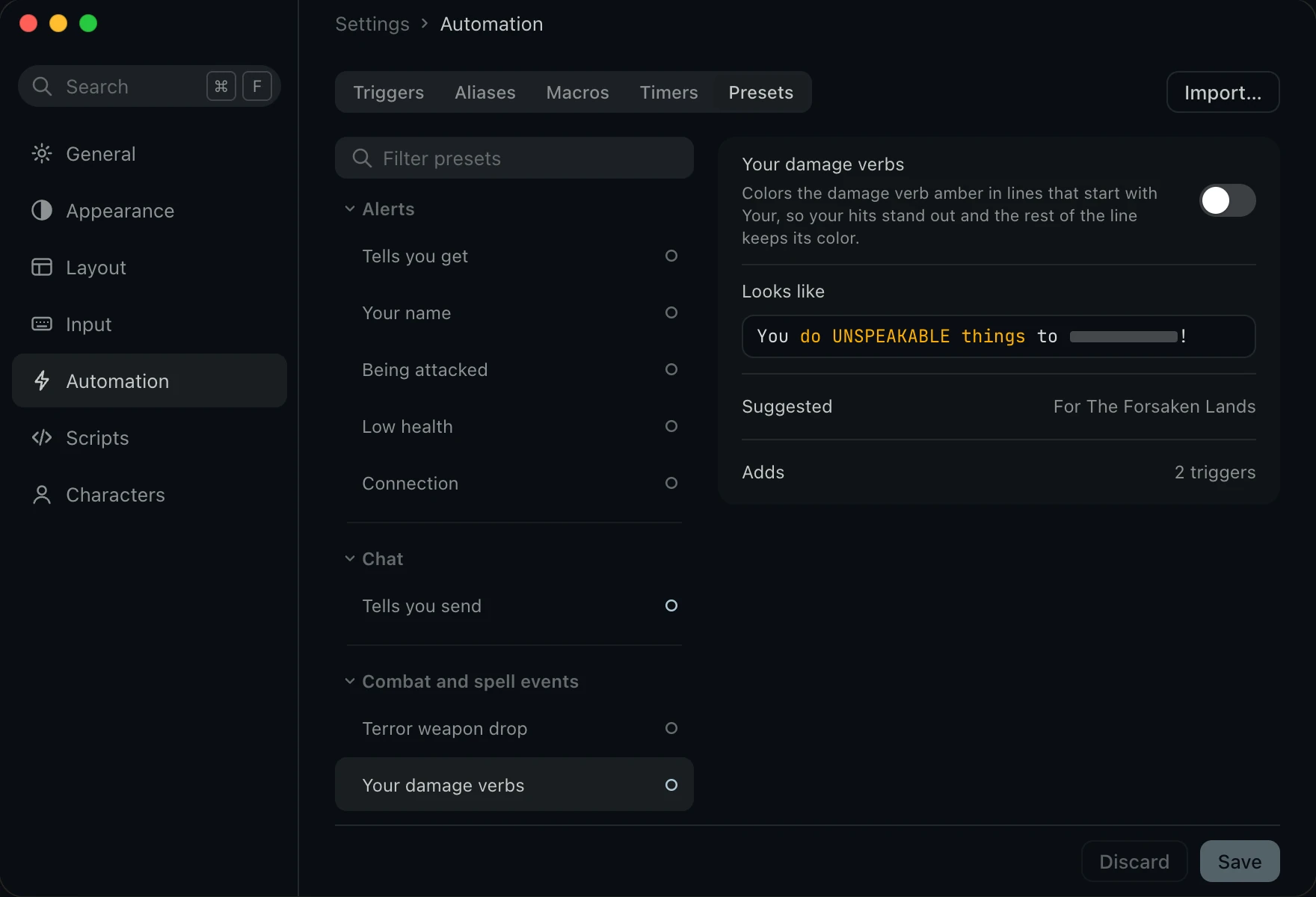
- Color the game for Aabahran. Presets color cures, parries, damage, loot, rooms and more.
- Pick the ones you want. Turn on the ones you like, and Save installs their triggers.
The panel
Your map, spells and chat beside the fight.
The panel holds your map, affects, group and chat. Set what each pane shows, and how big its text is.
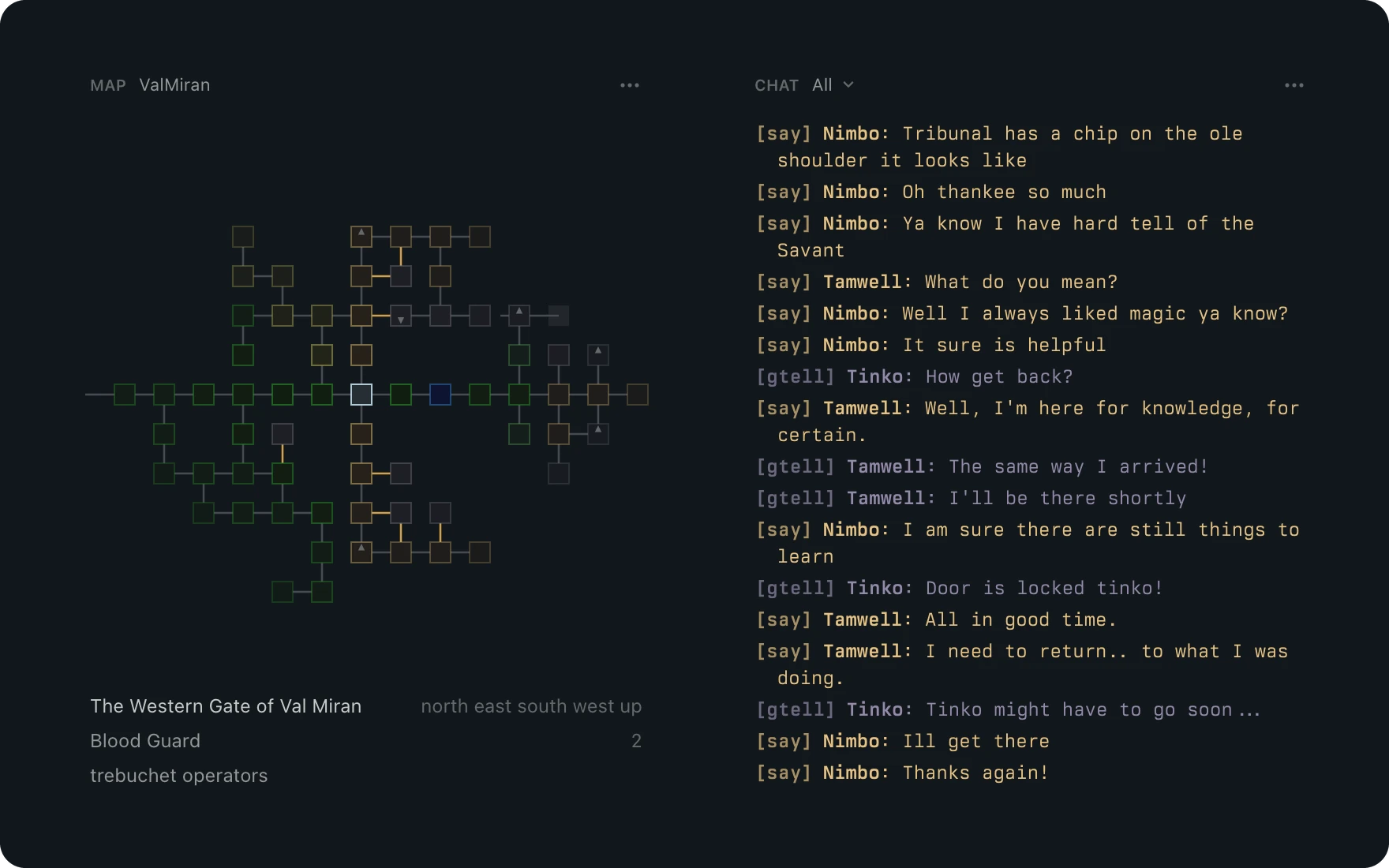
- See where you stand. The map draws the rooms around you as you walk, with doors and area colors, and lists who stands there with you.
- Follow every channel. Says and group tells collect in the chat pane in the game's colors.
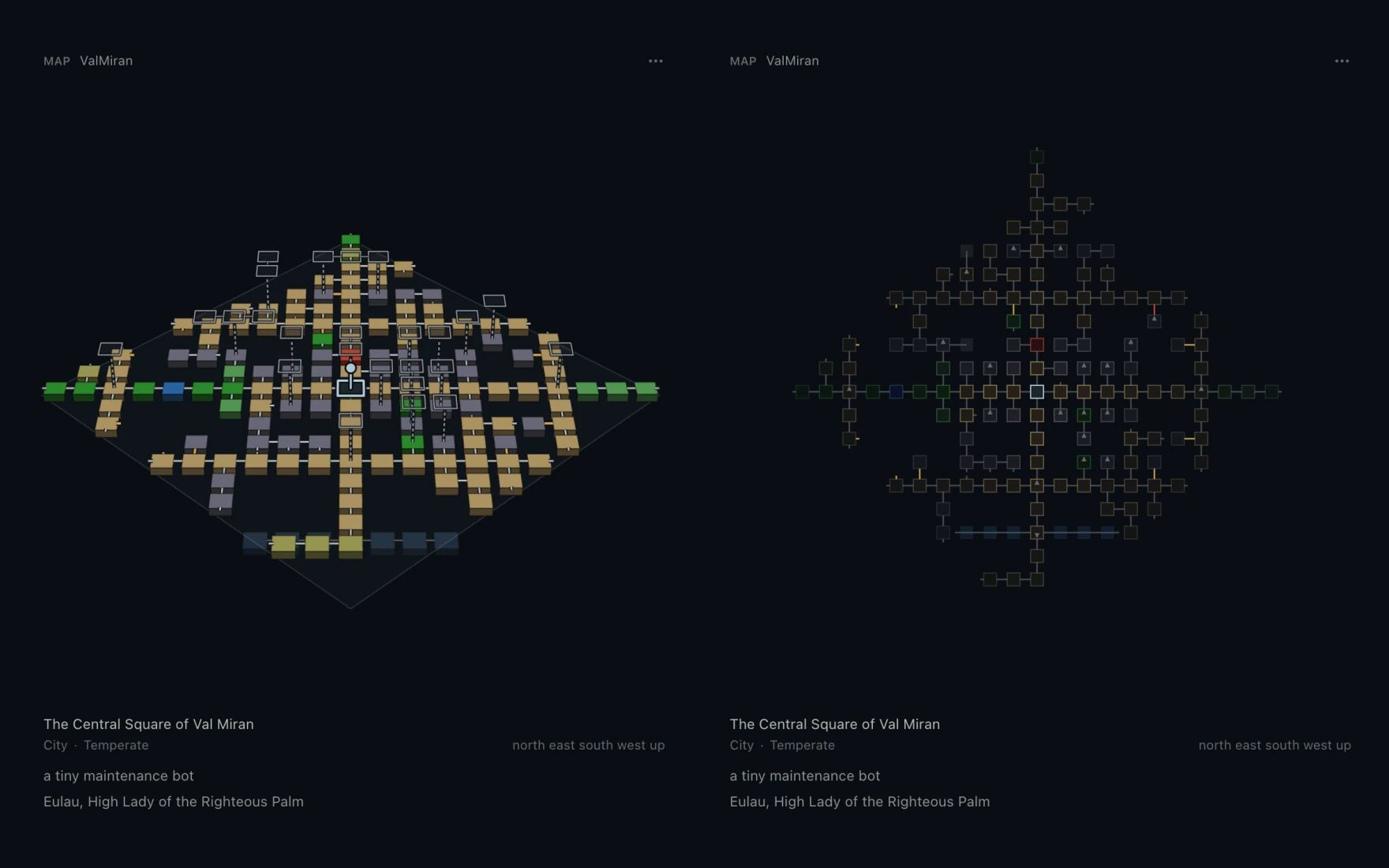
- See the floors around you. The 3D map stacks the floors around you.
- Turn it. Drag to turn it, scroll or pinch to zoom, and read the room's terrain and region under it.
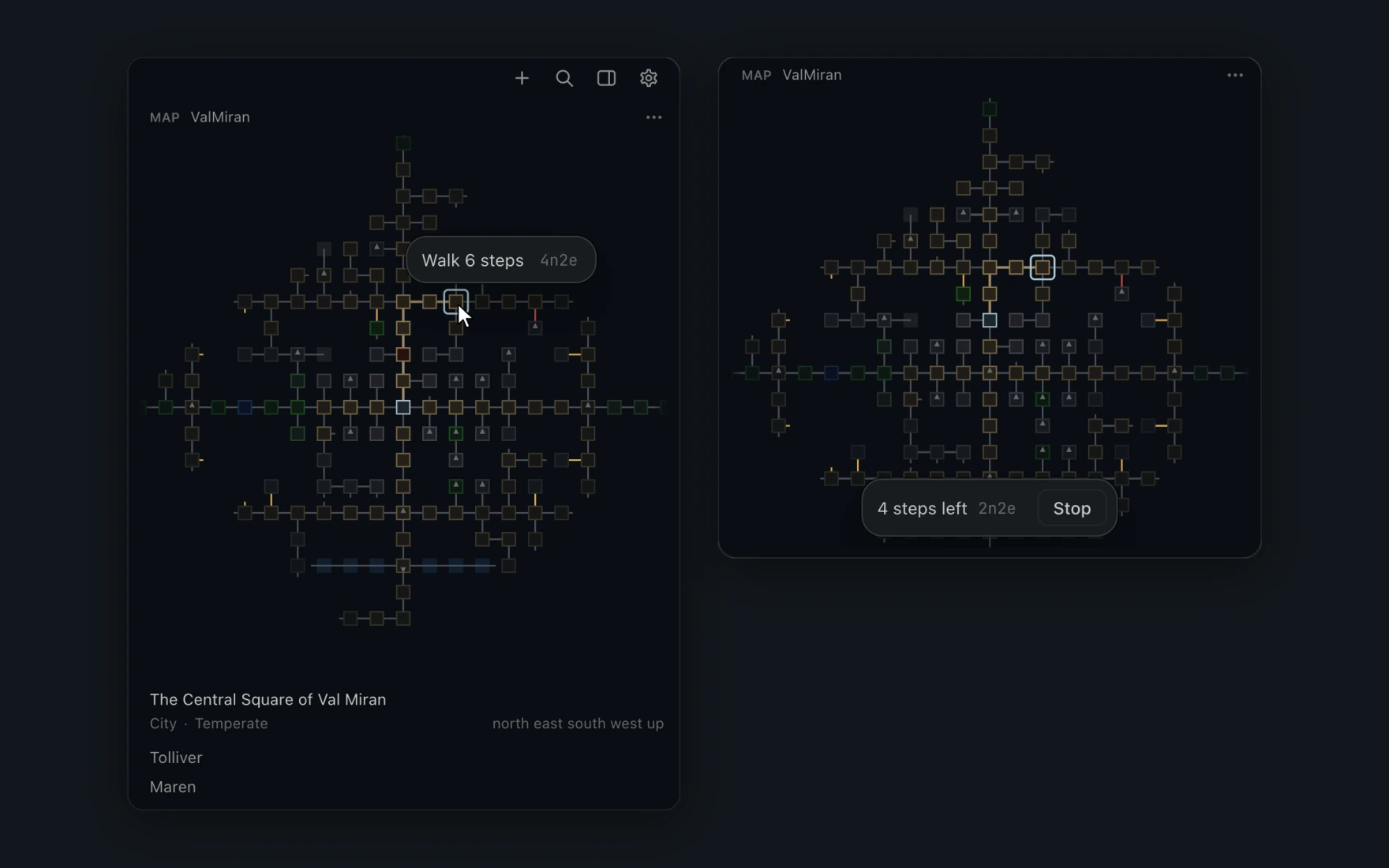
- Click a room to walk there. Point at a room to see the path, then click to walk it.
- Or type it.
#walk 4n2etakes one step at a time and waits for each room. Esc stops the walk.
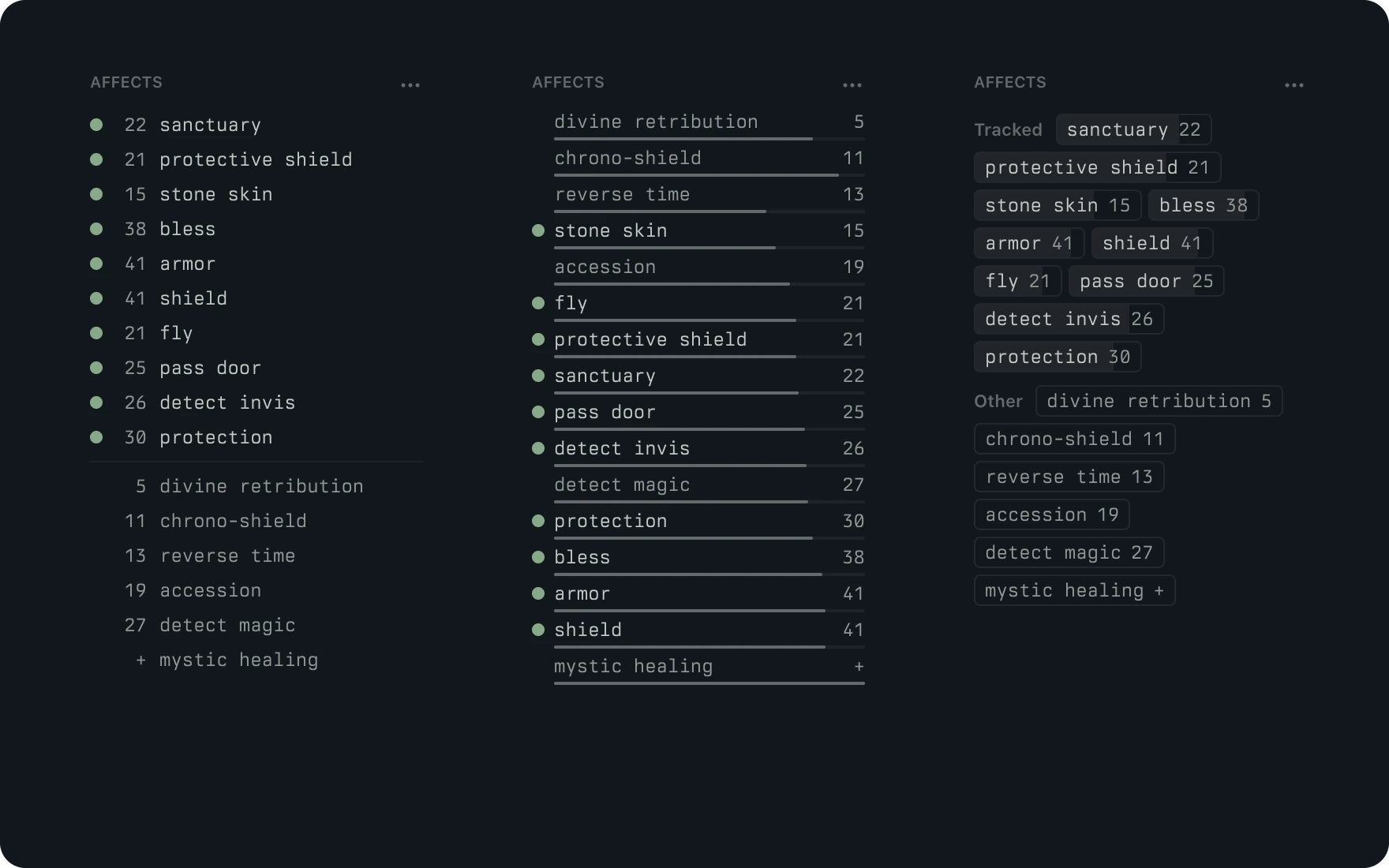
- Know which spells are up. Show your affects as timers, countdown bars or chips.
- Track the ones you care about. The spells you track sit at the top, and any you are missing are marked.
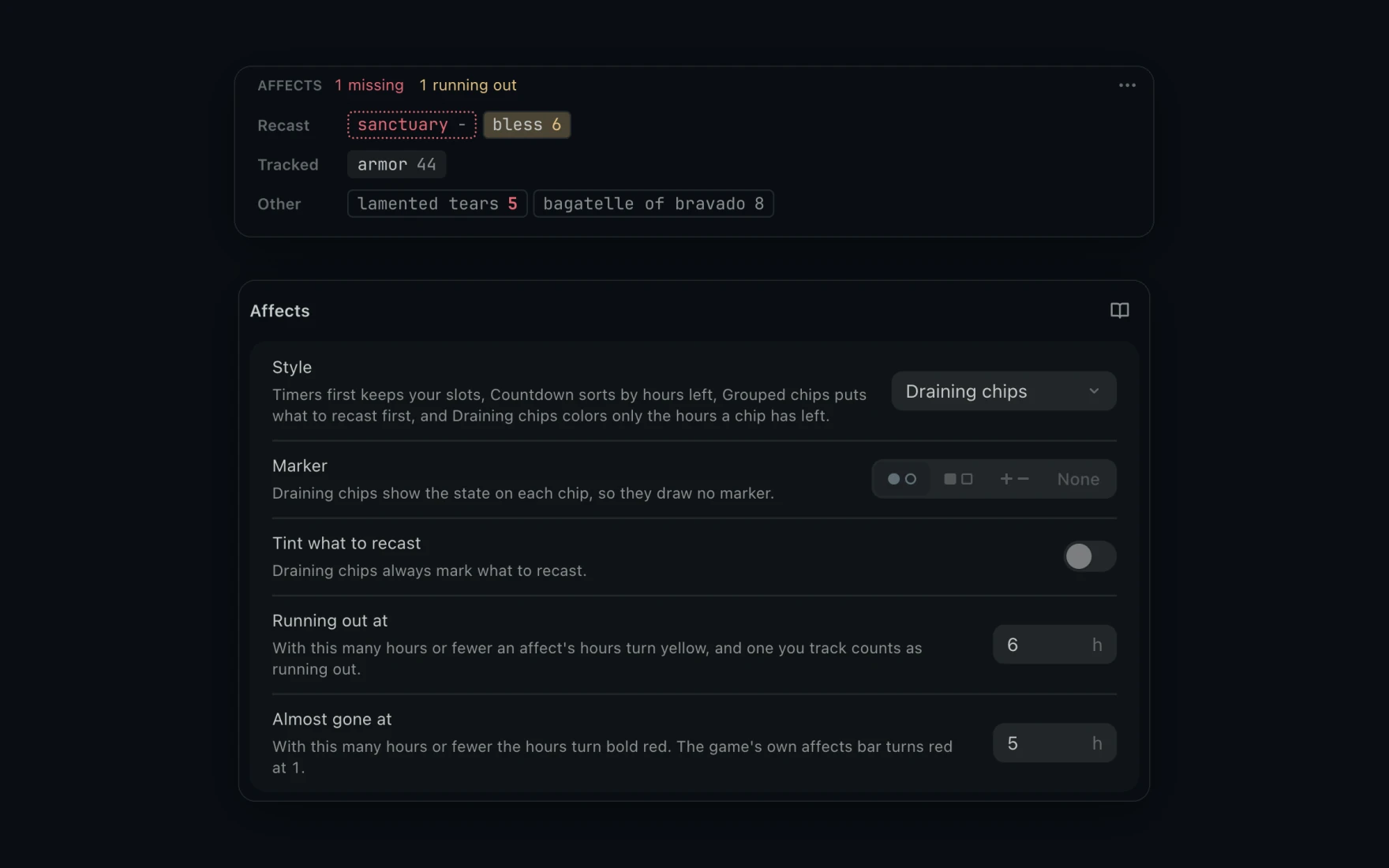
- See a spell running out. Set when an affect's hours turn yellow and when they turn red.
- Watch it drain. Draining chips shows the hours each affect has left.
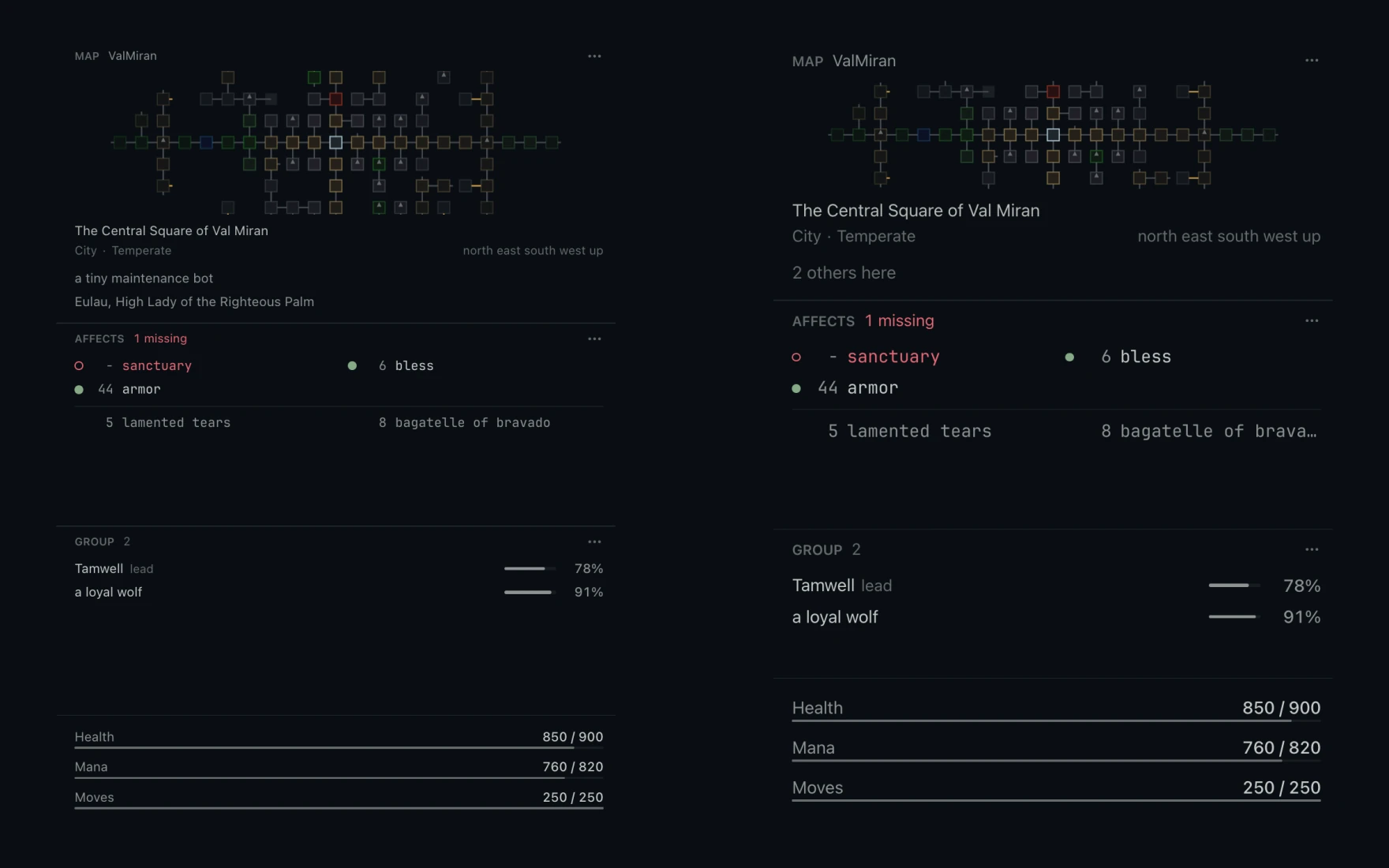
- Make the panes easier to read. Panel text sets one size for every pane and the status line.
- A font of their own. Give the panes a different font from the game text if you want one.
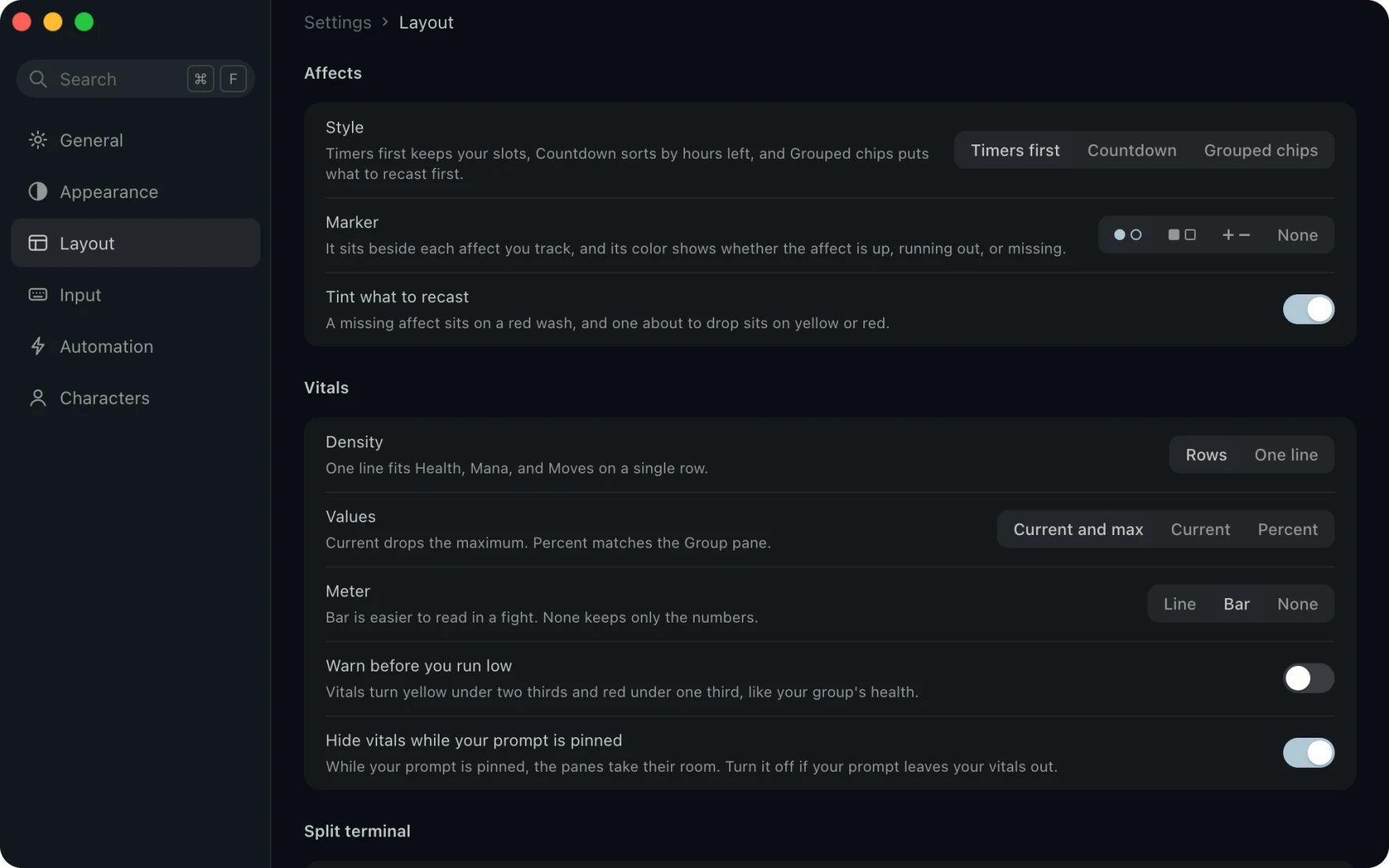
- Give your panes the room. Layout sets how the Affects pane draws.
- Hide the vitals. Hide vitals while your prompt is pinned gives your panes the room your vitals took.
Chat and panes
Arrange the chat your way.
Color each channel, give tells a pane of their own, or add a pane a plugin draws.
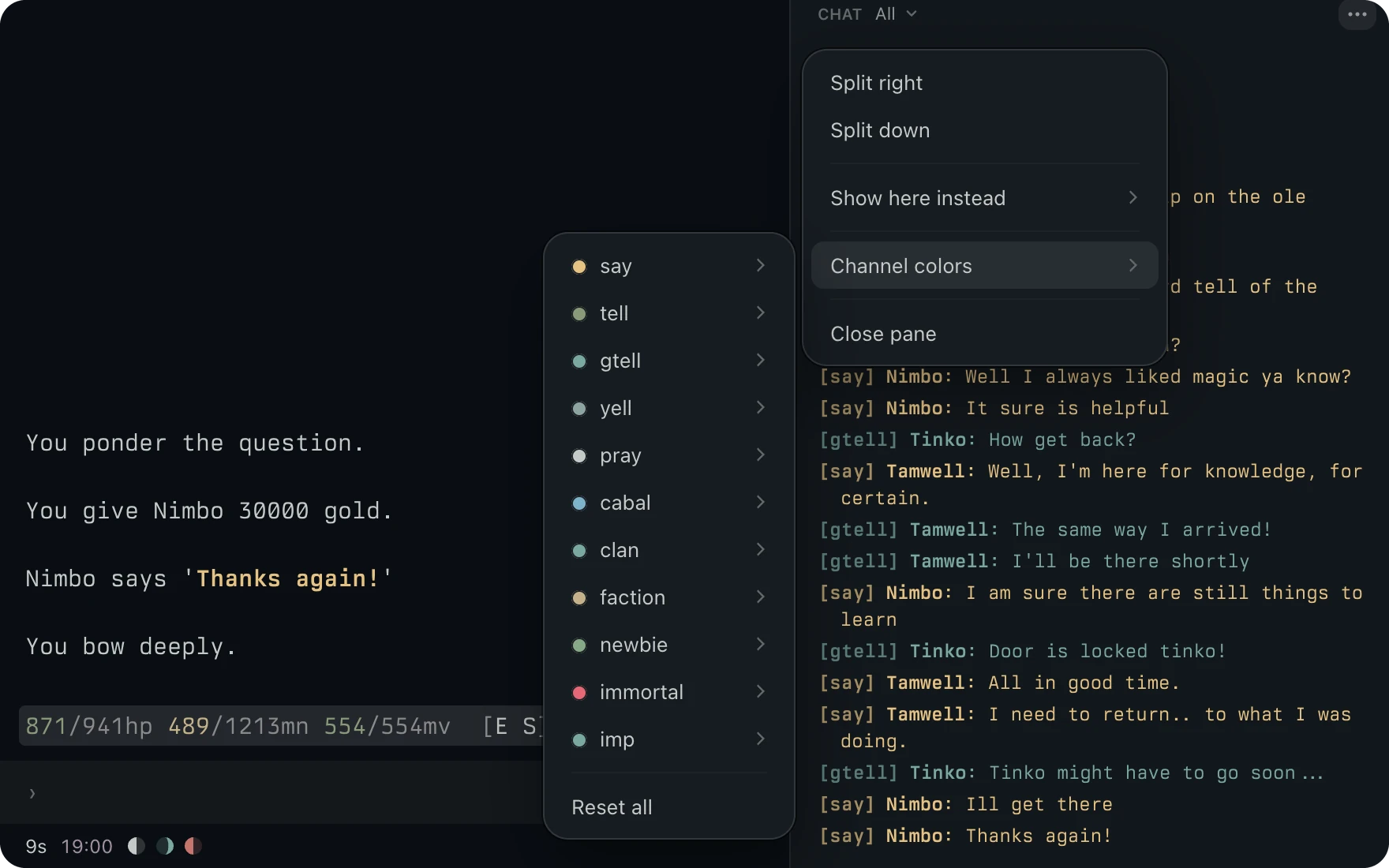
- Give each channel its own color. Open Channel colors in the Chat pane menu and pick a theme color for a channel.
- Every line follows. Each line on that channel changes at once, so group tells never get lost among says.
- Give tells a pane of their own. Add a second Chat pane and pick its channel.
- Catch the rest. Everything else gathers what the other pane leaves.
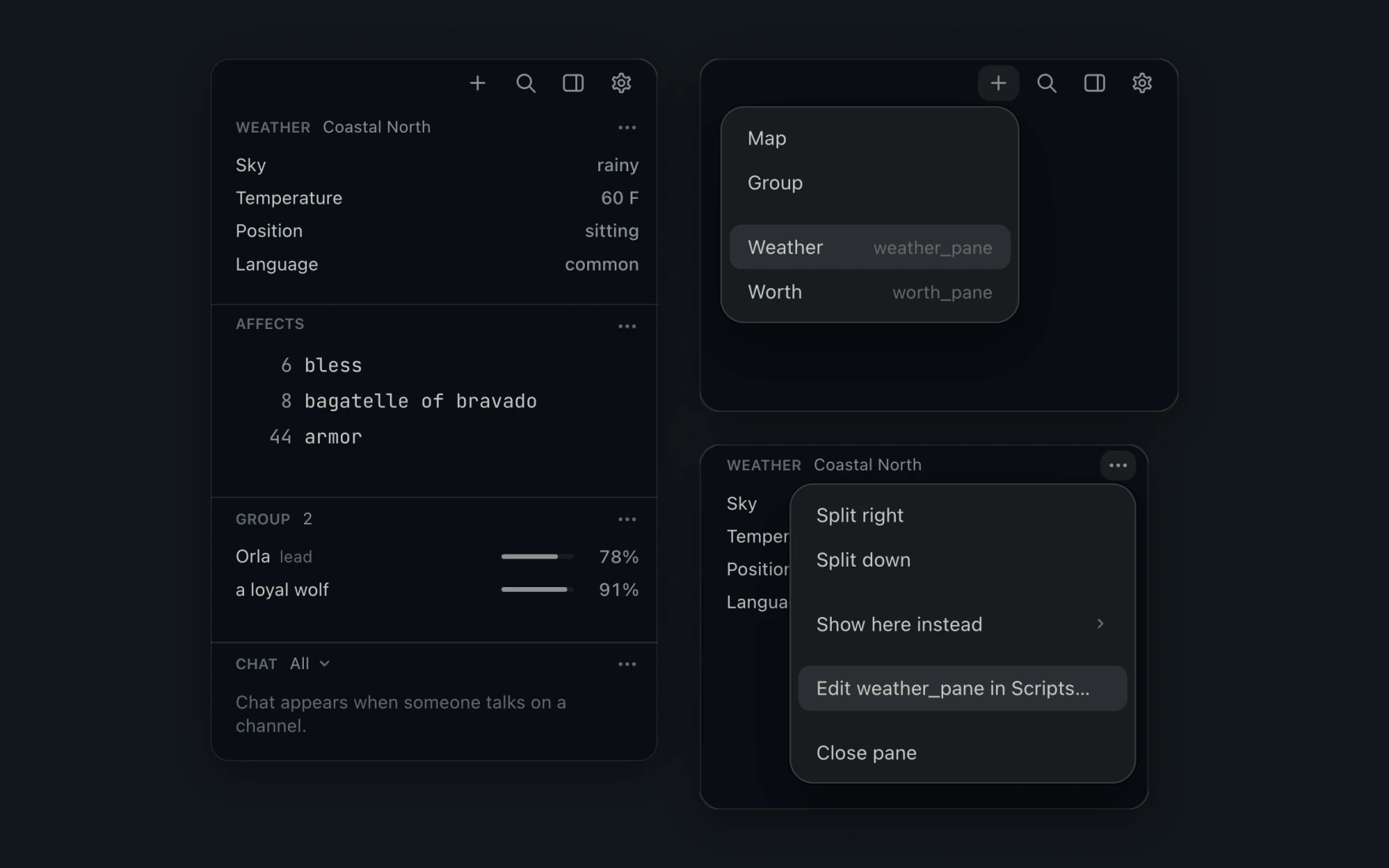
- Add a pane of your own. A Lua plugin can draw a pane, like this weather pane.
- Place it like any other. Add it from the panel's menu, and move or hide it with the rest.
Sessions
Keep two characters in play.
Open a session for each character, switch with a click, and the sidebar marks the one where something happened.
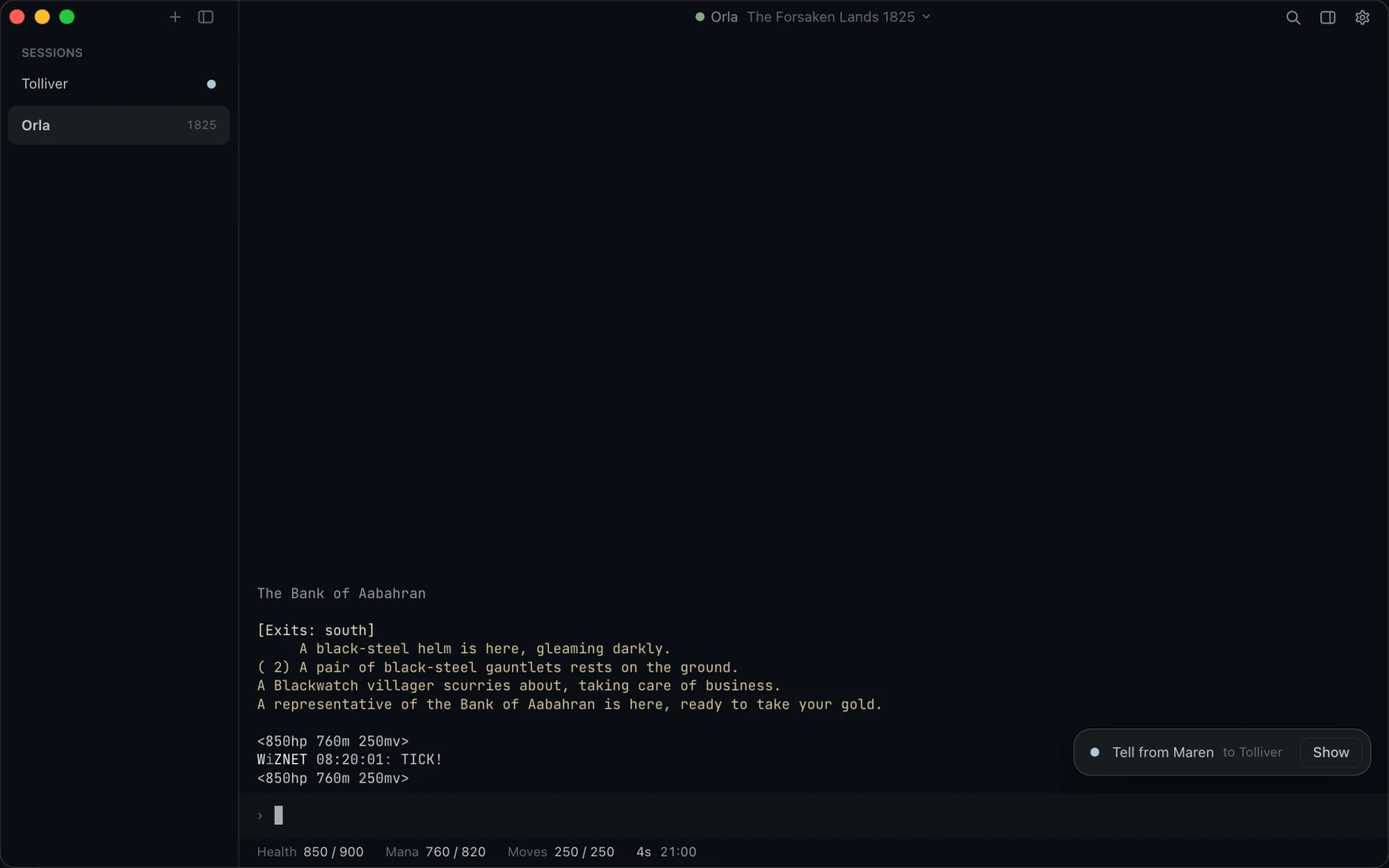
- Switch with a click. Every session keeps playing while you look at another.
- Never miss a tell. The sidebar marks the session where something happened, and a notice tells you who it was for.
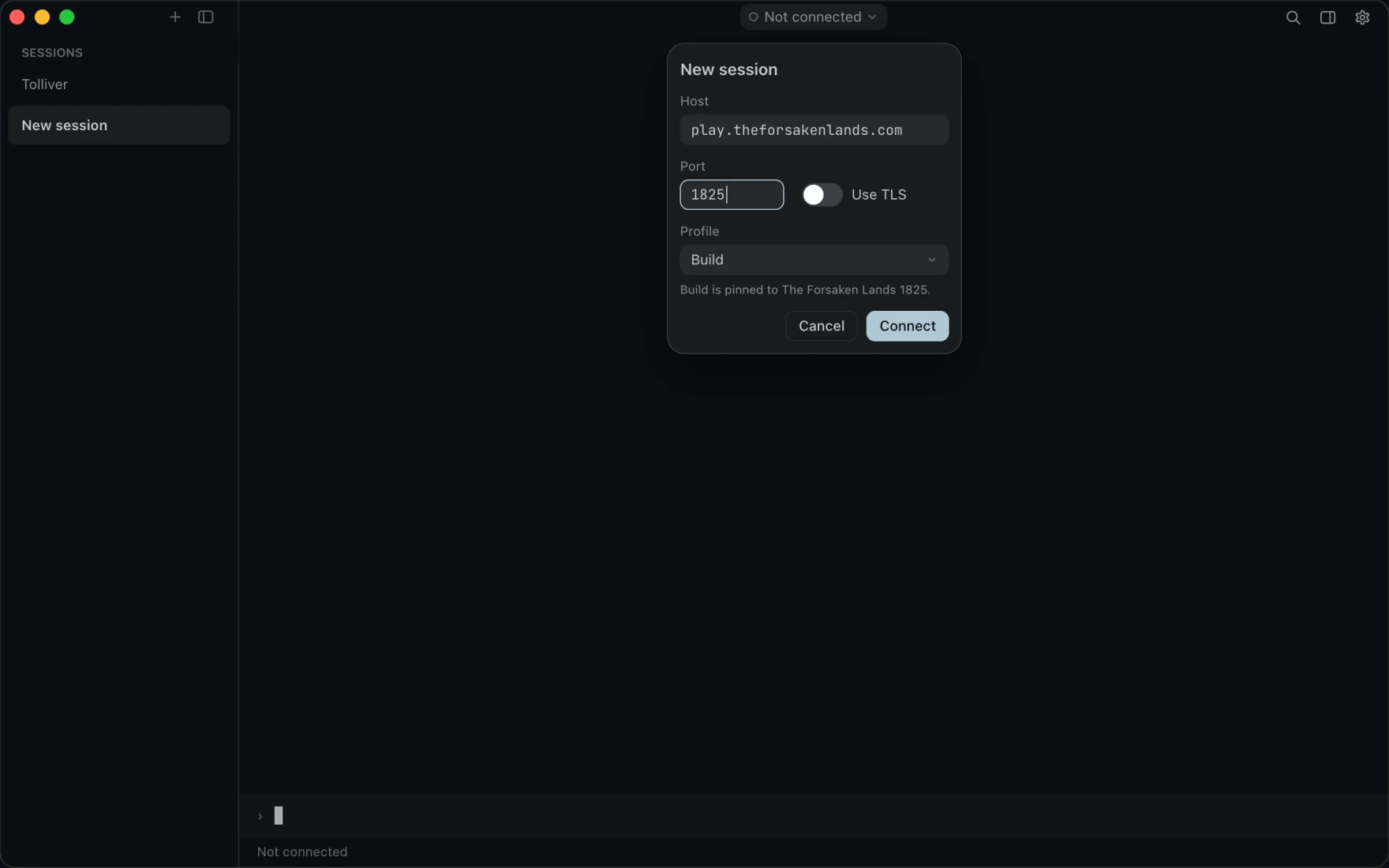
- Open one on any port. New session asks for a host, a port and a profile, and connects beside the sessions you have.
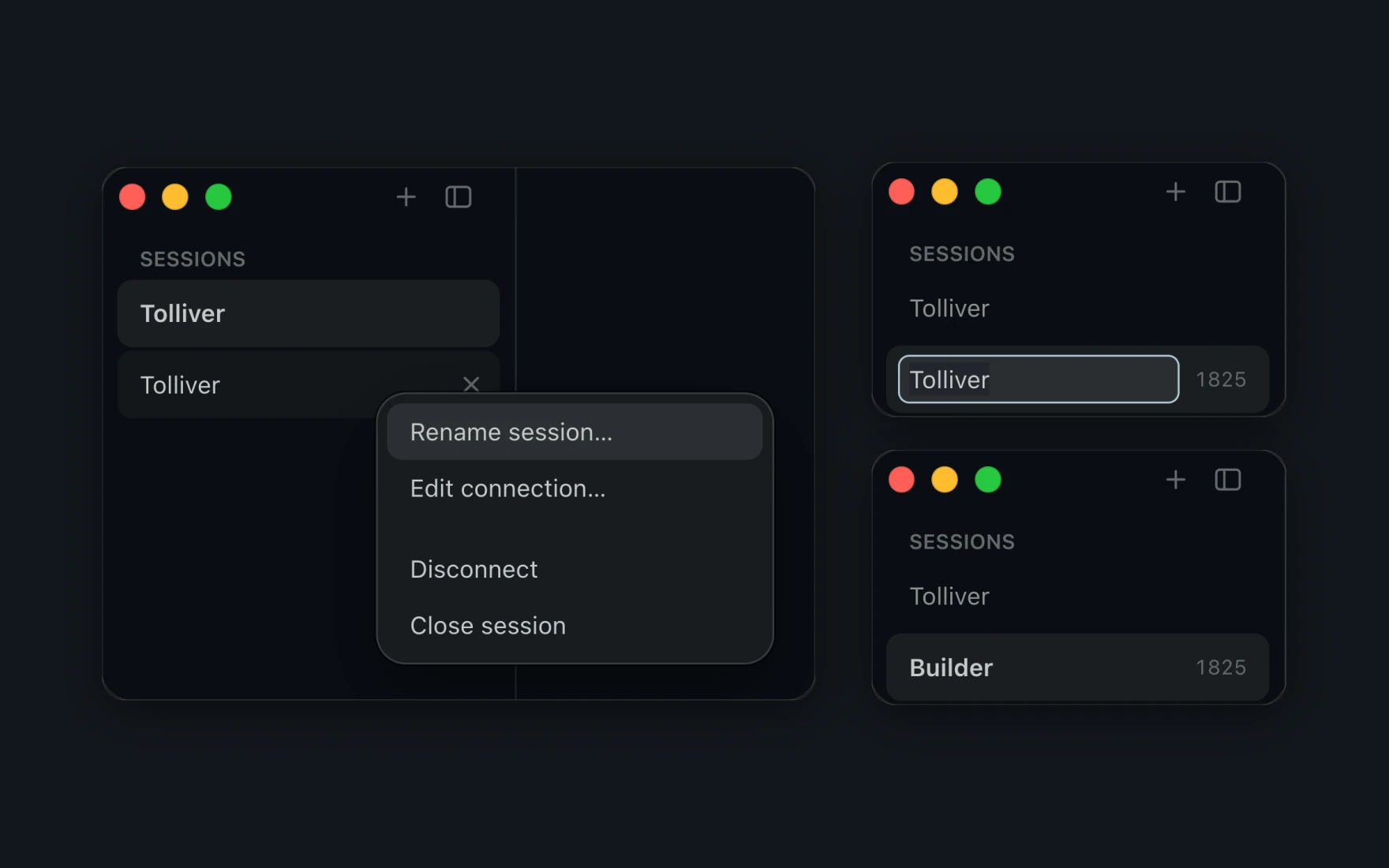
- Name each session. Rename a session from its menu, and the sidebar and Settings call it by that name.
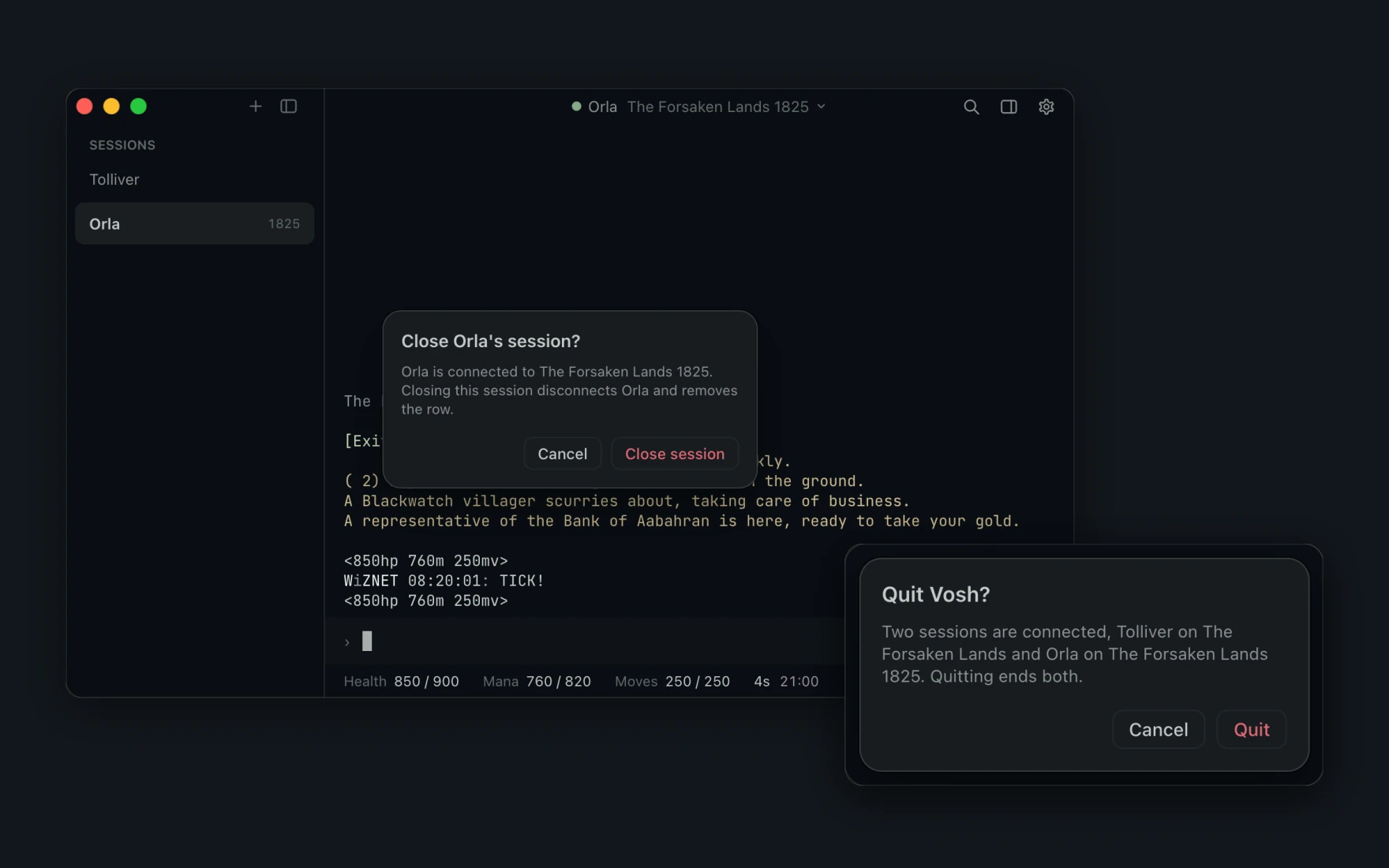
- Close on purpose. Vosh asks before it closes a connected session or the window.
- Know who is still on. Quit names every session still playing when two or more are connected.
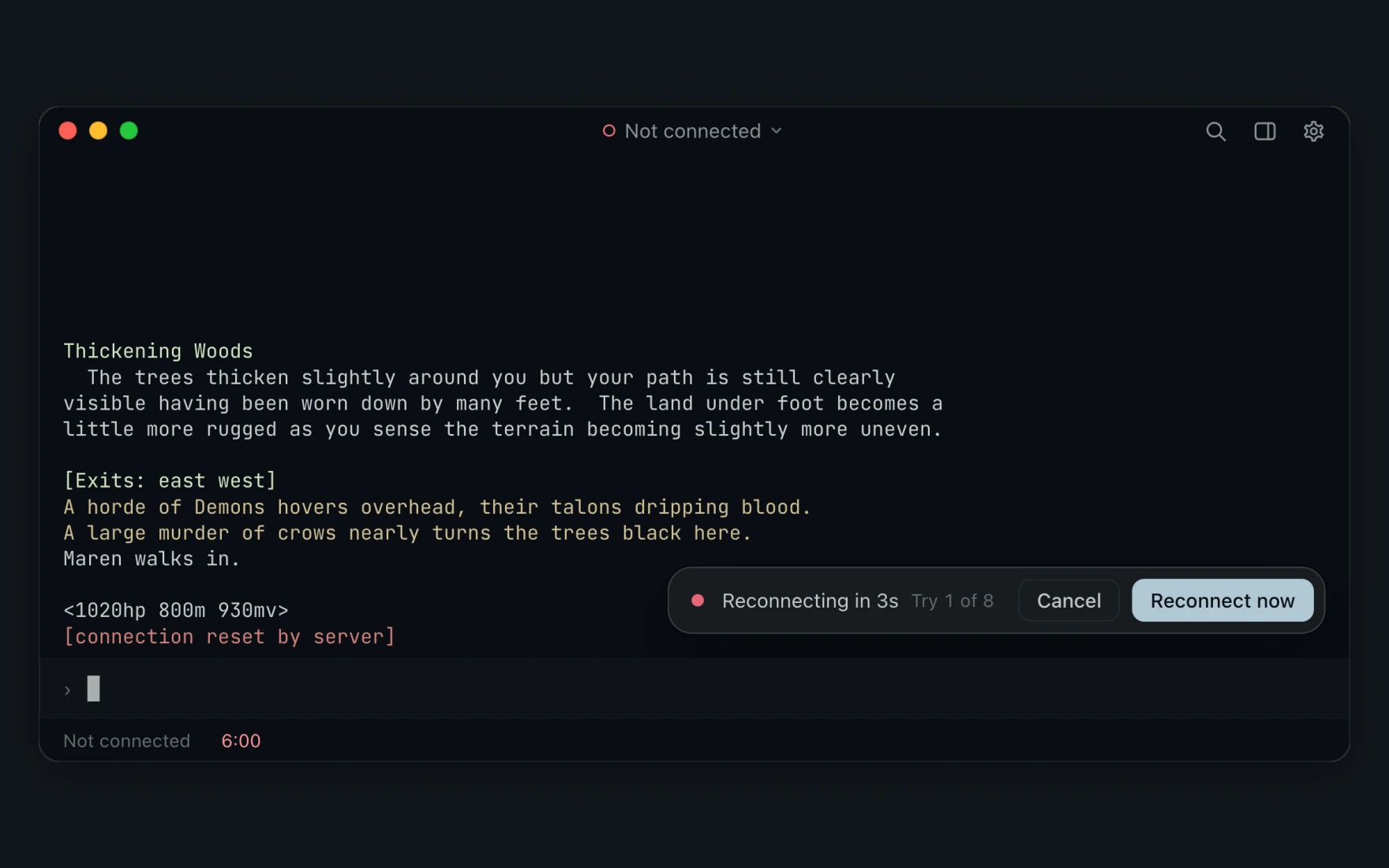
- Get back in after a drop. When the link drops while you play, Vosh dials again and counts its tries.
- Skip the wait. Reconnect now dials at once, and you log in yourself.
Pick a theme that suits your eyes.
Every theme colors the game text, the panes and the map together, from deep dark to warm paper.
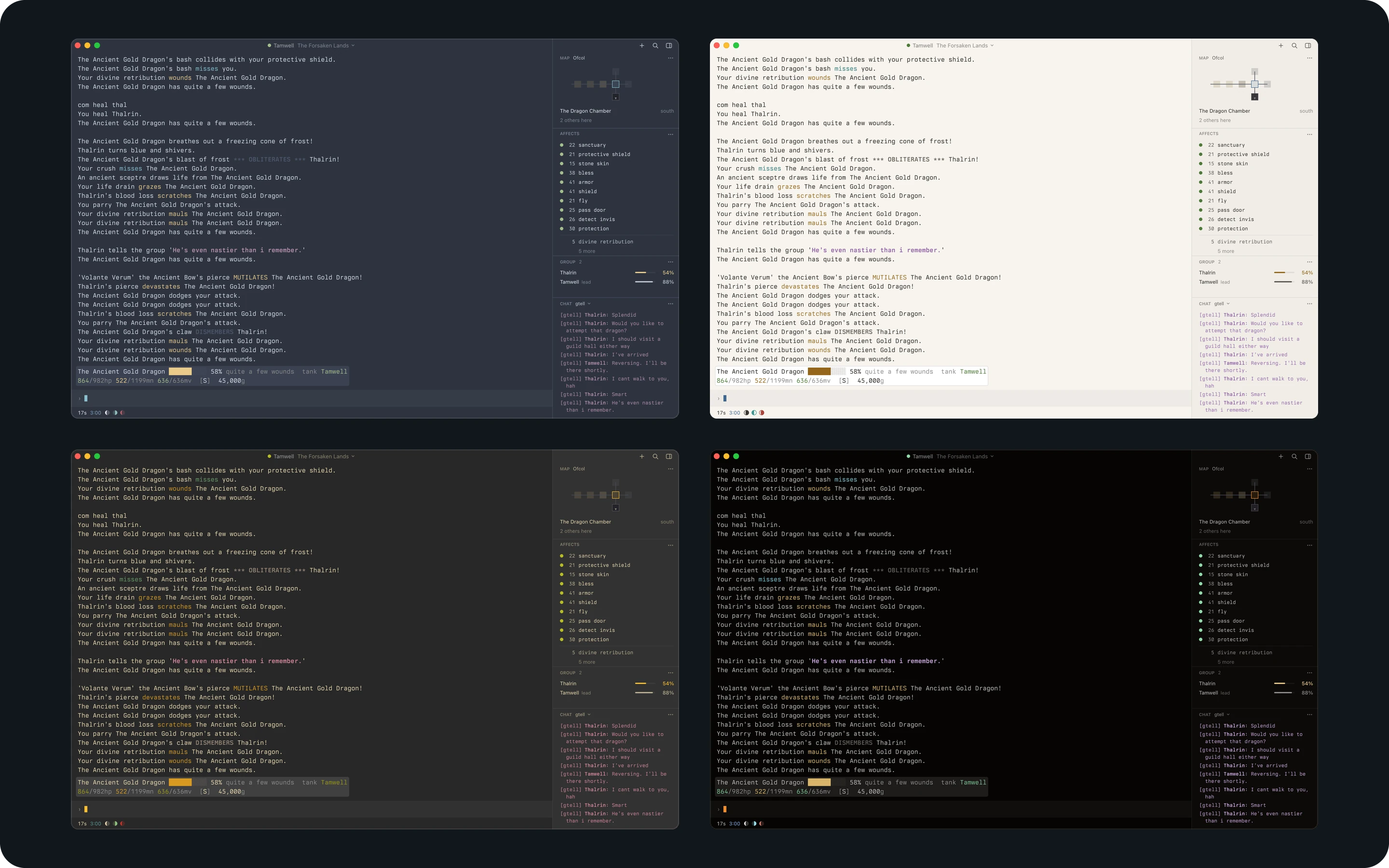
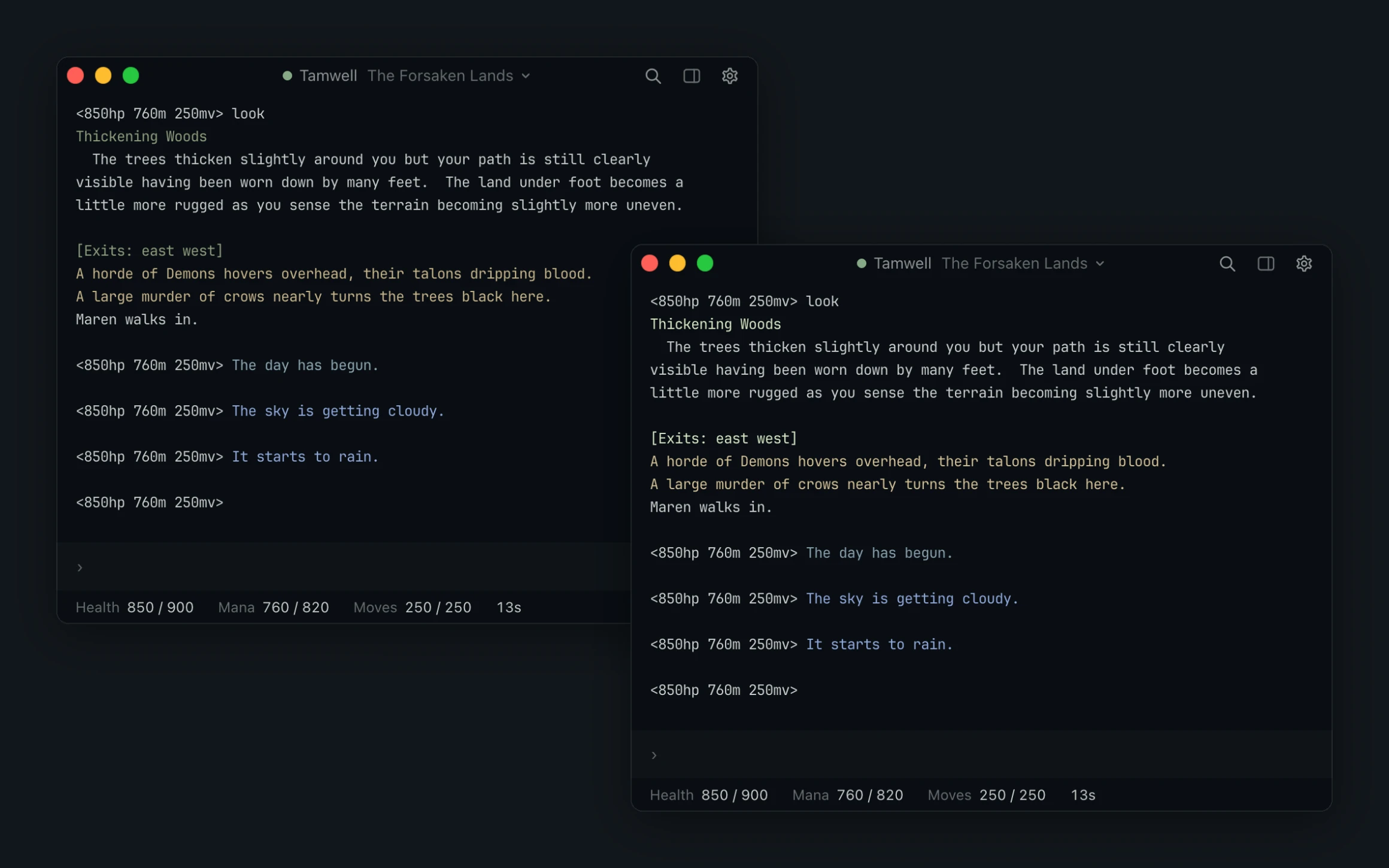
Read the game's colors on your theme.
Fit game colors is off at top left and on at bottom right.
Your theme stays as it was made.
It lifts only the colors that fade on your theme while you play.
Appearance
Bring the theme you already use.
Pick one of 26 themes, or import yours from Ghostty, iTerm2, Kitty or Alacritty.
Under Advanced, New custom theme copies the theme you see. Change any color and every Vosh window shows it at once.
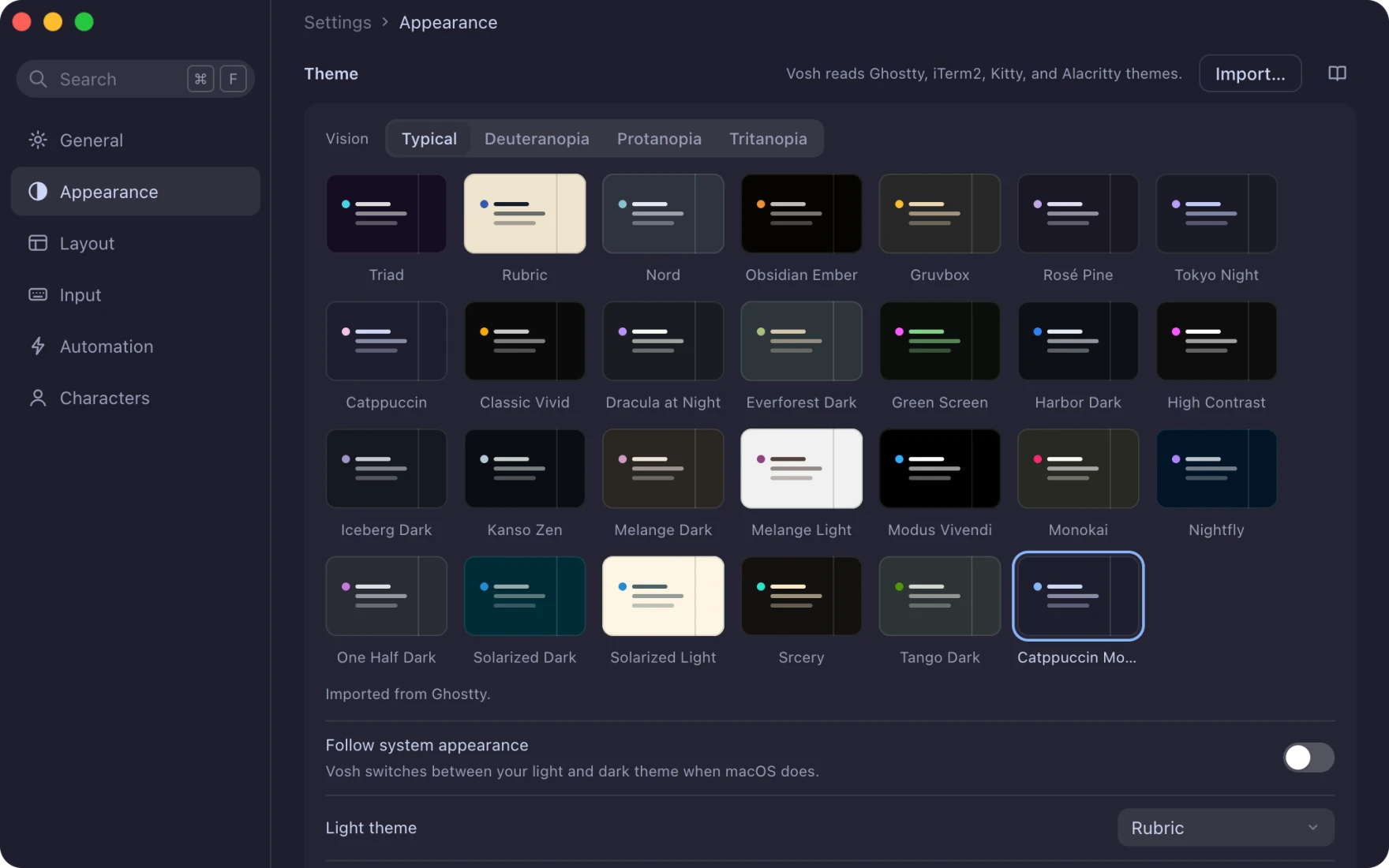
Appearance
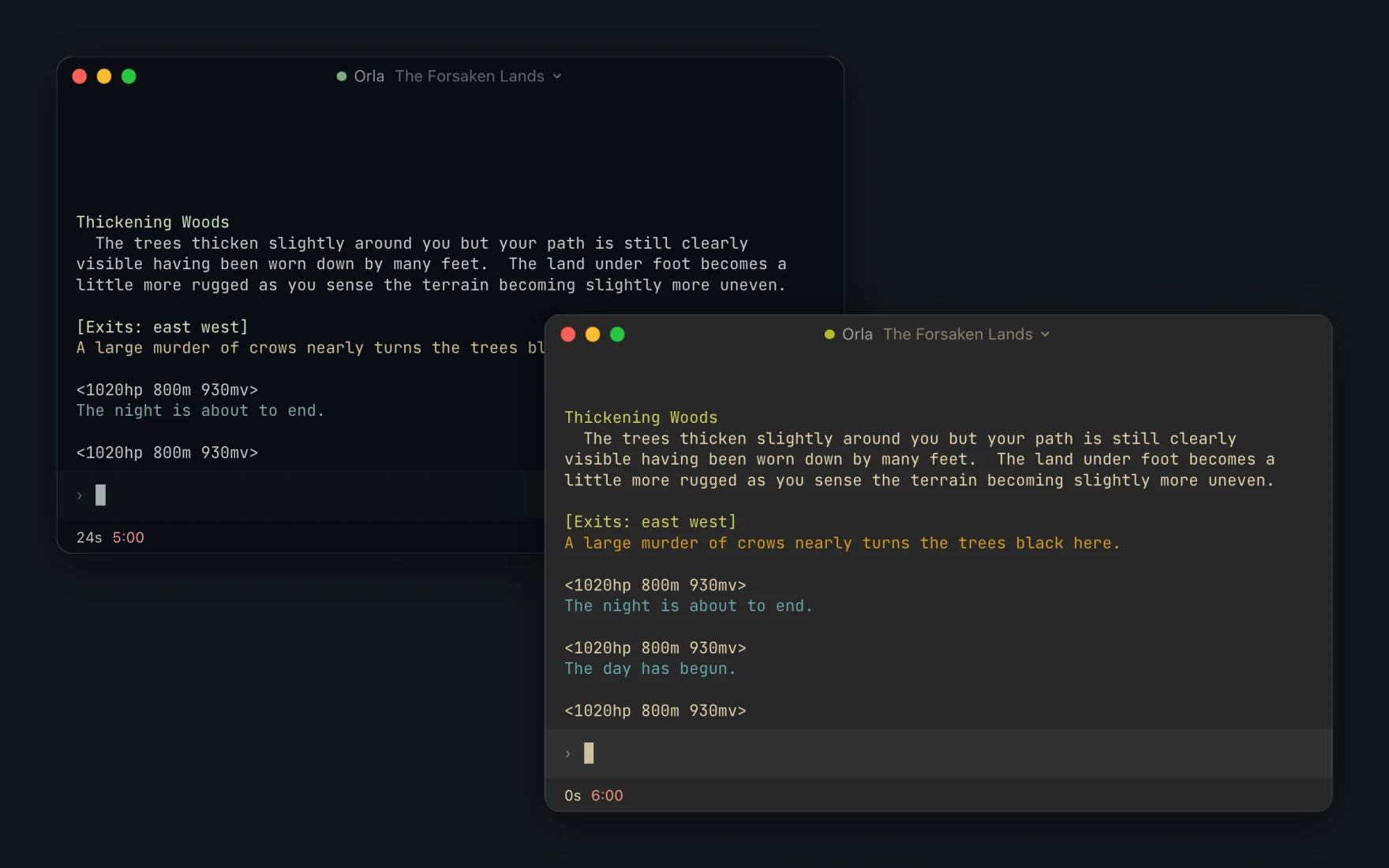
Let the game's day pick your theme.
Set Switch themes to With the game, and Vosh puts on your Day theme at dawn and your Night theme at dusk.
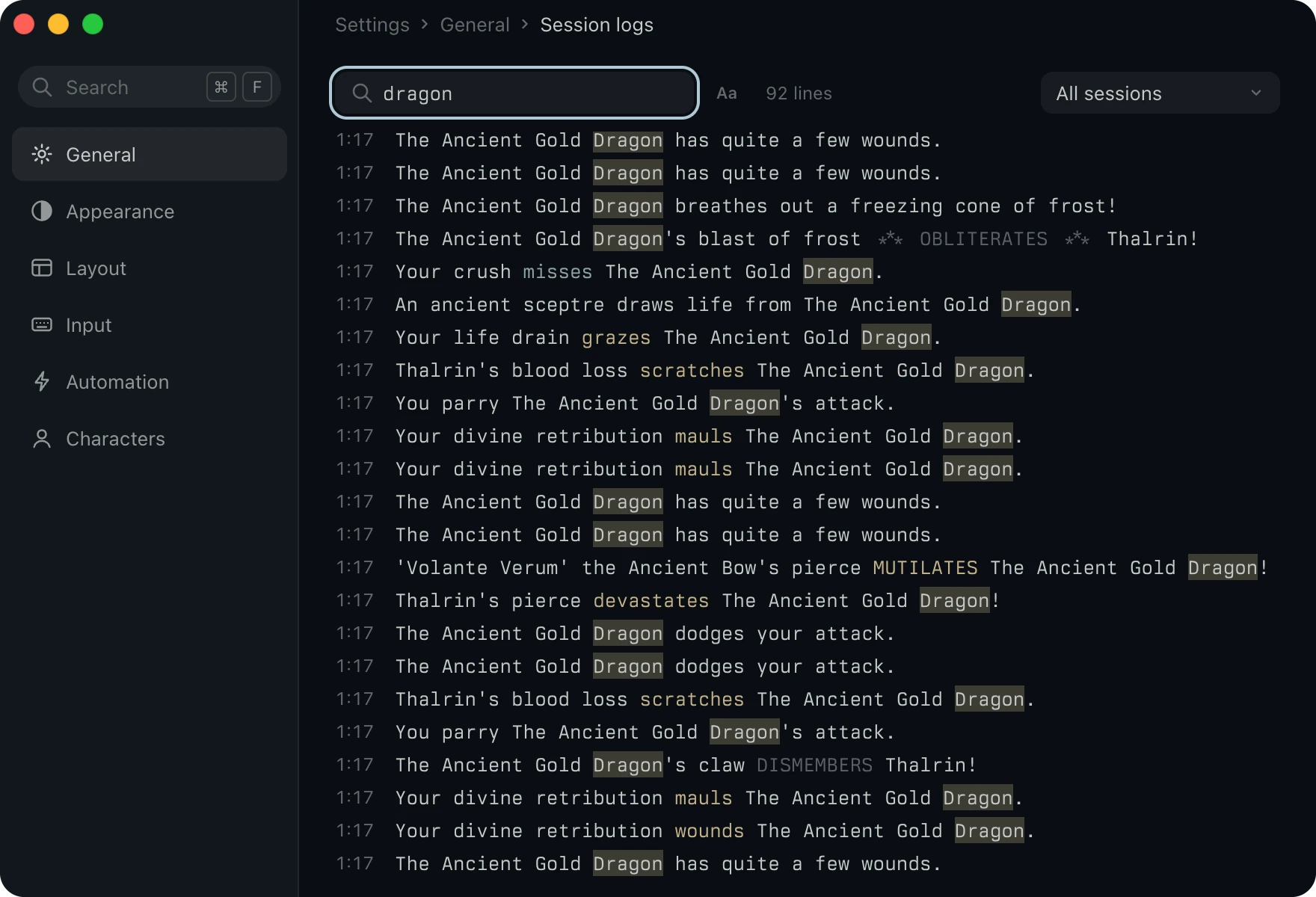
General, Session logs
Find any line you have played.
Vosh saves a log of every connection as you play. Search them all with a regular expression, and every match comes back in the colors the game sent.
Vosh marks your match the way the find bar does, so you see at once why each line came back.
Session logs, Save a scene
Share a stretch of play as a page.
Save a scene writes the lines you pick as one web page in the game's colors, and leaves out what you choose.
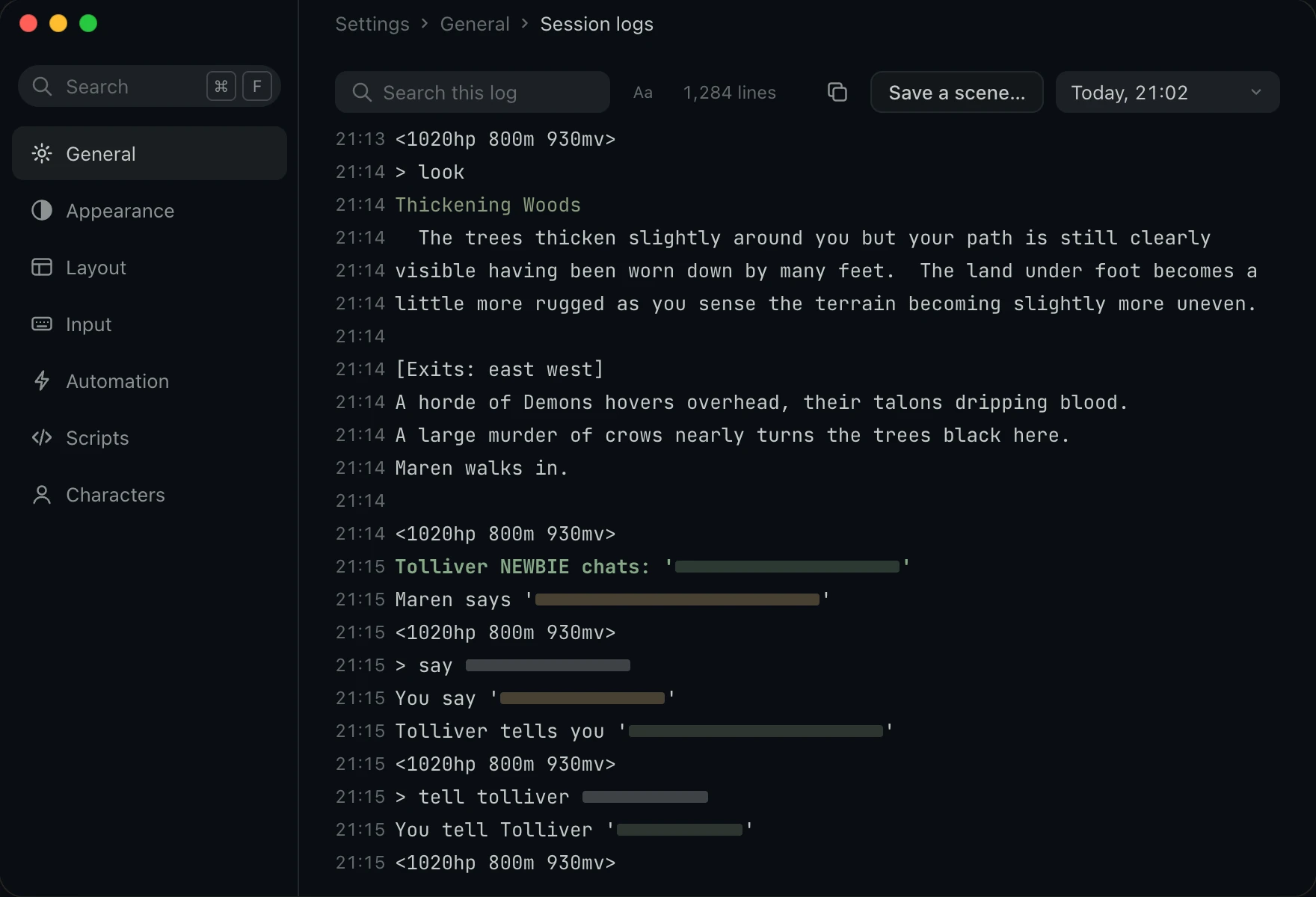
- Start from a log. Pick one log, and Save a scene joins the copy button in the toolbar.
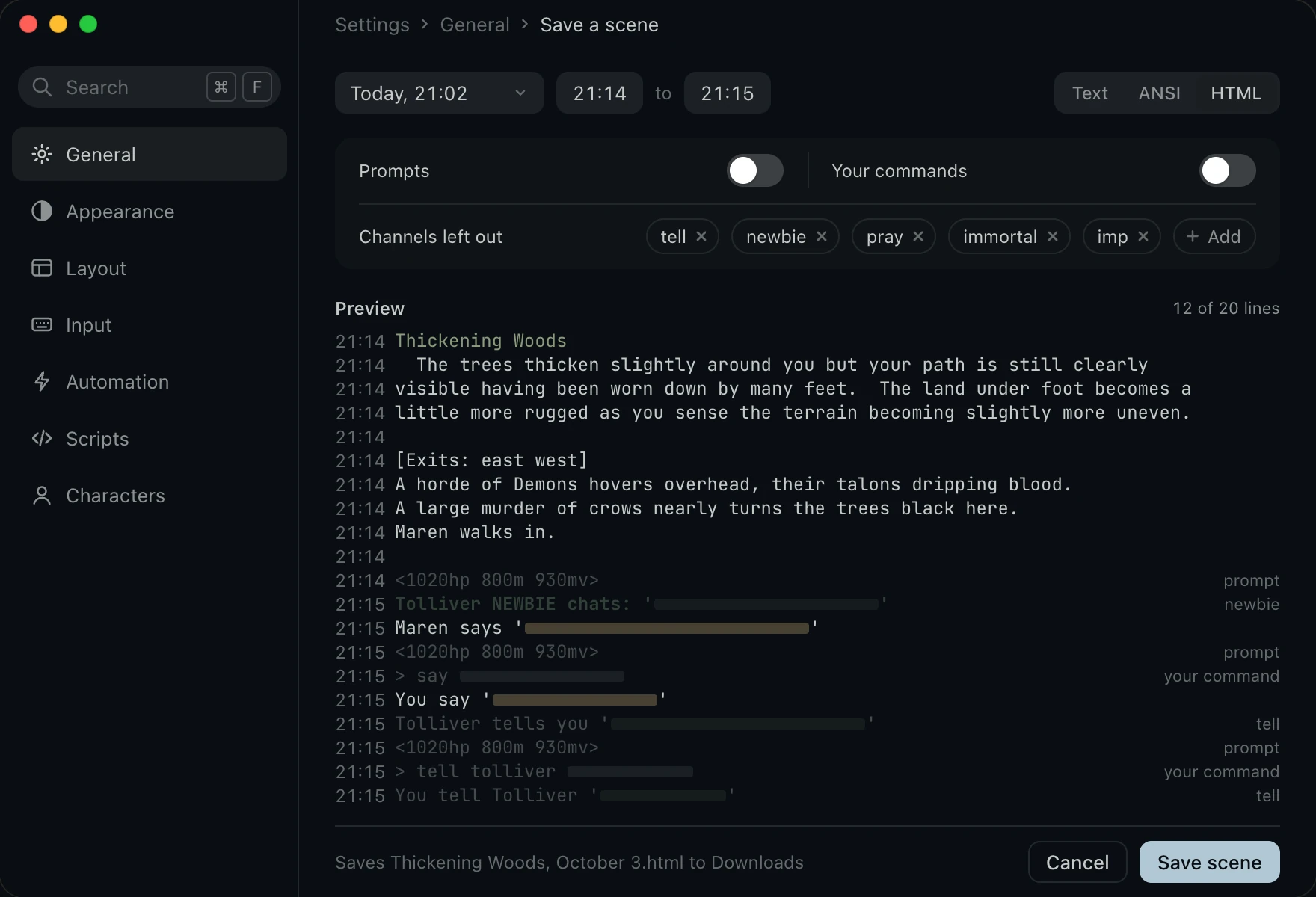
- Range and format. Pick where the scene starts and where it ends, and save it as Text, ANSI or HTML.
- Only the story. Prompts and your commands stay out until you turn them on. Tells and the four channels nearest to out of character start out of the scene, and Add leaves out any other.
- See it first. The preview shows each line as the scene keeps it, and a line that stays out draws quiet with the reason beside it.
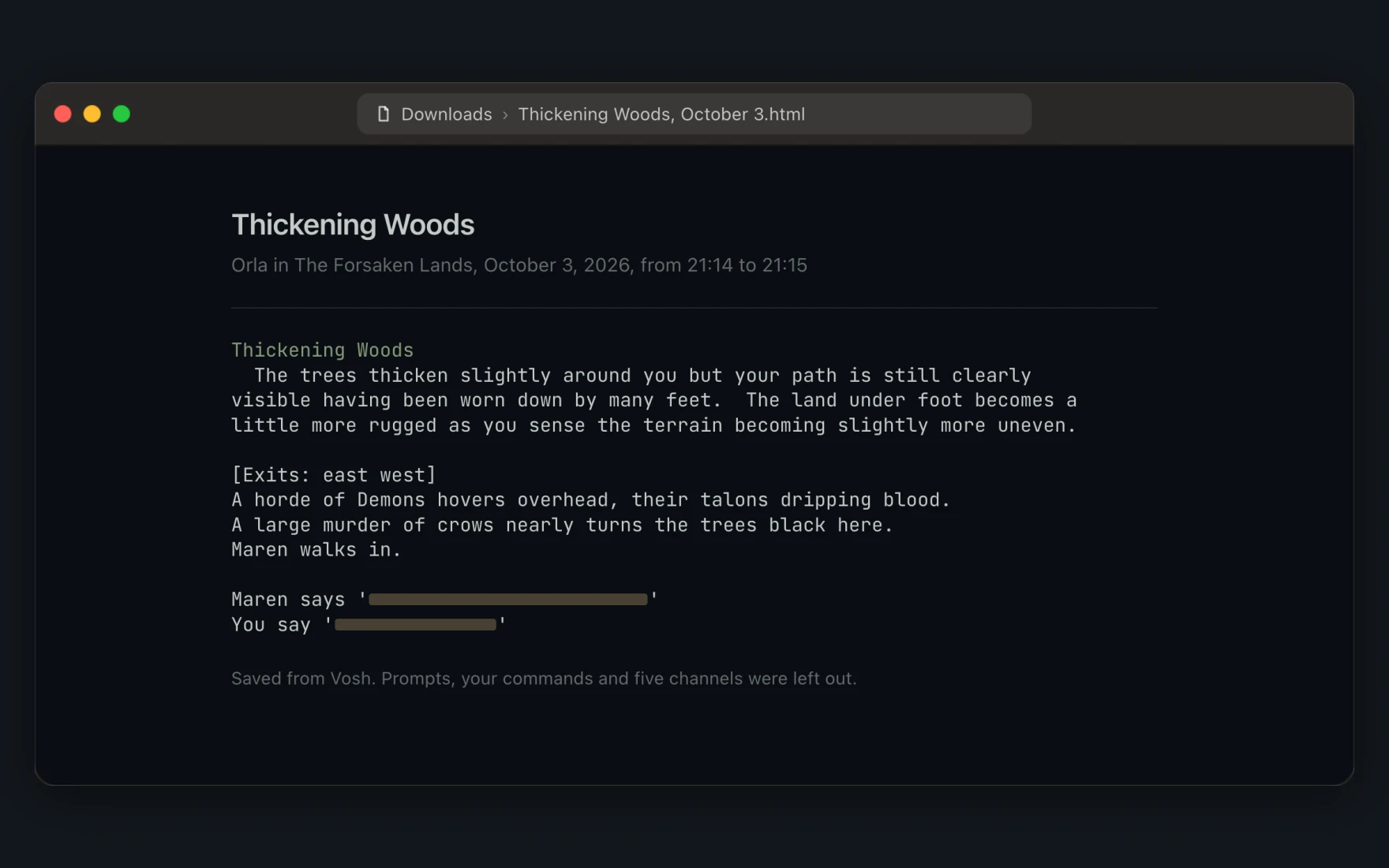
- One page to share. Save scene writes the file to Downloads, named after the first room and the day.
- Find it again. A notice names the file, and Show in Finder opens its folder.
Scripts
Extend Vosh with Lua.
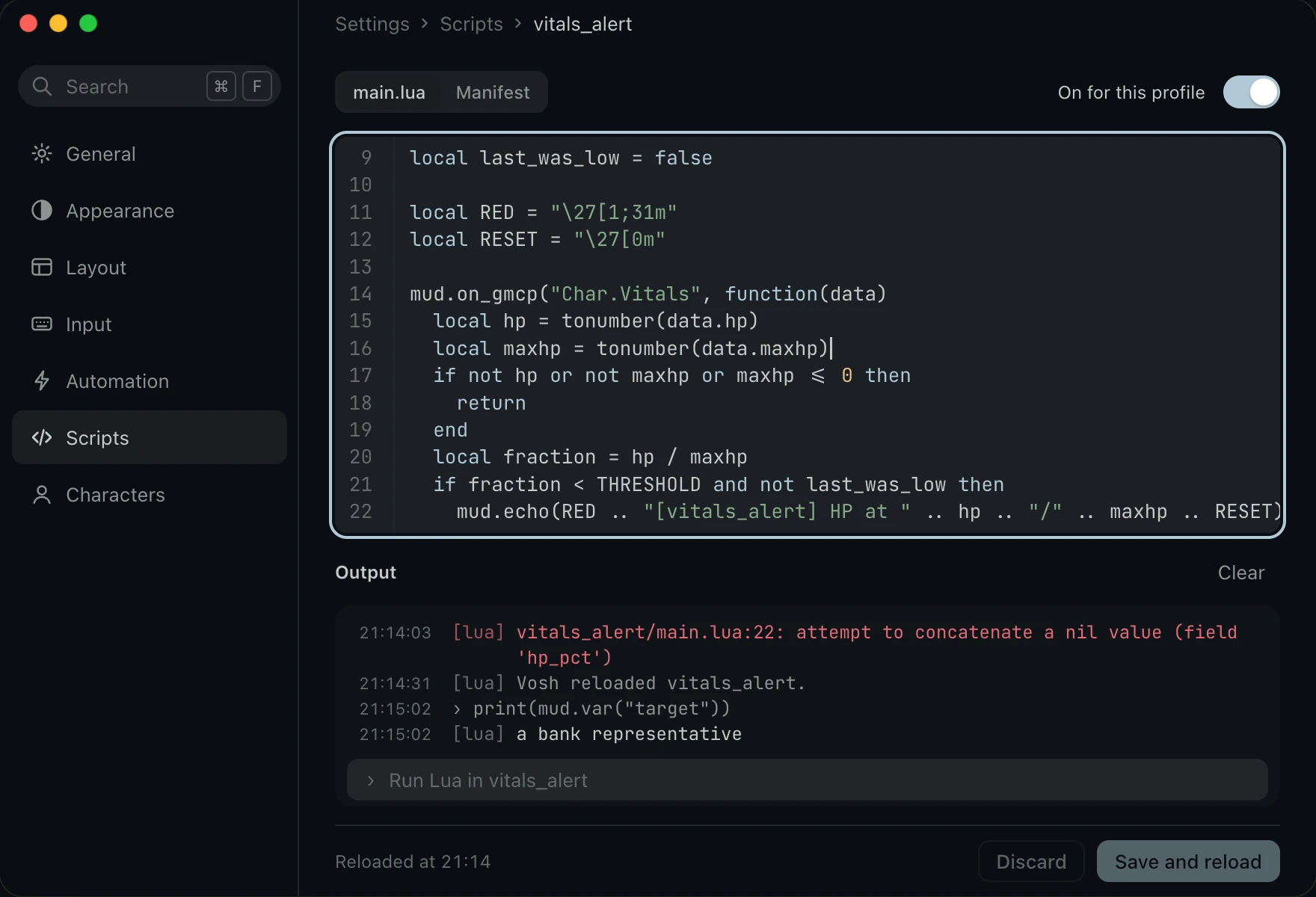
A plugin is a folder of Lua that Vosh runs for the profiles you turn it on for.
Save and reload runs your edit at once, and Output shows what the plugin prints.
Characters
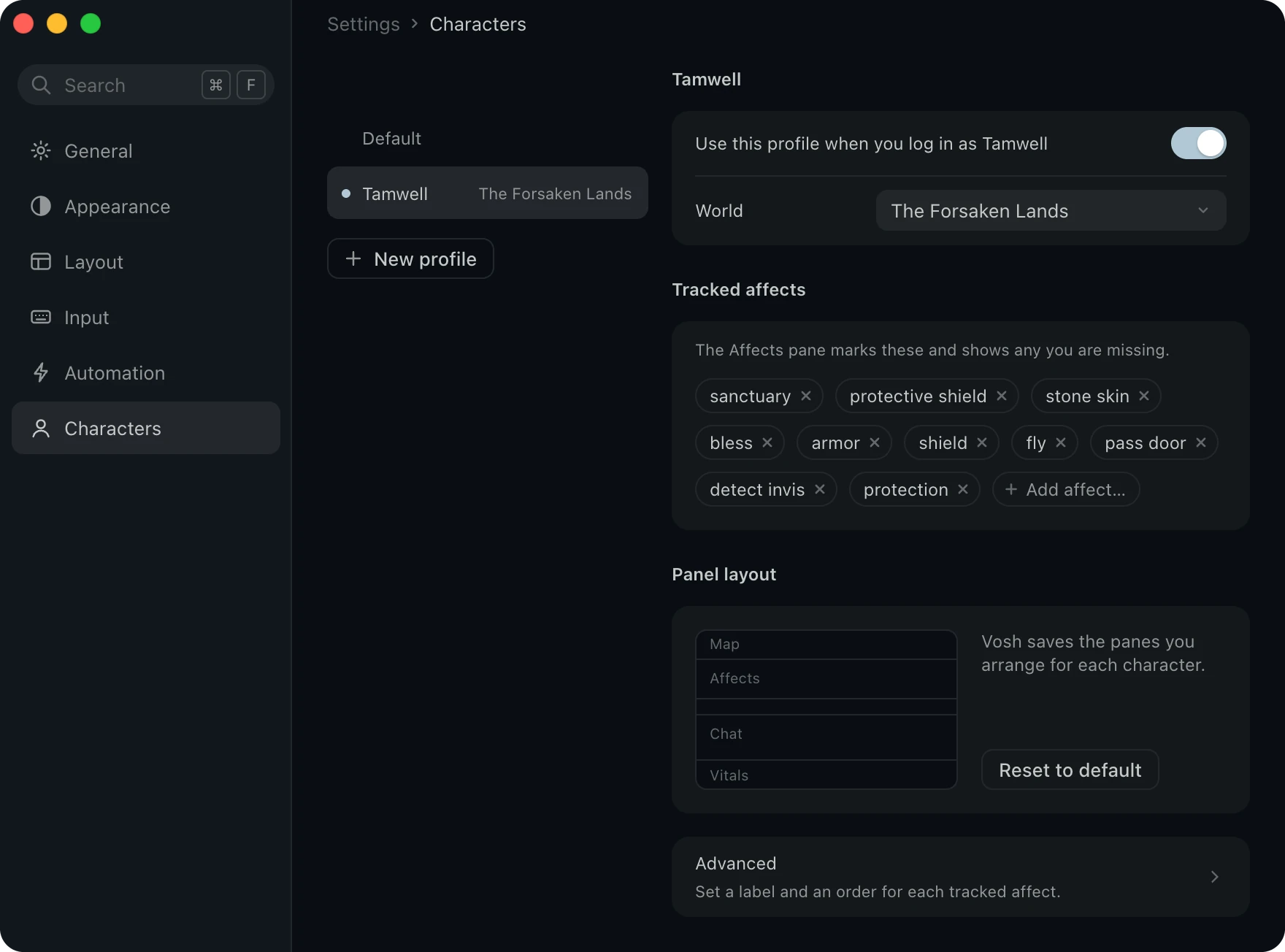
Every character keeps its own setup.
Give each character a profile with its own tracked spells and panel layout. Log in as that character and Vosh loads it for you.
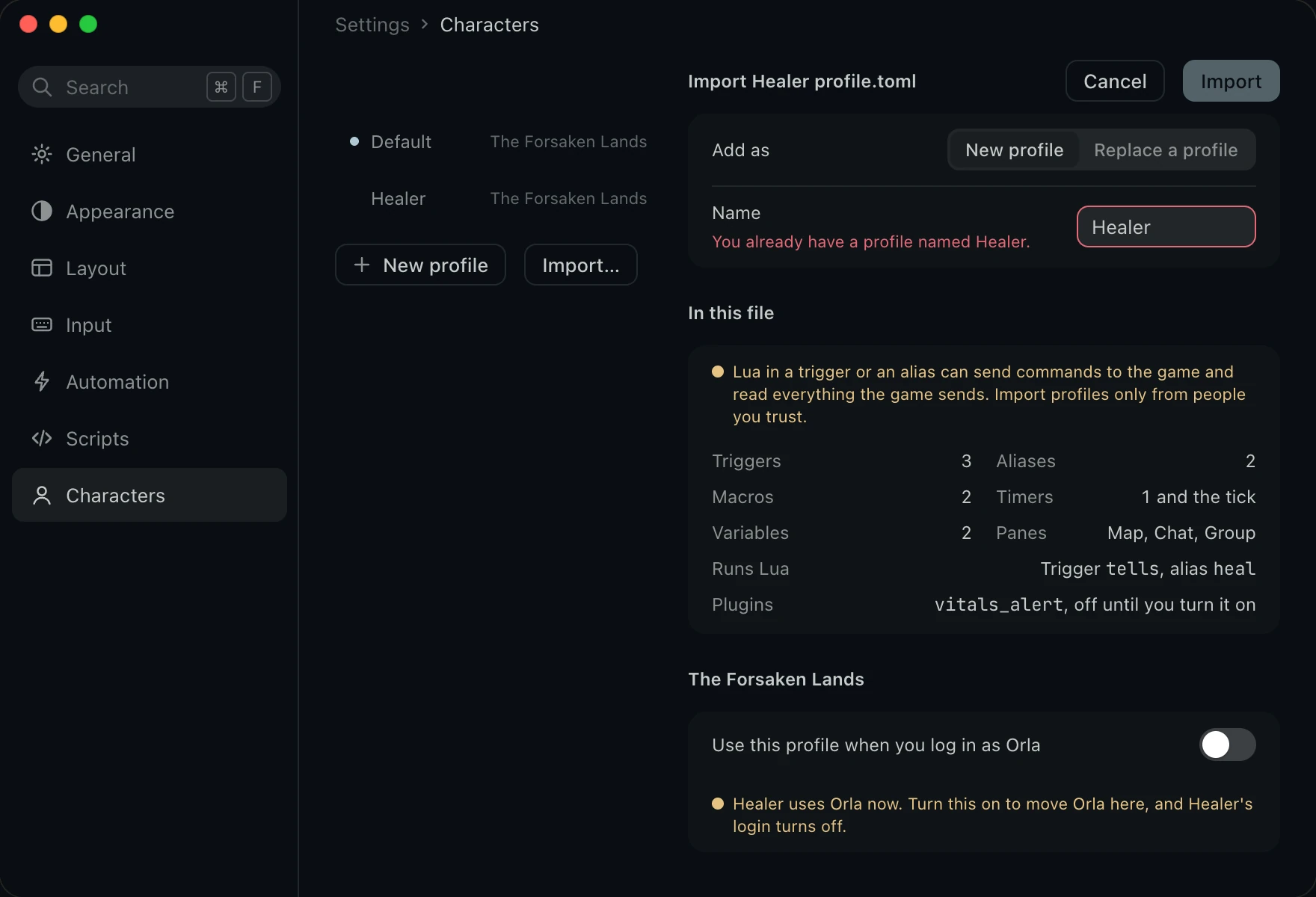
Import a profile someone shared, and see what it holds before anything changes. Its plugins stay off until you turn them on.
Automation, Import
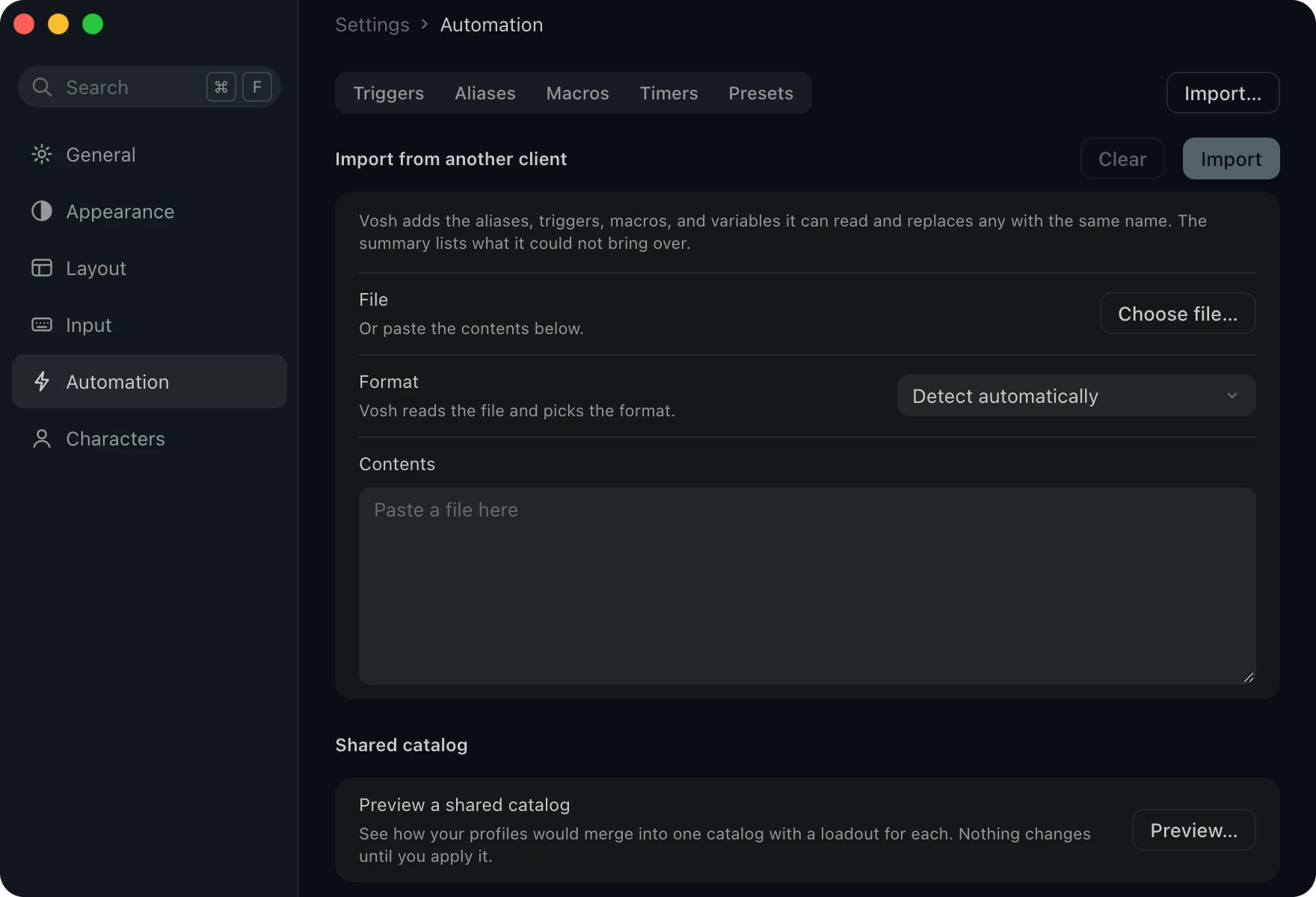
Bring your setup from another client.
Vosh reads what other MUD clients save, so the aliases, triggers, macros and variables you built elsewhere come with you. It picks the format itself and tells you anything it could not bring over.
- Mudlet
- MUSHclient
- CMUD and zMUD
- GMUD
- TinTin++
Help and the terminal menu
Everything a right click away.
Right click the terminal for any Settings page, and open Help in a window of its own.
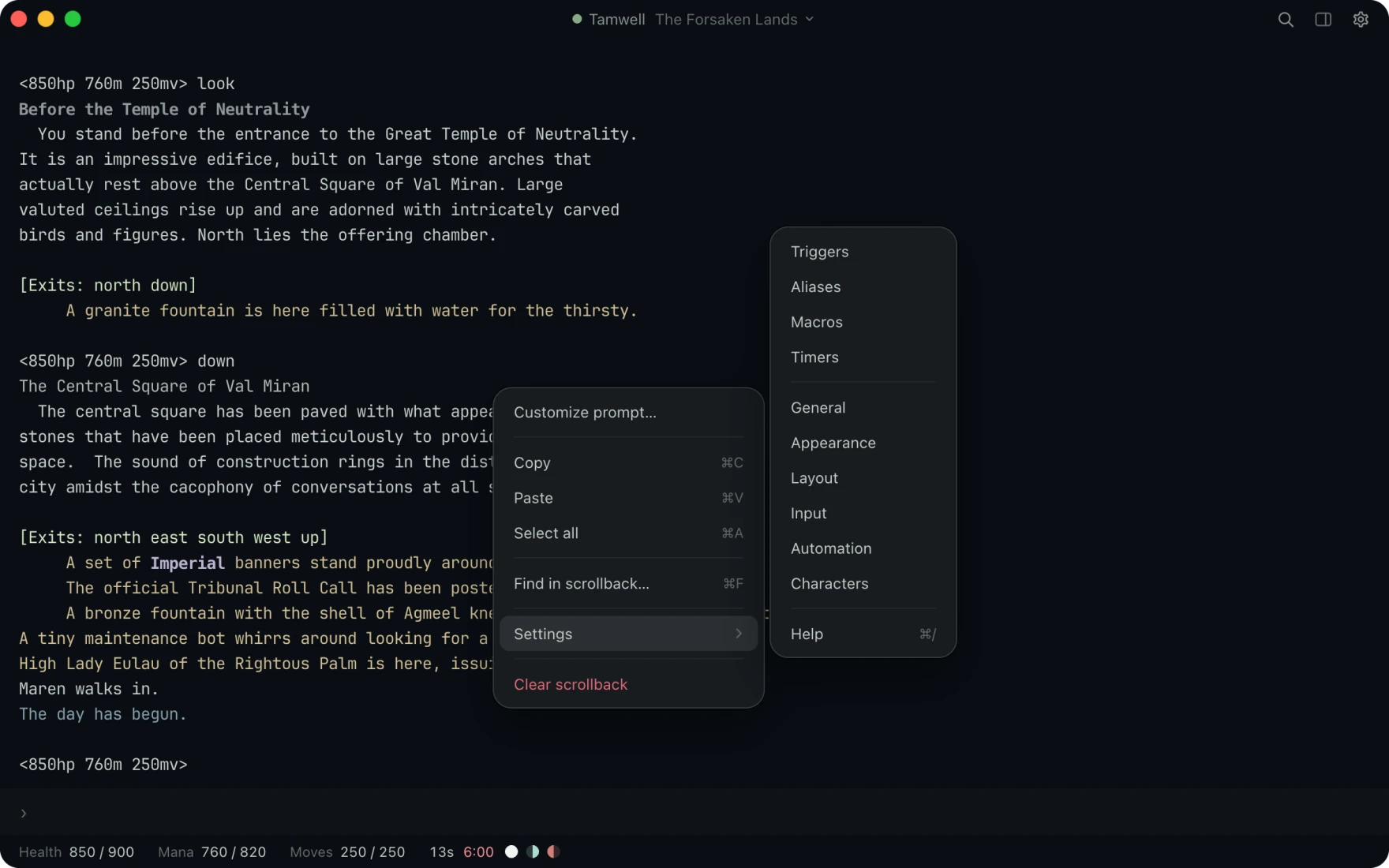
- Reach Settings from the text. Right click the terminal to open any Settings page, find in the scrollback, or clear it.
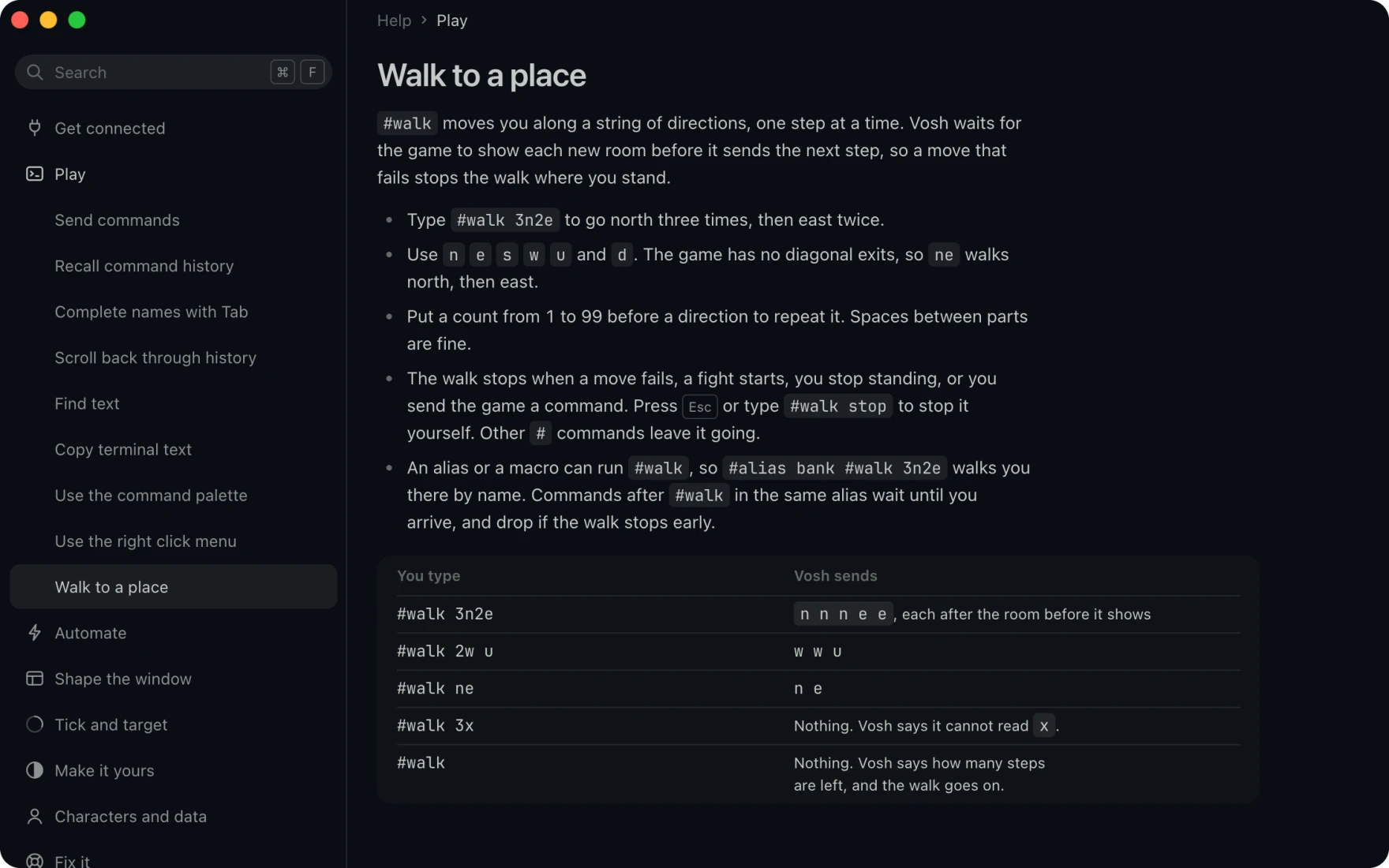
- Walk where you want to go. Type
#walk 3n2eand Vosh takes one step at a time, waiting for each room. - Every form it takes. Walk to a place in Help shows what you type beside what Vosh sends.
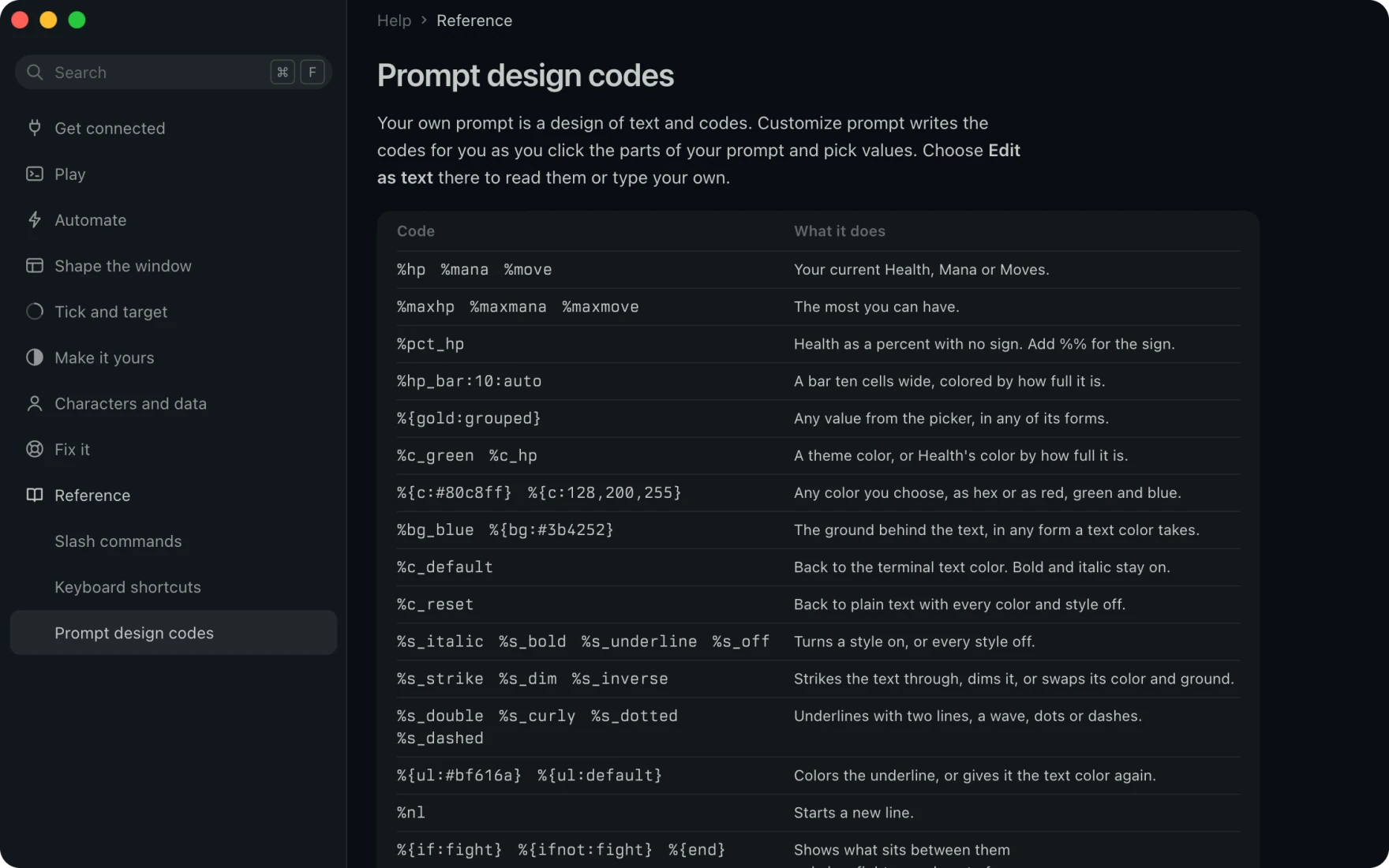
- Look up every prompt code. Prompt design codes lists every code your prompt takes, down to each underline kind and its color.
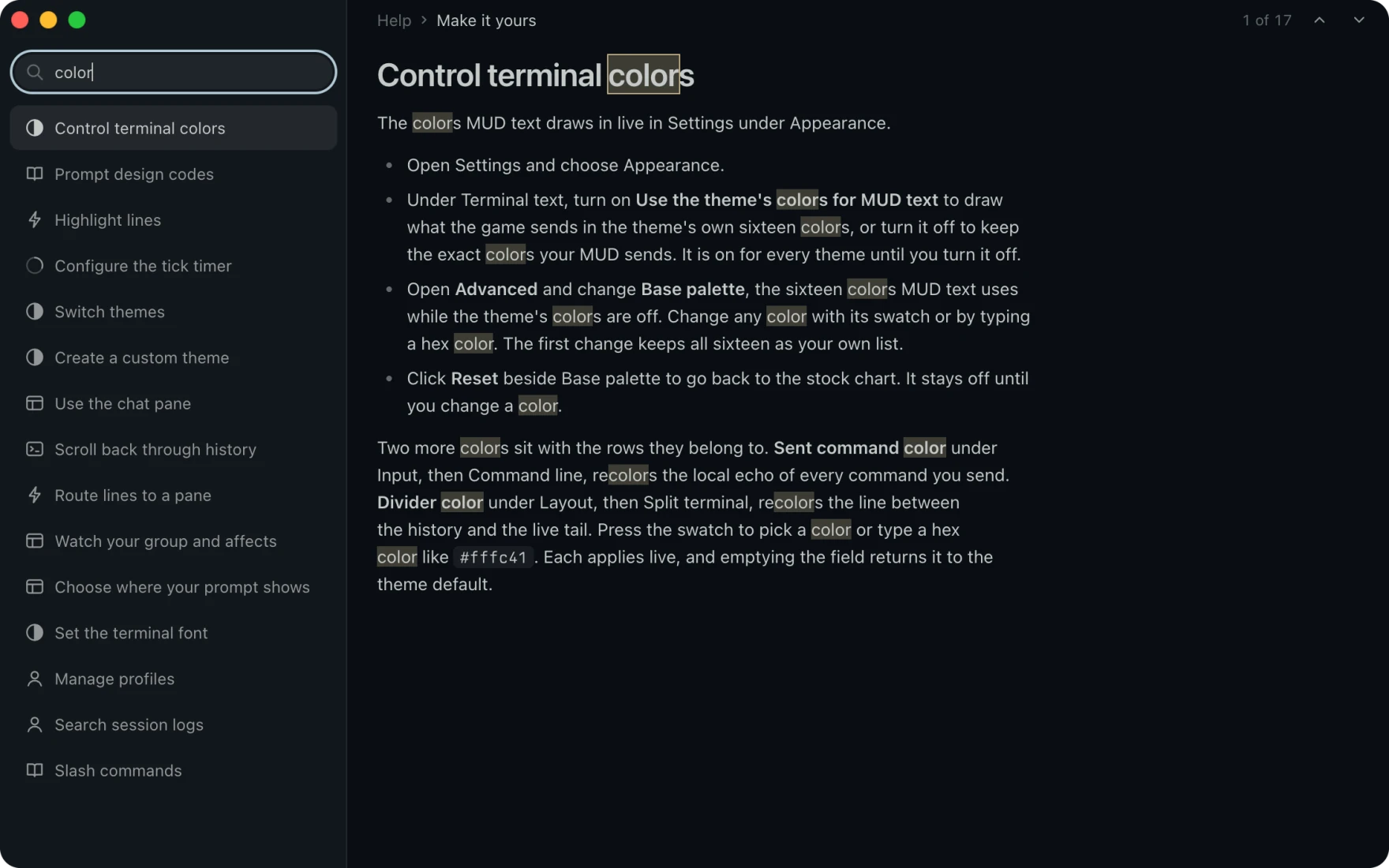
- Search all of Help at once. Type a word and Help lists every topic that holds it and marks each match.
- Step through. Press Enter to step to the next match.
How Vosh works
Every setting, page by page.
Settings opens in its own window. Here is what a few of its pages hold.
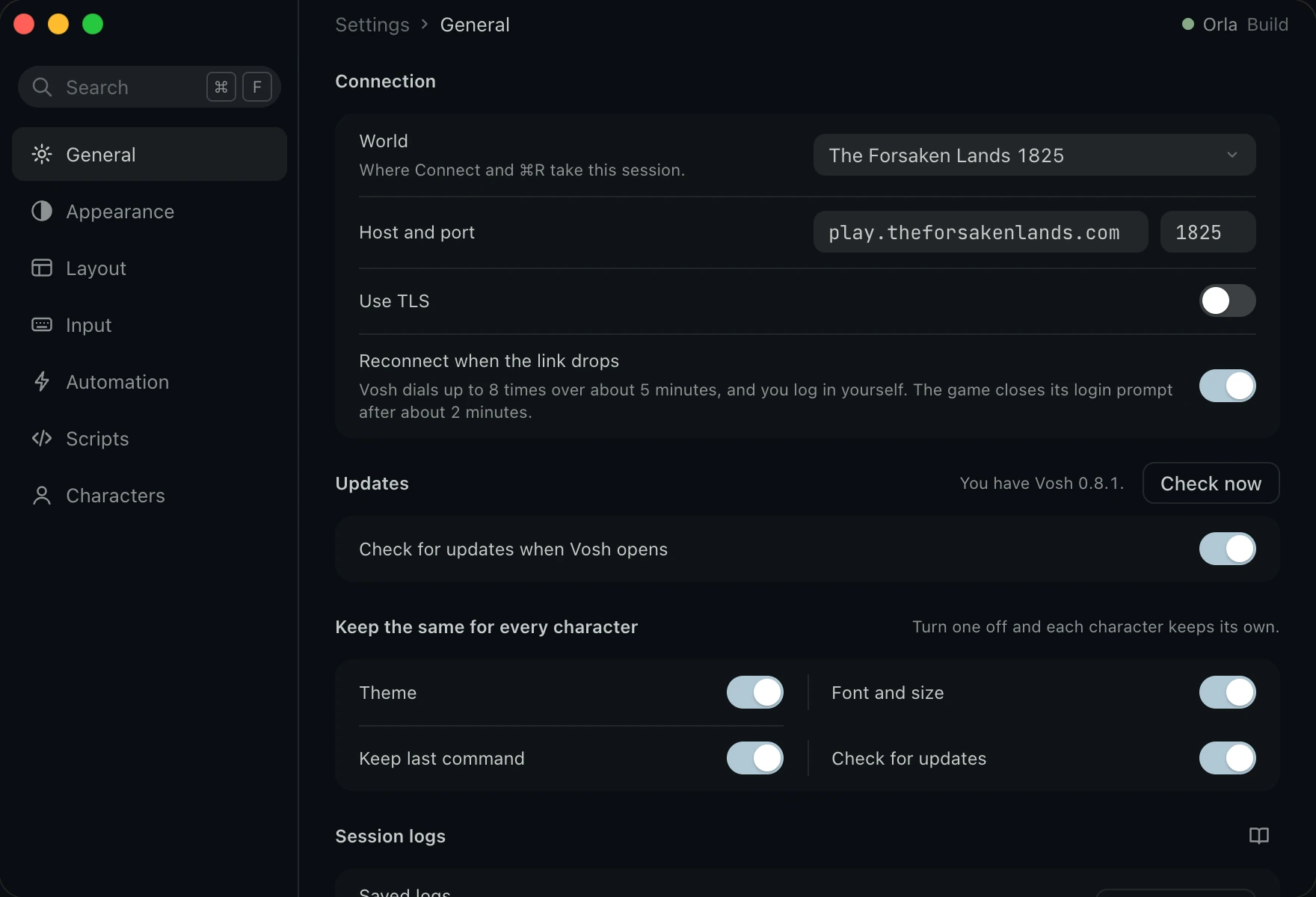
- Any MUD. Vosh starts on Aabahran. Choose Other under World to play any MUD by its host and port.
- Reconnect when the link drops. Vosh dials your world again, up to 8 times over about 5 minutes, and you log in yourself.
- Updates. Check now looks for a new build, and once Vosh finds one the button becomes Install and restart.
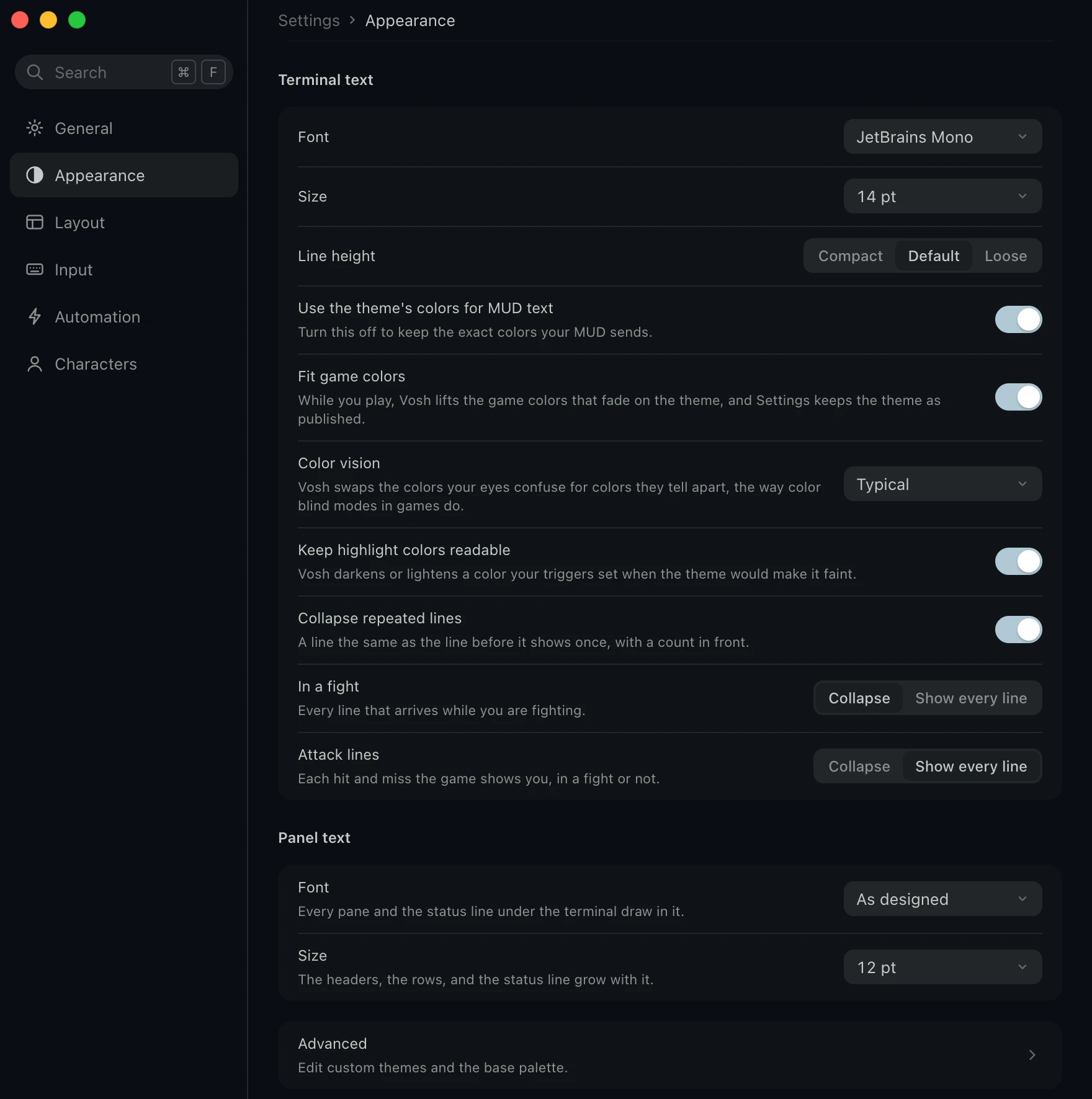
- A font that ships with it. JetBrains Mono ships inside Vosh, and the Font menu lists the monospace fonts on your computer too.
- Colors you can read. Fit game colors lifts the colors that fade on your theme.
- Color vision. Color vision swaps the colors you confuse in the game text and the window. Greens move to blue and reds toward orange for Deuteranopia and Protanopia, and blues move to purple for Tritanopia.
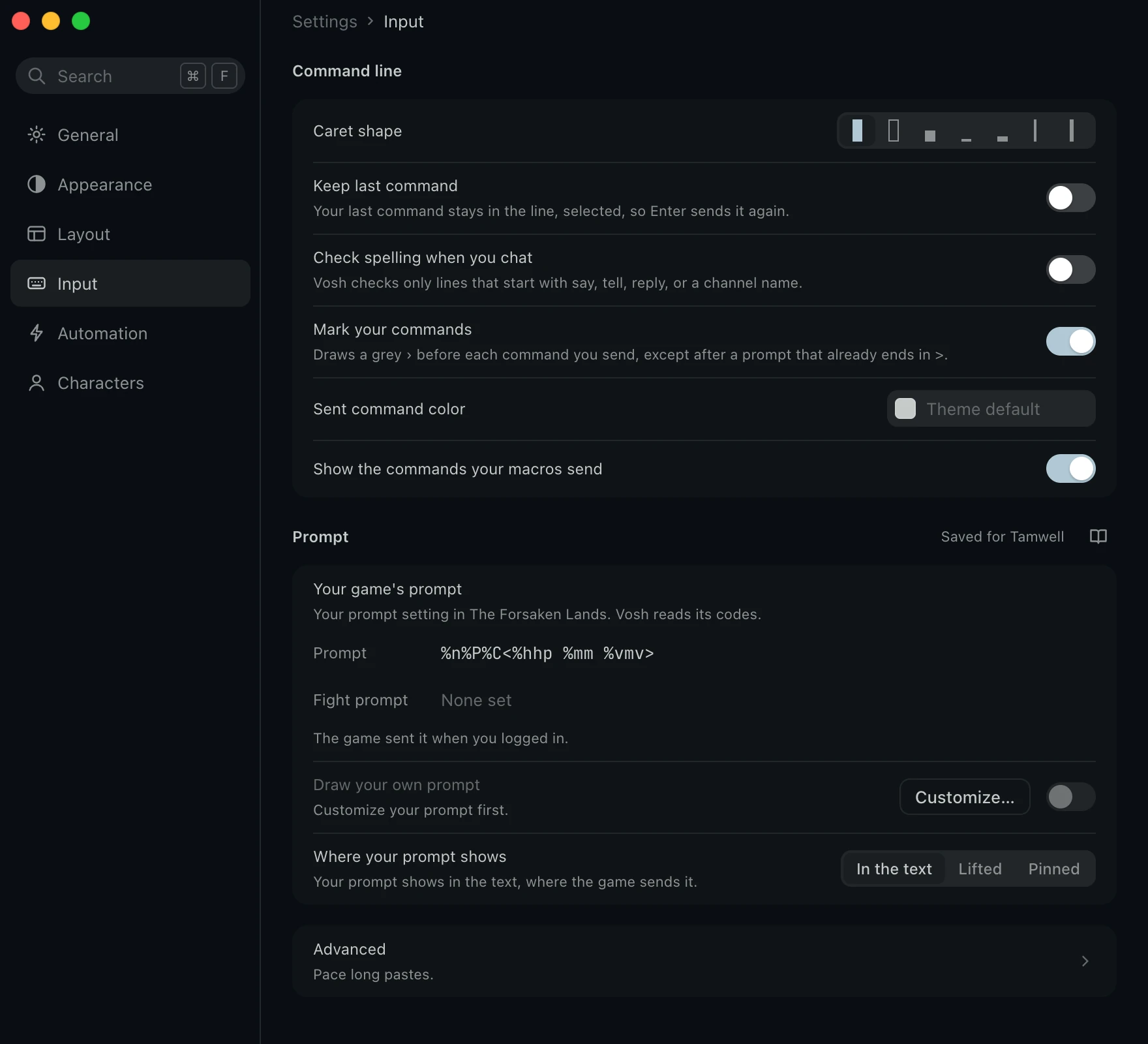
- Your prompt, your way. Draw your own prompt puts your design in place of the game's, and Pinned keeps your latest prompt above the command line.
- Paste with care. A long paste goes out one line at a time, and Esc stops the rest.
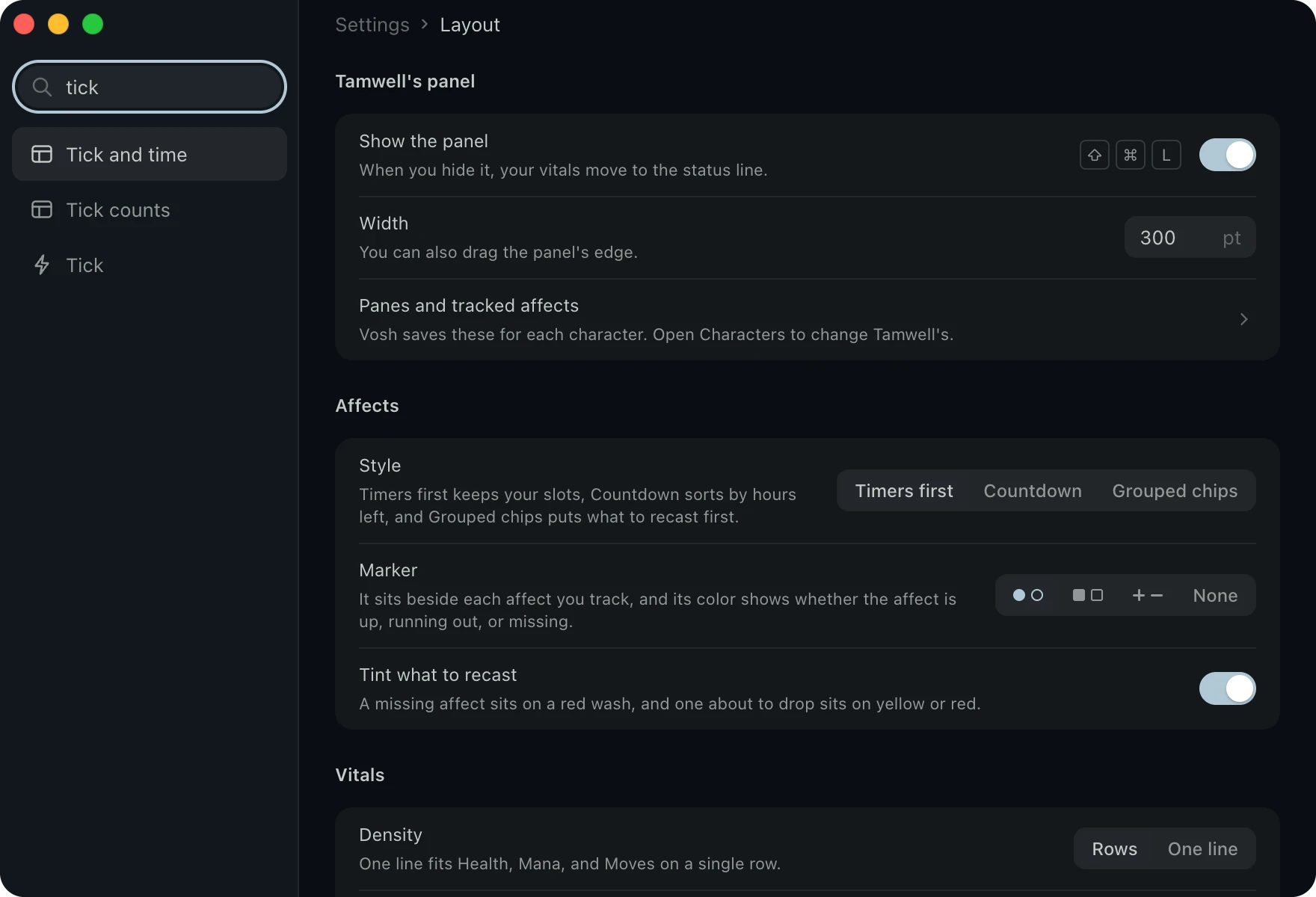
- Find any setting. Type in Settings and each result names a row beside the icon of its page.
- Straight to it. Enter opens the row, scrolls it into view and flashes it.
Take Vosh into your next fight.
Vosh runs on macOS, Windows and Linux. Supporters can download it now while it is in beta.
Changelog
Vosh v0.95.6, built 2026-10-15.
Changes
All notable changes to Vosh. Newest first.
v0.95.6 - 2026-10-15
Arrange your panes in a mode of their own, fold a pane down to its header, and bring back an earlier layout.
- Arrange mode turns each pane into a tile you drag, and the other panes make room as you go. Drop a tile on the top or bottom half of a pane to stack them, or near its left or right edge to put them side by side. Done saves the layout for that character, and Cancel leaves it as it was.
- Start arrange mode with the layout button over the panel, or choose Arrange panes in a pane's menu, the View menu, or the command palette.
- In arrange mode a shelf covers the game text. It holds the panes you put away and the panes you can add, another Chat pane and your plugin panes among them.
- Click a pane's header to fold it down to its name. The other panes take its space, and the header still shows its counts. Click it again to open the pane.
- Vosh keeps the last 20 layouts of each character. Earlier layouts in arrange mode or in Settings › Characters › Panel layout puts one back. The first time a new version opens, it saves every character's layout before anything changes.
- Panes you change just before an update are saved before Vosh restarts, so they're still there afterward.
- Close pane offers Undo.
- Split right, Split down, Move to sidebar, and Add a pane are gone from the pane menu, and headers no longer drag. Arrange mode does all of that now.
v0.95.5 - 2026-10-14
Put panes in the sidebar, read your stats in a new pane, and copy a trigger, alias, or macro.
- The sidebar across from the panel holds panes too, under your sessions, or on its own with one session. Drag a pane by its header to move it, or choose Move to sidebar in its menu. Add a pane has Add to the sidebar at the bottom.
- Settings › Characters › Panel layout draws the sidebar beside the panel. Drag panes there to arrange any character, even one you aren't playing.
- A new Stats pane shows your stats, luck, hitroll, damroll, armor, and saves as the game sends them. Pick Score sheet, Rows, or Ledger from its menu or in Settings › Layout › Stats.
- Duplicate alias, Duplicate trigger, and Duplicate macro make a copy you can change and save. The copy's name ends in copy, so it never clashes, and a copied macro waits for its own key.
- The status bar styles no longer run off the edge in a narrow window. Parts drop out whole before any name gets cut, and the Dashboard captions line up.
- A profile that never picked a status bar style shows Compact again, the quiet line from before 0.95.3.
- Find says No matches when the text isn't in the scrollback, instead of Found.
- Stop on a snoop tab closes it when the game says you aren't snooping anyone by that name, with your prompt off too. A tab for a player who left the game no longer stays open for good.
v0.95.4 - 2026-10-12
Letters hold still when you switch sessions.
- On macOS, the game text no longer stretches to the right for a moment as you switch sessions, and it no longer stays stretched until you switch away and back.
v0.95.3 - 2026-10-10
Choose how your status bar looks, put the panel on the left, and keep spell check on.
- The status bar has four styles. Meters, the new default, fills the bar with your vitals, your opponent and the tick so you can read them at a glance. Compact is the old quiet line. Strip adds small gauges, and Dashboard puts a caption over each value. Pick one in Settings › Layout › Status line.
- Put the panel on the left in Settings › Layout › Panel. Your sessions move to the right, and the title band buttons go with them.
- Spell check on chat lines no longer turns itself off every other time you open Vosh.
- Select all and copy keep your selection in the prompt design text, and a Copy design button copies the whole design.
- A snoop window closes when you stop snooping after the game's hot reboot.
v0.95.2 - 2026-10-09
Pick text sizes in half steps, and give each character its own aliases and triggers with the same names.
- Terminal text, panel text, and the command line take half sizes, such as 13.5. A font that only comes in fixed sizes keeps to them and says so.
- Two groups can each hold an alias with the same name. While both groups are on, the group listed first wins, and Settings shows which one fires. Use a loadout for each character so each one fires for its own character.
- Two groups can each hold a trigger with the same name, and both fire while both groups are on.
- When Settings can't save your aliases, triggers, macros, or timers, it says why beside Save and marks the rows to fix.
- Alias and trigger names lose stray spaces at either end. An alias name with a space inside is refused, with the reason.
- A new group that a loadout doesn't list says so before it turns off at your next launch.
- An alias that calls itself is named in the error.
- #unalias and #untrigger ask which group you mean when two groups hold the name.
v0.95.1 - 2026-10-09
Write your descriptions, notes and history in a card built for it, save a scene to share, and shape the command line your way. This is the test build before 1.0.
- The writing card edits your description, history, personality, purpose, notes and the other board kinds. Open it from the Write menu, the command palette, or the notice that shows when the game's editor opens.
- Drag the writing card anywhere, size its text box from the corner, or pin it into a Writing pane in the panel. Vosh keeps where you put it for each profile.
- The card reads your note back from the game before it posts, says which line differs when one does, and finds a post again after a dropped connection.
- Send for approval and Send for review sit in the card's menu. Vosh remembers a check that waits and reminds you when you send newer text.
- Save a scene picks a stretch of your log and saves it as text, ANSI or a web page in your theme. Open it from Session logs or the right click menu.
- Save as file can add times and save a web page. Copy as text leaves out password lines, as a saved file does.
- Log search stays quick on long logs and opens on the last 7 days. Choose how long Vosh keeps logs, and turn logging off for one profile.
- Your scrollback survives a quit or a crash. Set its size in Settings › General.
- Pick the mark before the commands you send. Use ›, >, your own text or no mark, give it a color, and dim your commands if you like.
- Shape the command line. Pick its background, size, caret blink and color, and the color of what you type.
- Color commands as you type shows aliases, Vosh commands and chat in their own colors before you send them.
- A pill at the start of the command line shows when you are in the game's editor, with the line you are on, and at a password prompt, in the pager or on a walk.
- Snoop a player and a split shows their screen above yours, with a tab for each player.
- See how long the game takes to answer on the status line, and type #lag to list each stall.
- Your prompt can show how much your health, mana and moves changed since your last prompt and over the last tick, with a gain in green and a loss in red. Find them under Insert value as Health change and Health this tick, and pick how a zero shows.
- Show each hit keeps the part of a vital a hit takes pale for a moment before it drains.
- Settings has eleven tabs, with Logs, Accessibility, Vitals and Prompt on their own. Old links still land on the right row.
- Tab follows the screen in every window, and a screen reader hears the names, keys and regions. Turn on the Screen reader section in Settings › Accessibility to hear new lines, and press Cmd+Shift+P to hear your prompt.
- High Contrast is rebuilt and High Contrast Light joins it. Increase contrast on macOS picks the pair.
- Menus, buttons and keys look the same in every window.
- One sessions toggle sits beside the window buttons. Press Ctrl+Cmd+S on macOS or Ctrl+Shift+S on Windows and Linux.
- On macOS the Settings pages open with Cmd+Option and a number, since Cmd+Shift+3 and 4 take screenshots.
- Things and people in a room take their colors after a walk or a goto, not only after a look, and your target colors on the first look.
- A right aligned part of a pinned prompt stays whole.
- A line Vosh prints after a prompt starts on its own row.
- Submenus stay open while the pointer moves into them.
- A reconnect from the account menu now knows which character you play.
- Help is rewritten in short, plain sentences.
- Vosh no longer offers Berkeley Mono. A setting that named it draws in the bundled JetBrains Mono.
- Scrolling back down fast to close the scrollback split no longer stops Vosh with an error. If something does go wrong, the notice sits in the corner, counts repeats, and closes with Close or Escape, so you can keep playing.
- Windows builds are not signed yet. If SmartScreen warns you, choose More info and then Run anyway.
v0.9.0 - 2026-10-06
Play several characters in one window, write plugins that draw their own panes, pick a vitals style, and get alerts when something needs you.
- Open more than one session in the same window. Each session keeps its own terminal, command line, history and scrollback, and Vosh brings them all back the next time you launch.
- A sessions sidebar lists your sessions while two or more are open. Each row shows where that character stands, their room or fight and health, and a count of tells and mentions you missed.
- Rest the pointer on a session row to see its character, world, room, vitals and time online.
- Rename a session in place. Double click its name, or press Return or F2.
- Fold the sidebar away and the session button in the title band lists the same rows, with the total of what waits on the others.
- Step between sessions from the keyboard, and pick a session to land straight on its command line.
- Vosh asks before you close a session or quit while you are connected.
- Vosh can dial again on its own when your link drops. A notice counts down to each try, with Cancel and Reconnect now. Turn it on or off in Settings › General › Connection.
- Triggers can raise alerts. Add an Alert row to a trigger to post a system banner, play a tone, or both.
- Five alert presets cover tells, your name, an attack on you, low health and your connection, under Settings › Automation › Presets.
- Choose a vitals style. Rows, One line, Ledger, Gauges, Pips and Text each draw your health, mana and moves their own way, in the panel or the status line.
- Customize vitals sets the colors, the order and the low marks. Right click the vitals for quick changes.
- Write your own vitals text, or keep the template you used before.
- Settings has a Scripts page. Install, export, turn on and off, and reload your Lua plugins there, and read what they print in the console.
- A plugin can draw its own pane with mud.pane, with rows, meters, lines and rules. Add it from Add a pane like any other pane.
- A plugin can raise an alert with mud.alert.
- Each session runs its own Lua. A plugin that runs too long or uses too much memory stops on its own instead of freezing Vosh.
- Open up to four Chat panes. A second pane starts on tells, and your first pane turns to Everything else.
- Pick one or more channels for each Chat pane. One pane can show Everything else, the channels no other pane picks.
- Import a profile someone exported from Vosh, as a new profile or over one you have.
- Triggers match in three ways. Pick Text, Starts with or Regex for each pattern.
- Turn a whole group of triggers, aliases or timers on or off from the switch on its heading.
- Timers can live in groups.
- The Numpad movement preset walks with your number pad.
- Type #walk with a string of directions and Vosh walks it one step at a time. Esc stops it.
- Color vision in Settings › Appearance swaps the colors your eyes confuse, the way color blind modes in games do, for Deuteranopia, Protanopia and Tritanopia.
- Fit game colors keeps the game's colors readable on any theme.
- New themes join the gallery, among them Triad, Rubric, Harbor Dark, Iceberg Dark, Srcery, Nightfly, Melange Dark, Melange Light and Modus Vivendi. A new install starts on Triad, with Rubric as its light theme. One Dark, Vellum and Everforest Light give way to the themes that replace them, and your pick moves over on its own.
- The panes can use their own font and size, set under Panel text in Settings › Appearance.
- Collapse repeated lines can fold fight lines and attack lines too.
- The status line can show the game time on a 12 hour clock.
- Before your first prompt, the pinned prompt no longer leaves empty rows under the login menu.
- A blank Enter with your prompt pinned no longer leaves an extra empty row.
- Saving your aliases no longer turns back on an alias a plugin stopped.
- The switches on trigger and alias groups work again.
v0.8.1 - 2026-10-03
Five new themes, blinking text, new prompt forms, room colors, and a 3D map.
- Five new themes bring the gallery to 20. You get Solarized Dark and Light, Everforest Dark and Light, and Green Screen, the old school look of green text on black.
- Text the game sets to blink now blinks with either renderer. Turn off Blinking text in Settings › Appearance › Advanced to keep it still, and Vosh turns it off by default when your system reduces motion.
- Your prompt design can blink too. More styles in Customize prompt now lists blink and every underline kind.
- Customize prompt has new number forms. Gold and other numbers can group by thousands, and a percent can round down as the game does.
- Customize prompt has new time forms. The game hour fits a short 12 hour form, and the tick can count up from the last tick.
- A value in your prompt can step through ten colors by how full it is.
- A prompt row can push the rest of its text to the right edge.
- The new Room, time and weather colors preset colors the room you look at, the clock, and the weather. Exits turn green, things and people yellow, day and night blue, and your target bright red.
- Triggers can now match what a room lists, or the line of your target.
- Keep highlight colors readable, new in Settings › Appearance and on by default, lightens or darkens a trigger color that would read faint on your theme.
- Each command you send now echoes after a grey ›. Turn off Mark your commands in Settings › Input › Command line to echo them bare.
- Turn on Collapse repeated lines in Settings › Appearance and a line the game sends again and again takes one row with its count, on screen and in the scrollback.
- The map has a 3D style that stacks the floors around you. Drag to turn and tilt it, and scroll or pinch to zoom.
- The map pane shows the room name in its terminal color, with its terrain and region.
- You choose when affects warn. Set Running out at and Almost gone at for each character.
- Affects have a new Draining chips style.
- A tracked affect you are missing now shows a soft dotted edge, so you spot it at a glance.
- The terminal's right click menu opens any Settings page.
- A gear at the right of the title band opens Settings on every platform.
- The groups in each Automation list fold away, and Vosh remembers which ones you folded.
- Text in the panes now follows your terminal font size.
- Faint chat colors now lift so you can read them on the panel.
- Enter on an empty line now echoes the bare line it sends, as a telnet client does.
- Drawing your own prompt now stays off until you turn it on.
- A trigger highlight now keeps the game's colors on the text around it.
- The map no longer draws false corridors or drops its top row and left column.
- Affect chip hours now stay readable on light themes.
- A selection you drag in the scrollback history keeps scrolling with you, and never copies the divider or the live text below it.
- Room contents now count armies and things correctly.
- Clicking through Help search results no longer shifts the window.
v0.8.0 - 2026-10-01
A new main window with a panel of panes, rebuilt Settings, and a prompt you design.
- Vosh has a new main window. The terminal fills the left with a flat command line and a status line under it, and a panel of panes sits on the right.
- A slim title band holds the session button. It connects to your saved world, edits it, sets up a new one, or disconnects.
- The window title names your character and world, so your taskbar tells your characters apart.
- The panel holds Map, Affects, Group, Chat, and Staff queues panes. Split them right or down from a pane's menu, and drag the lines between them.
- Each profile keeps its own panel arrangement. Your old dock layout carries over, and Reset panel layout in the View menu puts back the default.
- Health, Mana, and Moves sit at the foot of the panel with a thin meter each, and your opponent gets a row on top in a fight.
- In Settings › Layout › Vitals, choose rows or one line, how the numbers read, and the meter. Turn on Warn before you run low for yellow and red warnings.
- While lamented tears hides your values, your vitals read ? in dim text.
- The status line shows your target, the tick, the game time, and each moon as a phase icon in its own color.
- Vosh plays a soft tone on each tick by default. Turn it off with
#tick sound offor in Settings › Automation › Timers. - Vosh reads your prompt. On The Forsaken Lands it learns your prompt codes from the game at login or when you type
prompt. - Settings › Input › Prompt shows where your prompt codes came from, and warns when something is off.
- On other games, point at your prompt line in Customize prompt or type
#prompt {regex}. - Customize prompt opens a card right over your prompt line. Open it from the terminal's right click menu, the palette, or Settings › Input › Prompt.
- In Customize prompt, start from a ready design and click any part to change what it shows, its color, its background, and its style, curly and dotted underlines included.
- Customize prompt works fully by keyboard and with a screen reader.
- Choose where your prompt shows with
#prompt showor in Settings › Input › Prompt. In the text leaves it where the game sends it, and Lifted raises every prompt onto a band. - Pinned shows only your latest prompt, on a band above the command line, and still logs it.
- Vosh ships a default prompt design. It shows your vitals colored by how full they are, your exits and gold, and the tank's health in a fight.
- Turn on Draw your own prompt or type
#prompt draw onto draw your design. Your custom prompt from 0.7 carries over. - A rebuilt Settings has six pages in a sidebar, named General, Appearance, Layout, Input, Automation, and Characters. Cmd+comma opens it.
- Search in Settings jumps straight to a setting. Outside Automation, every change saves as you make it.
- Automation is one editor for triggers, aliases, macros, timers, presets, and loadouts, with folders, a filter, and a Save bar.
- Characters lets you edit any profile without switching, tie a profile to the character you log in as, and track affects as chips.
- The Affects pane comes in three styles, Timers first, Countdown, and Grouped chips. Pick one per profile in Settings › Layout › Affects.
- Your tracked affects lead the Affects pane and harmful ones show in red. You can tint what needs recasting.
- The Chat pane prints one line per message in each channel's game color. Recolor any channel from the pane's menu.
- The Map pane lists your room, exits, and people under the drawing, and keeps the last map after you disconnect.
- Help opens in its own window with a sidebar, a ranked search, and every topic rewritten for the new layout. Open it with Cmd+/ or type
#helpand a few words. - Two new themes join the gallery, Rosé Pine and Vellum, a warm light theme like paper.
- In Settings › Appearance you can import Ghostty, iTerm2, Kitty, and Alacritty themes.
- You can also follow your system's light and dark appearance and pick a line height in Settings › Appearance.
- The rebuilt command palette opens on your last three commands and finds every command, setting, and alias as you type.
- New shortcuts connect, open Settings and Help, and show the panel and the scrollback split. On macOS they answer to Cmd only, so Ctrl belongs to your macros.
- On macOS, Vosh has its own menu bar, the native title bar, and a frame that follows your theme.
- Vosh has a new icon, Moonpath, on every platform.
- Passwords stay out of your session log. Vosh logs a line you type at a password prompt as > (hidden).
#logs forget-passwordscounts the passwords older versions saved in your log, and#logs forget-passwords nowblanks them.- Lua from
#lua,#script load, timers, and plugins can now start timers, send input, and set prompt values. - The top bar, the bottom status bar, the panel strips, the room strip, the affects bar, and the panes you could split the terminal into are gone. The scrollback split stays.
- You turn loadouts on and off in Settings › Automation › Loadouts.
- The tick now follows the game. It lands when the game hour moves on The Forsaken Lands, or on any line that matches your Reset on pattern.
- The prompt trigger that
#promptmade in Vosh 0.7 moves into your profiles on its own. - Only triggers set to match Prompts see your prompt now. If one of your triggers should switch to Prompts, Vosh names it once.
- Every theme now paints the whole window from its own terminal colors. Use the theme's colors for MUD text is on unless you turned it off.
- JetBrains Mono is now the font Vosh ships, and Vosh no longer bundles Berkeley Mono. If you have Berkeley Mono installed, Vosh keeps using it.
- Both renderers always draw the same font face.
- On macOS, menus and dialogs now open on top of the fast native renderer.
- The fast native renderer takes your theme's colors for selection and find, and draws every underline style.
- Searching your logs moved to Settings › General › Session logs.
- Your command now reaches the game before Vosh logs it.
- A game reply that arrives in several pieces now draws all at once.
- Every Vosh window now opens already in your theme.
- Saving in Automation no longer deletes what you made with
#triggeror#aliasin the meantime. - Opening Settings › Appearance no longer freezes the app for two to three seconds.
- Cmd+K then Enter in the command palette can no longer drop your session.
- Aliases set to run Lua now work, where before they sent nothing.
#script reloadno longer makes a script answer game data twice.#profile save,#profile load, and#script loadnow work on Windows and Linux.- TinTin++ and CMUD imports now keep accented letters.
- Vosh never saves over a profile it could not read.
- Switching profiles in loadout mode now keeps that profile's own automation.
- A macro group you turn off now stops at once.
- Typing after the game hangs up now says [not connected].
v0.7.2 - 2026-09-14
Seven caret shapes, a vitals layout that stays put, and themed trigger washes.
- The command line caret comes in seven shapes. Pick block, outline, half block, underline, thick underline, pipe, or thick pipe in Settings › General.
- Every caret shape takes the same space, so switching never nudges the input row by a pixel.
- A washed trigger line takes its colors from your theme. The dim field behind it and its left accent bar follow your active palette instead of a fixed chart.
- The text of a washed line takes the mark color too, so the wash reads as a marked line rather than a slab of color laid over it.
- Your vitals layout now sticks. Gauges, pips, or strip no longer snap back to the ledger when you open Settings, move the bar between panels, or restart.
- Pick your vitals layout once more after this update, because the old fault had already saved the ledger into your profile.
v0.7.1 - 2026-09-11
Timers that repeat a command, and a way to print notes to your screen.
- Timers repeat a command on an interval while you are connected. Add one in Settings › Automation › Timers with a name, an interval in seconds, and a command, then tick it on or off.
- Timers save with your profile, next to your aliases and triggers.
- A timer command can be a Lua script of several lines, written in the same highlighted code editor that triggers use.
- Aliases and
#luarun from a timer exactly as they do when you type them. - If Vosh stalls, a timer skips the slots it missed instead of firing them all at once.
#echoprints text to your screen without sending it to the game. It fills in your$variables, so a timer or trigger can show you live state.#showmedoes the same thing as#echo.
v0.7.0 - 2026-08-28
The Obsidian Ember redesign, a command palette, and a rebuilt Settings window.
- Vosh has a whole new look. Obsidian Ember is the new default theme, a near black warm palette with a single ember accent.
- The new look brings bundled fonts and a mark of three moons.
- The top bar folds the old connect row into a session chip that shows your character.
- The side panels are cards floating on carved channels. Drag the channel between the terminal and a column to resize it.
- The vitals readout has four layouts to pick from in Settings › Vitals.
- Ledger leads with the numbers in a column per vital, gauges fills one bar per vital, pips draws ten cells each, and strip packs everything into one compact row.
- When the vitals sit along the top or bottom of the window, you can set their width in pixels and place them on the left, center, or right.
- A vital under 20 percent turns red and pulses. It holds that state until it climbs back over 25 percent, so a regen tick does not make it flicker.
- A rebuilt Settings groups every tab in a rail on the left, under Appearance, HUD, Automation, Characters, Session, and Tools, each with its own icon.
- Every control in Settings shares one clean style of underlined fields and boxed dropdowns.
- Typography and Tick & chips are tabs of their own now.
- A search box at the top of Settings jumps straight to any control.
- A command palette opens on Cmd+K, or Ctrl+K on Windows and Linux. From the keyboard it runs commands, shows or hides any panel, opens a settings tab, or fires an alias.
- You can split the terminal area into panes for the session, a chat feed, and a log. The status bar lists what is open.
- Right click the terminal for a menu of its actions.
- Steps that used to happen with no feedback now ask you to confirm first or show a small note in the corner. Deleting a theme asks before it goes.
- Triggers can wash a whole matched line with a color and mark it with an accent bar on the left. An important line reads at a glance instead of one recolored word.
- The chat pane gives each channel its own pastel color, so tells, gossip, clan, and the rest stay distinct as they scroll.
- Edit the terminal base palette, the sixteen ANSI colors Vosh uses when theme tint is off, in Settings › Themes. Reset it to the standard chart whenever you like.
- The rebuilt in app help works by task, and each topic is a short set of steps. A reference lists every slash command, the
#commands Vosh runs itself. - Terminal tint now follows each theme by default, and Obsidian Ember ships with its pastel ANSI colors on.
- The prompt on the command line is a single chevron.
- The input row stays steady. It no longer shifts by a pixel or flips its font as you type.
- The password prompt and the command prompt now share exactly the same size and spacing.
- The command line takes focus back after you copy terminal text or middle click to snap the scrollback to the bottom. You can keep typing without reaching for the mouse.
- PageUp and PageDown scroll the scrollback without shrinking the terminal.
v0.6.5 - 2026-08-10
A staff panel that shows immortals the work waiting for them.
- Turn on imm (staff queues) in Settings › Panels to see the work queues the game sends you, such as description checks, applications, journals, notes, bugs, and votes.
- Only the queues that need something appear, and the most urgent sit at the top.
- A count turns red when work is past its deadline, and amber when the deadline is getting close.
- Mortals never receive staff data, so the panel stays quiet for them.
v0.6.4 - 2026-08-06
Triggers and aliases that save themselves, and macro keys that echo as you press them.
- Macro keys now echo their command in the terminal the moment you press them. Under lag you can tell the key registered before the world answers.
- Turn off Echo macro commands in Settings › General if stacked macros get too noisy.
- Triggers, aliases, and group toggles now save on their own. Vosh writes your changes to disk a couple of seconds after you make them, and again when you quit.
- In loadout mode,
#profile save,#profile load, and#profile resetnow explain that saving is automatic. They no longer write files that could bring back items you had deleted. - New triggers and aliases no longer vanish after a restart.
- Unticking a group now silences everything inside it, even items whose own box stays ticked.
- Saving from the editor no longer quietly turns back on every group you had turned off.
- Deactivating all loadouts now keeps your catalog dormant, as the button promises. It stays dormant across restarts and profile switches.
- The group pane no longer fills with duplicate "someone" rows when you fight blinded characters. It keeps one row per name, however many copies the server sends.
- The map no longer slows your commands down. It redraws once per move instead of five times, so you can keep the pane open without the delay players traced to it.
- Middle clicking to open or close the scrollback split keeps your command line focused. Enter still resends the highlighted command, and your macro keys keep working.
v0.6.3 - 2026-07-05
A smoother scrollback split, a scrollbar, and a custom prompt that no longer flickers.
- A slim scrollbar returns to the right edge of the terminal and shows where you are while you scroll back. Drag its thumb to scrub or click the track to jump.
- Middle click toggles the scrollback split. Click once to open the scrollback, and again to snap back to live.
- Selecting text shows a brief "copied N chars" note in the bottom corner, so you know the selection landed on your clipboard.
- The divider of the scrollback split glides with your mouse pixel by pixel instead of ratcheting row by row.
- You can grab the divider everywhere it shows the resize cursor, and that cursor now stays on the divider instead of covering the whole terminal.
- Your typed command now sits beside the custom prompt on the same row, the way a MUD prompt reads.
- Long lines on the native renderer now wrap between words, as they did on the previous renderer. They used to break in the middle of a word at the right edge.
- The content no longer jumps when the scrollback split first opens.
- The split divider color setting now works on the native renderer, and applies the moment you change it.
- Clicking the terminal focuses the command line again, like clicking anywhere else in the window.
- The custom prompt redraws in place with no flicker. It no longer flashes a blank row, shifts the content up for a frame, or leaves a stray blank line above itself.
- Your typed commands no longer overwrite the prompt on servers that end their lines in an unusual way.
v0.6.2 - 2026-07-04
Color fields that wait for a whole color, and tidier macro and trigger lists.
- The tick warning color accepts hex like
#ff8800, short hex like#f80, and 256 color palette numbers like196, as well as the color names it already took. - Preset triggers collect in their own section, which you can collapse.
- Type a group name into a preset trigger's group field to file the preset into one of your own groups.
- The row for a new macro now sits at the top of the macros panel, so a long list never makes you scroll to add a binding.
- Macro and trigger groups stay collapsed the way you left them, across tab switches and restarts.
- The group you set on a preset trigger now sticks across restarts. It used to be silently undone at the next launch.
- Settings no longer blanks the window while you type a color. A half typed color used to turn parts of the window transparent.
- The theme editor, split divider color, and sent command color fields now apply only a complete color. If you leave a typo behind, the field snaps back to the last good color.
v0.6.1 - 2026-07-02
A way to try the native renderer on Windows and Linux.
- Type
#nativesurface onand restart Vosh to switch the terminal to the native GPU renderer on Windows and Linux. #nativesurface offforces the previous renderer on any platform, and#nativesurface defaultgoes back to the platform default.- The default stays native on macOS and the previous renderer elsewhere, because no one has tested the native renderer on real Windows and Linux hardware yet.
- If something looks wrong after you turn it on,
#nativesurface offand a restart put everything back. A report of what you saw helps a lot. #helpand the in app help list the new command.
v0.6.0 - 2026-07-02
A smoother terminal on macOS, clickable links, and a richer custom prompt.
- The terminal on macOS now draws on a native GPU surface, on by default. Scrolling and heavy combat output are far smoother, and text keeps the same size and weight.
- Hover a URL in the terminal and it turns blue and underlined. Cmd+click opens it in your browser.
- The custom prompt can color anything with color names, 256 color palette numbers, RGB values, or hex codes. Backgrounds take the same color forms.
- A number in your prompt can color itself by its stat percent, so your health shifts from green to yellow to red on its own.
- Bold, italic, underline, inverse, and strikethrough work inline in the prompt, and time, date, and percent tokens round it out. The hint in Settings lists the syntax.
- A new Bright text as bold setting in Settings › General draws bright colored text in the heavier bold font, as most MUDs mark it. Leave it off for the normal weight.
- The scrollback split with its draggable divider, and your saved scrollback from last session, carry over to the new surface.
- Selection and find work on the new surface too. Drag to select copies when you let go, Cmd+C copies, and find takes regex and highlights each match.
- Your theme colors and the tint toggle, your font at its exact size, and the echo of sent commands all carry over as well.
- If anything looks wrong, set
vosh.nativesurfaceto0in the DevTools local storage and reload to go back to the previous renderer. - Windows and Linux keep the previous renderer for now. The native renderer builds for both and waits on testing with real hardware.
- Menus and dialogs that open over the terminal now show in full instead of clipping behind it.
- The content under a menu or dialog no longer shifts while it is open.
- Selecting text in the live half of an open scrollback split now grabs the right characters.
v0.5.3 - 2026-06-25
A scrollback split that opens with your history in place and no delay.
- The history pane of the scrollback split shows your scrollback the moment it loads, so it never comes up blank and never lags.
- The pause an earlier fix added before the content appeared is gone, and GPU rendering stays on by default.
v0.5.2 - 2026-06-23
Another fix for the history pane of the scrollback split.
- The history pane shows content on your very first scroll again. Since v0.5.0, opening the split with the mouse wheel or PageUp could leave it blank until you scrolled a second time.
v0.5.1 - 2026-06-23
A fix for the scrollback split after GPU rendering became the default.
- The history pane of the scrollback split no longer comes up blank when the split opens. It used to show nothing while the scroll depth counter kept climbing.
- The history pane now draws with the standard renderer so it paints every time, while the live pane keeps GPU rendering.
v0.5.0 - 2026-06-23
A command line that takes several lines, GPU rendering by default, and a tidier Settings.
- The command line takes more than one line. Press Shift+Enter to start another, and the prompt numbers each line down the left edge.
- When you press Enter, Vosh sends each line as its own command, so you can stack a whole sequence and fire it at once. A single line works exactly as before.
- The vitals readout and the tick timer each get a tab of their own in Settings.
- The Vitals tab has a live preview. Drag it to scrub the fill and watch your glyph, color, layout, and percent choices update.
- GPU rendering is on by default, for smoother scrolling and bursts of output. If the GPU drops out, the terminal falls back to software rendering on its own and never goes blank.
- If you prefer the old renderer, turn off GPU rendering in Settings › General and reload.
- The Settings window now groups its tabs under clear section headers.
- Many labels and hints across Settings are shorter and plainer.
- New profiles start on the Kanso Zen theme.
- Vosh is faster under load. Output reaches the screen with less overhead, log writes come in batches, and triggers do less repeated work on each line.
- Pasting several lines no longer clears what you already typed. The paste still sends each line, and whatever sat in the command line stays put, selected or not.
- The game's parting text when you quit now lands in the terminal, the scrollback, and the session log. Those last lines used to vanish, and now they survive into your next launch like every other line.
- The window stays smooth during heavy output and no longer loses frames on each combat round.
- The match counter in the find toolbar holds steady while output streams, instead of jumping around as new lines arrive.
v0.4.3 - 2026-06-07
A scrollback split that drags like a curtain, the way CMUD does it.
- As you move the divider, the top pane grows or shrinks over the live pane in real time.
- Text stays put while you drag. The rows the top pane uncovers match what was at the top of the live pane, because both panes share one scrollback.
- The jitter at each snap and the refresh after you let go are gone. Each snap now redraws in one go.
- Closing the split by scrolling to the bottom, pressing Esc or middle clicking no longer makes the text visibly reflow.
v0.4.2 - 2026-06-07
A smoother scrollback split that feels like the one in CMUD.
- The live pane now stays in place in the background, and the history pane sits on top of it with its height set by the divider.
- As you drag, the divider slides over the live output in real time and both panes hold their place.
- The divider snaps to whole rows, so it always lands between lines and never cuts off half a line at the bottom of the history pane.
- Letting go of the divider no longer reflows anything. The row by row jitter and the jump after release from the last version are gone.
v0.4.1 - 2026-06-06
Five new themes, a target variable, group switching, and a few fixes.
- Five new themes join Settings › General › Theme. Dracula at Night puts the classic Dracula purple, green, and pink on darker window colors for late sessions.
- Monokai brings the classic Sublime colors with their signature magenta accent.
- One Dark is the cool slate look of the Atom editor, with a blue accent and soft pastel colors.
- One Half Dark takes One Dark and gives it brighter text and cooler surfaces.
- Tango Dark is the GNOME Terminal classic, with saturated primary colors on a warm dark background.
- A new
${target}variable holds whoever you last set withtar. Use it in alias templates likekill ${target}, trigger Send templates likebash ${target}, or Lua withmud.var("target"). ${target}clears when you disconnect or typetarclear. Trigger patterns and highlight matches do not expand it.- New
#group <name> onand#group <name> offcommands switch a group's triggers, aliases, and macros together. Turn a highlight or gag group on for one fight, then off again. #group <name>with nothing after it shows whether the group is on for triggers, aliases, and macros.#groupslists every group in your profile.- In Lua,
mud.set_group_enabled(name, enabled)does the same as#group. - The percent chip in the template vitals layout now sits level with the text around it. That text no longer looks taller and looser than in the plain inline layout.
- Game output now starts at the bottom of the terminal when your saved scrollback is short, not only when it is empty. It no longer piles into the middle with a big gap on connect.
v0.4.0 - 2026-06-05
Lua scripting, vitals from your prompt, door states on the map, and new vitals styles.
- Aliases and trigger actions can now run Lua. Switch an alias from template to lua mode, or give a trigger a Script effect, and write the code in a new code editor in Settings.
- Your Lua runs in a sandbox and reads the match's capture groups from a
capturestable. - The new TinTin style
#prompt {regex}command feeds your vitals bar from any server prompt. Each named capture, like(?<hp>\d+), sets the bar value of the same name ahead of GMCP. - Values from your prompt use the same chip styling you picked in Settings. Vosh gags the matching line, and
#unpromptremoves the rule. #promptworks without GMCP, so a MUD that sends no vitals over GMCP can still drive your bar from its prompt text.- The trigger editor gains a target dropdown. Prompt fires on the unfinished prompt the server sends at GA or EOR, and line, the default, fires on completed lines.
- The map now shows doors by state. Hidden doors draw as pink dashed lines, closed doors in amber, and closed and locked doors in solid red.
- Door states come from the game's GMCP map data. A hidden door with no room beyond it shows as a short stub.
- Your own commands now go into session log files with a
>in front, so#logsearch finds both sides of the transcript. - Spell check now works in the input line on macOS. It only checks chat lines that start with
say,tell,gossip,emote, and the like, so game commands do not light up red. - Spell check starts off. Turn it on or off with the spell check chat lines toggle in Settings › General.
- A new drain style shows each vital as a chip with caption and percent in the top corners and the number below. Its fill tracks the value and glows at the edge in the vital's color.
- A new badge style shows each vital as a compact chip with the value and a small percent pill on its upper right corner.
- Pick drain or badge from the new inline style dropdown in Settings › Panels › Panes › Vitals. Plain, the old look of the value followed by its percent in parentheses, stays the default.
- A new % mode dropdown colors the percent in the drain and badge styles. Its default, drain to red as low, fades from the vital's color through gold and orange to red as the value drops.
- The other % mode choices are match stat color, which keeps the vital's color, and accent, which paints the percent pink.
- The percent in the inline and template vitals layouts can now sit in a styled chip. Pick pill, soft tint, glow ring, or drain fill from the new % chip dropdown in Settings › Panels › Panes › Vitals.
- The % chip works for the plain inline layout and for the
%pct_hp,%pct_mn, and%pct_mvtemplate tokens. It stays plain by default, so your layouts look the same until you pick one. - Commands joined with
;or a line break now reach the game as separate lines. The escapes\\,\;, and\\\nstill work. - Trackpad scrolling in the terminal is calmer. Small jittery movements no longer set off a runaway scroll.
- Commands you type now show in the history pane of the scrollback split, next to the game's output, with no added delay. Scrollback restored at your next launch still holds only game output.
- Triggers such as a disarm chain no longer send
get 1.;wield 1.to the game as one broken line. - A trigger that gags a line and echoes text from Lua now shows the echo where the gagged line was. Before, you saw a blank row and then the echo on a new line.
- A fresh session with no scrollback now starts output at the bottom of the terminal, even after a resize. The big gap between your latest prompt and the room strip and vitals chip is gone.
#profile loadand#profile savenow use your active profile, not the old single settings file they still pointed at. Setups from before multiple profiles still fall back to that file.- Triggers, aliases, and macros saved in your profile now layer on top of the shared catalog instead of the shared catalog silently replacing them at launch. Your version wins when names match.
- A trigger you make in your profile or with
#promptnow survives the next launch.
v0.3.15 - 2026-06-04
A vitals trend grid, a movable combat panel, and calmer trackpad scrolling.
- A new history layout draws a braille trend grid under your vitals bar. Recent drops in health, mana, and moves read as a falling shape beside the current fill.
- Each grid cell holds two samples across four rows of dots, drawn in the vital's color over a dim base.
- Pick the layout from the new layout dropdown in Settings › Panels › Panes › Vitals. Bar style and layout are now separate, so solid, track, or ramped bars all pair with the trend grid.
- The live preview in Settings shows both your bar style and your layout.
- The combat target chip can now live in its own panel. Place it in the top, bottom, left, or right zone in Settings › Panels › Combat.
- The default, hidden, keeps the combat chip inline next to vitals as before.
- When combat and vitals both sit in the bottom zone, the combat chip joins the vitals bar with no border between them, so the two read as one block.
- In any other zone, combat gets a full pane and centers vertically, so a one line chip never sits stuck to the top edge.
- Drag the chat pane's inner edge to resize it, the top edge when chat sits at the bottom or the bottom edge when it sits at the top. Vosh remembers each zone's height between launches.
- The combat target's health bar now uses the bar style and bar font you picked for vitals, so combat and vitals match.
- The combat bar uses a single red that runs bright at full health and darkens to nearly black as your opponent dies.
- The combat chip now fits on one line with swords, the target's name, the bar, and the percent. The condition word is gone.
- The low health vignette has a name that says what it does, and keeps your choice.
- Trackpad scrolling on macOS is much calmer, and the terminal no longer runs away when you swipe.
- The live terminal and the history pane of the scrollback split now scroll by how far your fingers move, not by how many tiny events macOS sends.
- Selecting text in one pane of the scrollback split now clears the selection in the other, so copy always takes your latest selection.
- Switching chat channels such as all, chat, or tell now jumps to the latest message instead of keeping the last channel's scroll position.
- Selected text no longer leaves a gray ghost highlight behind when new output scrolls it off the top. The selection clears as soon as it leaves view.
v0.3.14 - 2026-06-03
A two column vitals console, a low health vignette, and more bar fonts.
- The vitals console has a new low health vignette. Turn it on and a soft red glow pulses at the window edges while your health is below 30 percent.
- The vignette sits on top of the window. Your bar, template, or inline layout keeps showing as normal underneath it.
- The bar font picker adds MonoLisa, Menlo, Consolas, and Courier New.
- MonoLisa comes under several names, such as regular, Variable, and Trial. A status line under the dropdown tells you which one your system has, or warns you when it finds none.
- The vitals settings panel is now a two column console. Controls for mode, show, appearance, layout, colors, and template sit on the left, and a live preview of your real bar fills the right.
- The preview footer shows your current layout, style, width, and font, so you can check them at a glance without scrolling.
- When the Settings window is narrower than 820 pixels, the console folds into one column, so it still works at half width.
v0.3.12 - 2026-06-03
A simpler vitals style picker and a font just for your bar.
- A new bar font picker changes only the bar glyphs. Labels, percent, numbers, deltas, and the panel frames keep your app font.
- Pick the bundled Berkeley Mono or JetBrains Mono for clean partial block and braille glyphs.
- You can also name any monospace font installed on your computer. Vosh loads it itself so it shows up on macOS, which blocks fonts asked for only by name, for privacy.
- A font family field, always shown below the dropdown, takes any custom list of fonts.
- The top of the vitals settings is simpler. One style dropdown and a small width field beside it replace the crowded row of style, filled, empty, and width.
- Each style entry sets the bar style and its glyph pair together. Choices include solid with block glyphs, ramped with full braille, and track for a smooth bar with no glyphs.
- If you edited custom glyphs by hand, the dropdown shows a custom entry and reveals the filled and empty fields when you need them.
v0.3.11 - 2026-06-03
New glyph sets for your vitals bars and the return of the smooth ramped style.
- Five new glyph presets for your vitals bars follow the look of btop. They are dark and light shade (▓ ░), block and medium shade (█ ▒), braille full (⣿ ⣀), braille mid (⠿ ⠤), and braille thin (⠶ ␣).
- The ramped bar style is back. Pick ramped in the style dropdown, next to solid and track.
- Ramped draws the end of the bar in eighths of a character (▏▎▍▌▋▊▉), so the bar moves smoothly instead of snapping a whole cell at a time.
- At a bar width of 20, a solid bar moves in 5 percent jumps and a ramped bar moves in 0.625 percent jumps.
- Ramped looks best in Berkeley Mono or JetBrains Mono, the fonts that ship with Vosh.
v0.3.10 - 2026-06-02
A vitals preview you drag to test your colors at every fill level.
- Click and drag the health, mana, or moves bar in the vitals preview in Settings to scrub it from 0 to 100 percent. The colors change through the ramp as you drag.
- The header above the preview shows the percent each bar sits at, so you can check a custom color at every fill level before you keep it.
v0.3.7 - 2026-06-02
Your own colors for each vital, and vitals that fit narrow panels.
- Each vital can now have its own color. Pick it from a swatch in the colors section of Settings › Panels › Panes › Vitals.
- Leave a color blank to keep the default green, blue, and orange ramps.
- With the "drain through red as the bar empties" toggle on, the bar drains from your color to red in its bottom half, so a 75 percent bar keeps your color.
- With that toggle on, dark colors stay true. A dark green you pick shows as green instead of turning muddy olive.
- Turn that toggle off, and the bar stays your color at every fill level.
- The preview in Settings shows your color picks, so what you see while you set them up is what you get on the live bar.
- Bar width in Settings now sets the widest the bar gets instead of a fixed width. In a narrow panel the bar gives up width first.
- The vitals bar no longer hides your current and max values or your change per tick in a narrow panel. The percent, numbers, and change stay in view.
- A narrowed bar keeps its fill true in both the track and solid styles. A 50 percent bar always shows half full, however narrow the panel.
- Custom vitals templates with bar tokens now break only at the line breaks you typed. Each line becomes its own row, and the bar fills the space the text leaves.
- Templates without bar tokens draw as before, so your exact spacing stays put.
v0.3.6 - 2026-06-02
Scrollback search, profile settings that now save, steadier color, and a cleaner quit.
- Search your scrollback. Press Cmd+F on macOS or Ctrl+F on Windows and Linux to open a search bar at the top of the terminal.
- Type a search and press Enter to find matches across the whole live session, not just what is on screen. A count such as 3 / 12 shows next to the box.
- Shift+Enter or the Up arrow steps back through matches. The case, word, and regex toggles work as labeled, and Esc closes the bar.
- When a match sits above the live view, the scrollback split opens and highlights it in the history pane while live output keeps streaming below.
- Settings › Panels › Chips drops the moons position dropdown, and moons always show on the right side of the status bar.
- The dropdown placed the moons beside the tick and MUD time chip, which moved to the input row in v0.3.5. Profiles that used it now show the moons at the right edge.
- Profile settings now save when you use the global catalog. Before, they stayed in memory and vanished when you quit or switched profiles.
- The settings that now save are tracked affects, the "tint server output with theme palette" toggle, panel layout when its scope is profile, the vitals shape, custom themes, paste pacing, moon glyph position, chip style, and the enabled presets list.
- Each loadout now saves its own profile file. Switching loadouts puts the shared catalog back on top, so your aliases and triggers stay in step.
- 256 colors now stay on for Forsaken Lands and other servers that decide color from the first TTYPE answer. Vosh now names itself a 256 color terminal in that first answer.
- Servers that speak MTTS still get the full three part answer with Vosh's capability flags.
- Servers that check environment variables instead of, or as well as, TTYPE now get an answer too. Vosh tells them it supports 256 colors and true color.
quitno longer ends in a raw error on MUDs that slam the connection shut, such as Forsaken Lands. Vosh reads everything the server sent before the close, so its goodbye line has a chance to show.- The disconnect message now reads [connection reset by server] or [server closed connection] instead of a raw system error.
v0.3.5 - 2026-06-02
Help inside Vosh, one tick and time chip, and a Panels tab in three parts.
- Click [help] in the top bar to open a full help window that explains every feature in plain language.
- The help window has a search bar that filters topics and highlights matches as you type. Press Esc or click outside the window to close it.
- The same help text sits in the Vosh repository as a file you can read offline.
- Click anywhere in the main window outside a button or a text selection to put the cursor back in the command input. Bringing Vosh to the front from another app does the same.
- The tick countdown and MUD time clock now share one chip on the top border of the input row. Choose value only, caption plus value, or icon plus value in Settings › Panels › Chips.
- Settings › Panels › Chips also holds tick interval, the auto fire command, regex reset, sound, and warnings, so you no longer need the command line to set up the tick.
- Settings › Panels now splits into Layout, Panes, and Chips. Layout places zones, Panes sets up panel content like vitals shape and tracked affects, and Chips holds the tick, MUD time, and moons chips.
- The chat pane stays at the bottom while you read the latest messages and stops following when you scroll up. Scroll back within 24 pixels of the bottom and it follows again.
- Opening the chat pane jumps to the latest message instead of the oldest.
- In a left or right side panel, the room strip wraps onto several lines and reads top to bottom instead of running past the edge. You can resize that panel too.
- The top bar drops the chat toggle button. Show the chat pane from Settings › Panels by setting its zone to top, bottom, left, or right, like every other panel.
- The group pane drops its unpin button. It shows whenever its zone is not hidden, like every other panel.
- Deleting a profile, alias, or trigger now works. Click [delete], then [confirm delete] on the same row, in place of a confirm dialog that never appeared.
v0.3.1 - 2026-05-31
Profiles that load for your character on their own, and settings that survive a bad save.
- Profile auto match now reads your character name from the MUD. When you log in, the MUD sends your name over GMCP and Vosh switches to the matching profile quietly.
- You no longer type your character name into the Connect form, and forgetting it no longer loads the wrong profile.
- One profile can now claim several characters. List the names, separated by commas, in Settings › Profiles › Auto match, and the profile loads for any of them.
- Use one profile for every warrior you play, or for every alt on one shared host.
- Every save of your profile and global settings files now completes whole or not at all, and Vosh keeps the previous version as a dated backup.
- Vosh keeps up to ten backups, so a crashed save or an overwrite from stale settings can no longer wipe your custom themes or tracked affects.
- The protection covers saves from this release on. One user reported losing custom themes and tracked affects after installing v0.3.0.
v0.3.0 - 2026-05-31
Vitals you write as a template, folders for your automation, and a much faster client.
- The vitals row is now a template you write. Use tokens like
%hp,%mana, and%spfor common stats, or pull any GMCP Char.Vitals or Char.Worth field with the long form%{Char.Worth.gold}. - Each bar can use the new track style, which replaces the old ramped glyph bars.
- Vitals can show an optional percent gradient and sit inline or stacked.
- The center of the status bar now always shows a tick countdown and the MUD time, both driven by the MUD clock. The time changes color with the time of day.
- Each trigger can now hold several pattern rows, as in Mudlet. Each row has its own on and off toggle, so you can switch mob names or events on and off without editing one long regex.
- Triggers you made with a single pattern still load.
- Aliases gain
%N-for N from 0 to 9, which means word N and the rest of the input with its spacing kept.%1-is the same as%0. %N-expands to nothing when fewer than N words are present.- Group your aliases, triggers, and macros into folders. Each item takes an optional group tag, and one checkbox in Settings turns the whole group on or off without losing each item's own toggle.
- In a group you turn off, aliases pass through as typed, triggers do not fire, and macros fall through to an alias or to the MUD.
- Tracked affects gain up and down arrows on every chip to reorder them.
- Give any tracked affect its own label, so Field of Discord can show as Shroud.
- Every Settings form shows a saved mark that fades after 1.5 seconds when your changes land.
- Forms you save by hand, like triggers, aliases, and the JSON tabs, show a dot for unsaved changes. Closing the window with unsaved edits asks you first.
- The combat target chip stacks to the right of mana and shows your target's name and condition, wrapping when it needs to.
- Settings › Panels lets you place each panel by zone and alignment, with a live preview at the top of the tab.
- The map label moves into the map's existing subheading row, which gives you back a row of height.
- Moon phase placement gains right edge, before time, and after time options.
- The Kanso Zen theme's accent moves from pink to a cool blue that matches the Aabahran site.
- Log writes are about 18 times faster in benchmarks and about 3 times faster against a full, indexed log database.
- Map updates are about 21 times faster.
- Each panel now listens only for the GMCP packages it uses, so panels in the background stop redrawing on every message.
- The tick countdown no longer redraws the vitals template four times a second.
- Saving in Settings sends nothing to your other windows when nothing changed, and one update for each field you change instead of ten at a time.
- Output lines with no ANSI codes take a fast path that is about 7 times faster.
- The vitals bar can no longer spill into the right sidebar at wide widths.
- The Duplicate button on a profile row works again. It now opens a text box on the row, like Rename, where before a click did nothing.
- Dragging the scrollback split divider no longer leaves the live pane stuck above the newest output. The live pane snaps back to the bottom when you let go.
- Scrollbars on Windows now match the rest of Vosh. A thin scrollbar in your theme replaces the chunky white default in the terminal, the panels, and the Settings forms.
- Window corners on Windows no longer show white at the rounded edges. Windows now gets square corners, and macOS keeps its rounded ones.
- The first
whoand the message of the day no longer wrap at 80 columns. Vosh now remembers your window size between connects, so the MUD knows it from the first byte.
v0.2.11 - 2026-05-30
A fix for Settings opening slowly.
- Settings › General now opens at once. Vosh reads your installed fonts only when you focus the font filter or hover the list, and remembers them until you quit.
v0.2.10 - 2026-05-30
A map that lines up like a terminal, and server output that arrives all at once.
- Map glyph mode now draws as text in the app font. Each cell is a true terminal cell, like the character grid map in TinTin++, instead of the loose square cells before.
- The map keeps the same sector glyphs, colors, and dimming, and the same @ marker for you.
- Server output no longer types itself out line by line. Each batch the MUD sends now draws at once, so a 50 line reply paints in one go, and Windows gains the most.
v0.2.9 - 2026-05-30
Safe pasting of several lines, and a vitals panel you set up your way.
- Pasting several lines into the input now sends each line as its own command instead of joining them into one. A single line still pastes at the cursor, and a paste at a password prompt works as before.
- Paste pacing keeps the MUD from kicking you for flooding. Set the delay between lines in Settings › General › Paste pacing, from 0 to 10000 ms, 500 by default.
- A chip such as [paste 7/50 esc cancels] shows progress next to the prompt. Press Esc to stop the queue and leave the remaining lines unsent.
- Settings › Panels › Vitals has separate toggles for the bar, the percent, the numbers, and the change per tick. A live preview shows the result.
- Pick the filled and empty glyphs from a row of quick picks (parallelogram, block, heavy and light, circle, square, vertical bar), or type your own Unicode characters.
- Set the bar width anywhere from 4 to 60 cells.
- Preset chips switch the whole layout to bars, compact, numeric, or percent in one click.
v0.2.7 - 2026-05-30
Panels you reorder, a tick that tucks into another bar, and quiet unset quick keys.
- Reorder panels within a zone in Settings › Panels. The up and down arrows on each chip in the live preview move it through the stack, and Vosh keeps the order.
- Four new choices in the tick's zone dropdown tuck the tick countdown into the right edge of the vitals bar, room strip, affects bar, or status bar, instead of its own panel.
- The preview shows a tick placed this way as "+ tick" on the panel that holds it.
- Quick keys you have not set now pass through to your aliases or the MUD quietly, instead of showing the error "no verb is set".
v0.2.6 - 2026-05-30
A quick way back to live output and a tidier close.
- Click the scroll wheel on the terminal to close the scrollback split and snap back to the live output.
- Closing the main window now closes the Settings window too, instead of leaving it open on its own.
v0.2.5 - 2026-05-30
A scrollback split you can resize and a smaller, steadier chat panel.
- Drag the divider of the scrollback split to resize the history pane, down to grow it and up to shrink it. Vosh remembers the size between sessions.
- The chat panel is shorter, 160 pixels by default, so it no longer takes over the window when pinned to the bottom.
- Chat now opens on the most recent message instead of the oldest.
- Scrolling over chat stays inside the chat panel and no longer scrolls the terminal.
v0.2.4 - 2026-05-29
Tab completion, words that stay whole, and a status bar that wraps.
- Tab completes the word you are typing. The first Tab fills the most recent match from your typed history, more Tabs cycle forward, and Shift+Tab cycles back.
- Tab also completes the names of characters in your room, your combat targets, so a few letters fill in a whole name. Matches from your history come first.
- Vosh now wraps long lines such as tells and channels itself, so words no longer split in the middle. The server still wraps most lines through NAWS, and Vosh catches the rest.
- The status bar no longer cuts off the target name or quick keys. It wraps to a second row when they do not all fit.
- The chat panel now has a default height of 240 pixels, capped at half the window, so it stops taking over and its contents scroll properly.
- Chat scrolls to the newest message again when new ones arrive.
- The terminal now refits when the panel layout changes, so hiding chat no longer leaves a strip of padding at the bottom.
v0.2.3 - 2026-05-29
Mouse scrolling into history, a tick panel of its own, and an update check.
- The mouse wheel and trackpad now open the scrollback split and page through the history pane, the same as PageUp or Fn+Up. The live pane stays at the bottom wherever your pointer is.
- Settings › General gains a [check now] button for updates. It shows checking, up to date, install and restart, or the error right beside it.
- The tick countdown is now its own panel you can move, so hiding vitals no longer hides the tick.
- Esc now also snaps the live pane back to the bottom, as well as closing the split.
- The scrollback divider is thicker and easier to see.
v0.2.2 - 2026-05-29
Word wrap that follows the size of your window.
- Vosh now tells the MUD your terminal's columns and rows through telnet NAWS, and the MUD wraps its output between words before sending it. Words stay whole, with no added delay.
- Resizing the window sends the new size to the MUD at once, so output rewraps as you drag.
v0.2.1 - 2026-05-29
Copy keys, selection keys, and an input that works while you are disconnected.
- Ctrl+C and Ctrl+X copy the text you selected in the terminal on Windows and Linux. Cmd+C and Cmd+X do the same on macOS.
- Shift+Home and Shift+End extend the selection to the start or end of the input line.
- The input bar stays editable while you are disconnected, so you can write commands ahead of a reconnect.
- Home and End on a long input now scroll the cursor into view.
v0.2.0 - 2026-05-28
Panels you can move anywhere, placed from a layout map in Settings.
- A new Panels tab in Settings shows a visual map of your layout.
- Move each panel to the top, bottom, left, or right, or hide it. In a left or right zone, align it to the top or bottom.
- The six panels you can move are map, group, vitals, room strip, chat, and affects.
- A new option lets the left and right zones run the full height of the window, with the input and status bar under the terminal only.
- Resize handles sit on the side of a panel that faces the terminal.
- The map fills its column, and other panels stack above or below it at their natural size without overlapping.
- Chat is now its own panel, apart from group, and its header has a close button.
- Switching tabs in Settings now clears error banners that used to get stuck.
v0.1.0 - 2026-05-28
The scrollback split, full color from more MUDs, and a CMUD importer.
- Press PageUp to open the scrollback split. Read older output above while combat keeps streaming below, then press PageDown or Esc to close it.
- The history pane shows how far back you have scrolled.
- Choose your own color for the scrollback split divider.
- Import CMUD and zMUD XML files, with their wildcards translated.
- Vosh now tells MUDs through MTTS that it supports 256 colors and true color, so MUDs that held back full color now send it.
- You can now bind a single printable key, such as backslash, as a macro.
v0.0.9 - 2026-05-28
Version info at a glance, copy that works from the input, and macros that update live.
- Hover the [vosh] label in the top bar to see the app version. The Settings footer shows it too.
- Every release now ships signed updates for the auto updater.
- Cmd+C copies the text you selected in the terminal even while the input box has focus.
- Macro changes in Settings reach the main window without a relaunch.
- Macros that use Shift with one other key, such as Shift+F1, now fire from the input.
v0.0.8 - 2026-05-28
Fixes for custom themes and a smaller label in the top bar.
- Theme changes save on their own, so the live preview becomes your saved theme.
- The [vosh] label in the top bar is smaller and sits inside the bar instead of filling it.
- Deleting a custom theme now works.
- Creating a theme from the active theme now starts from the one you just clicked.
- Custom themes stay in sync between the Settings and main windows.
v0.0.7 - 2026-05-28
A custom theme editor, plus keys for scrolling, moving the cursor, and copying.
- Settings has a custom theme editor. Copy any theme and change every color in it.
- Fn+Up and Fn+Down scroll the terminal history by a page.
- Fn+Left and Fn+Right, or Home and End, move the input cursor to the start or end of the line.
- Cmd+C copies the text you selected in the terminal.
v0.0.6 - 2026-05-28
A change to the default colors of game output.
- Server output now uses the standard 256 color palette by default. Tinting it with your theme is a choice you turn on.
v0.0.5 - 2026-05-28
Native full screen and signed builds on macOS.
- The maximize button enters native full screen on macOS.
- macOS builds are signed and notarized.
v0.0.4 - 2026-05-28
Profiles for each character, with settings you share or keep apart.
- A named profile catalog gives each character or MUD its own aliases, triggers, macros, and variables.
- Connecting switches to the matching profile on its own.
- Each category of settings has a scope toggle, so you choose whether it is global or belongs to one profile.
- With the Keep last command setting on, press Enter to send your last line again.
v0.0.3 - 2026-05-27
Themes you switch on the fly, map zoom, and automatic updates if you want them.
- Vosh ships with a catalog of themes, and you can switch between them while it runs.
- The map gains zoom controls.
- An auto updater keeps Vosh current once you turn it on.
v0.0.2 - 2026-05-06
The first tagged release of Vosh, with the whole foundation of the client.
- Vosh speaks telnet and draws ANSI color, both tested against recorded game output.
- Connect to a MUD over plain TCP or encrypted TLS.
- The game shows in a full terminal view, with a command input that keeps your history.
- Set up aliases, regex triggers, and macros on keys.
- Variables last with your profile or only for the session.
- Lua scripting runs inside Vosh, alongside a plugin manager.
- An automapper draws rooms as you go and keeps the view on you.
- Session logs save to a local database, and regex search finds lines in your scrollback.
- Import from MUSHclient, Mudlet, GMUD, and TinTin++.
- A status bar in the TinTin++ style shows your hp, sp, and mv vitals, a tick countdown, and tracked affects.
- A chat pane collects channel messages the game sends over GMCP.
- A Settings drawer holds triggers, aliases, profiles, plugins, themes, and fonts.
- The window is frameless in the style of tmux, with Kanso Zen as the default theme.
- Vosh builds for macOS, Linux, and Windows.
Every player name in these pictures is invented, the healer's included. The game text is Aabahran's own, from a healer's sessions or the game's source. Spoken lines come word for word from those sessions, and in the newer pictures a grey bar stands in where a player spoke or a name is left out.