 Aabahran
Webclient Guide
You can play Forsaken Lands in your web browser. You do not need to install anything. This page shows each part of the screen, how to move, and where to ask for help.
Start playing
- Open the web client. It works on a computer, a tablet or a phone.
- The game asks you questions in the big text area, like the name of your character. Type each answer in the box at the bottom and press Enter.
- A new character starts in the Spiritual Void. The only way out is down. Type
downand press Enter. - The first time you play, a short tour shows you the screen. To see it again, press the ? button at the bottom right.
Do not reload the page while you play. A reload closes your connection, and you must log in again.
The screen
Click or tap a picture to see it bigger in a new tab.
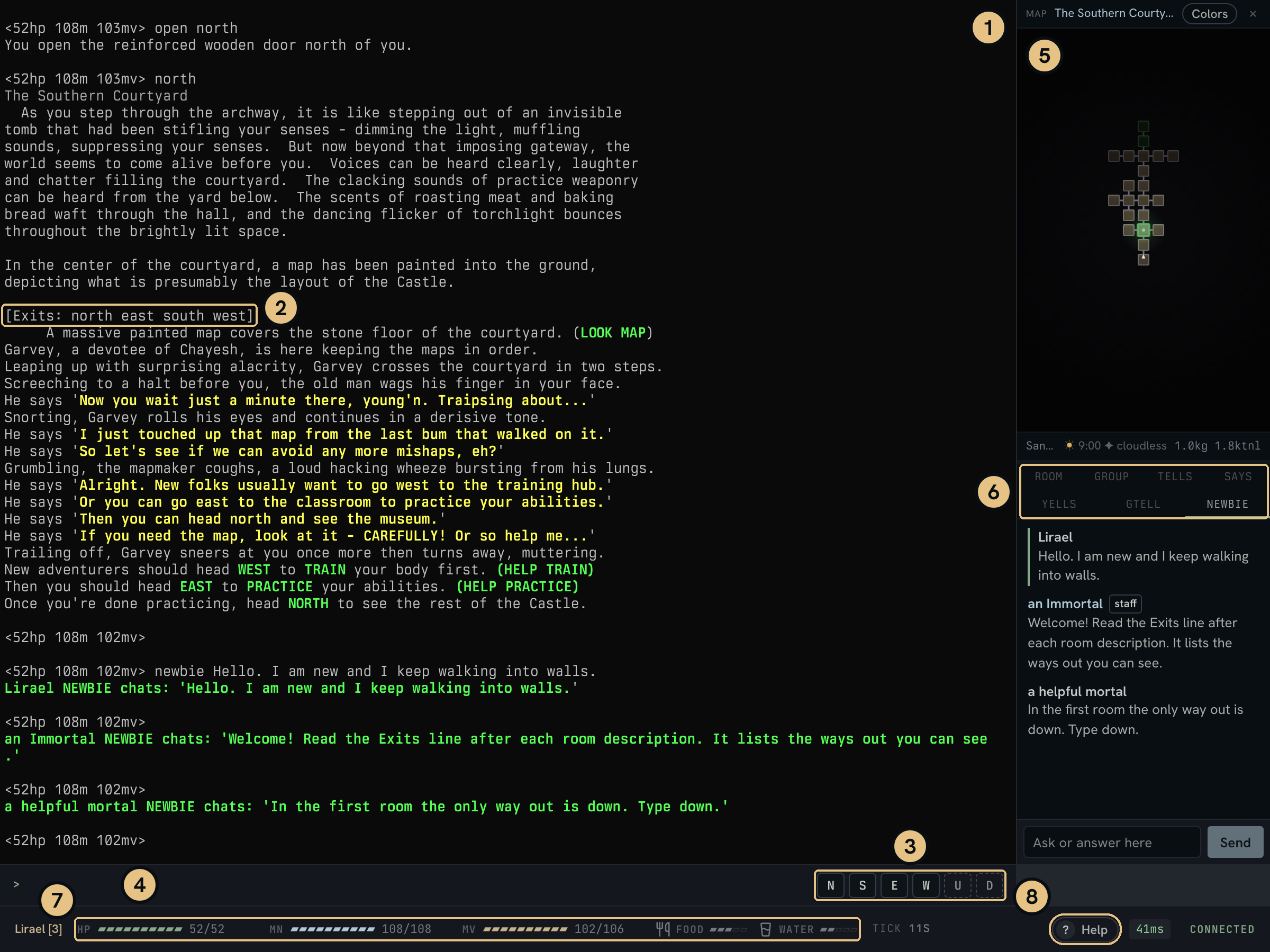
The game screen on a computer. The numbers match the list below.
- Game text. The game writes everything here. New text appears at the bottom. Scroll up to read older text.
- Exits line. It comes after the room description. It lists the ways out that you can see.
- Walk buttons. Click one to walk that way.
- Typing box. Type a command here and press Enter.
- Map. It shows the rooms near you.
- Tabs. Room shows who and what is here. The other tabs show tells, says, yells, group talk and the newbie channel.
- Bars. Your health, mana, moves, food and water.
- Help button. It opens the tour, the map colors, the newbie channel and this page.
Moving around
![Game text for a room called A Massive Archway. The exits line reads [Exits: (north) south].](/uploads/guide/browser-room.png)
A room with a closed door to the north.
- The room name. Every place in the game is a room, even outside.
- What the room looks like.
- The exits line. It lists the ways out that you can see.
- A way in round brackets has a closed door.
- Things and people in the room.
To walk, type a direction and press Enter. There are six directions, and the first letter works too.
northorneastoresouthorswestorwuporudownord
The exits line lists the ways out that you can see. If you walk where there is no way, the game says Alas, you cannot go that way. Pick a way from the exits line instead. Some ways are hidden. Read Hidden ways below to learn how to find them.
A way in round brackets, like (north), has a closed door. Type open north to open it, then walk north. Some doors are locked. You need the key to open them.
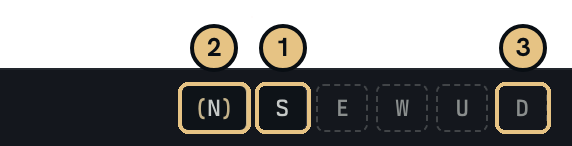
The walk buttons in the same room.
- A bright button is a way out that you can see. Click it to walk.
- A button in brackets is a closed door. Click it to open the door.
- A faded button shows no way that you can see. A hidden way can still be there. Click it to check.
Walking uses moves. When you have few moves left, type rest. Type stand when you want to walk again. Type look to see the room again.
In the game, help exits and help north tell you more.
Hidden ways
Some ways out are hidden. The exits line does not list them, and the map does not show them. A faded walk button can still lead to one.
The room text often gives a hint, like a cold draft behind a bookcase on the west wall. To check, walk that way. Players call this bumping.
- If nothing is there, the game says Alas, you cannot go that way.
- If you find a hidden door, the game tells you its name, like The bookcase is closed. Type
openand the way you walked, likeopen west. Then walk that way again. - Some hidden ways have no door. You walk through and arrive in a new room.
An open hidden door shows in the exits line like any other open door.
In the game, help exits explains this too.
The map
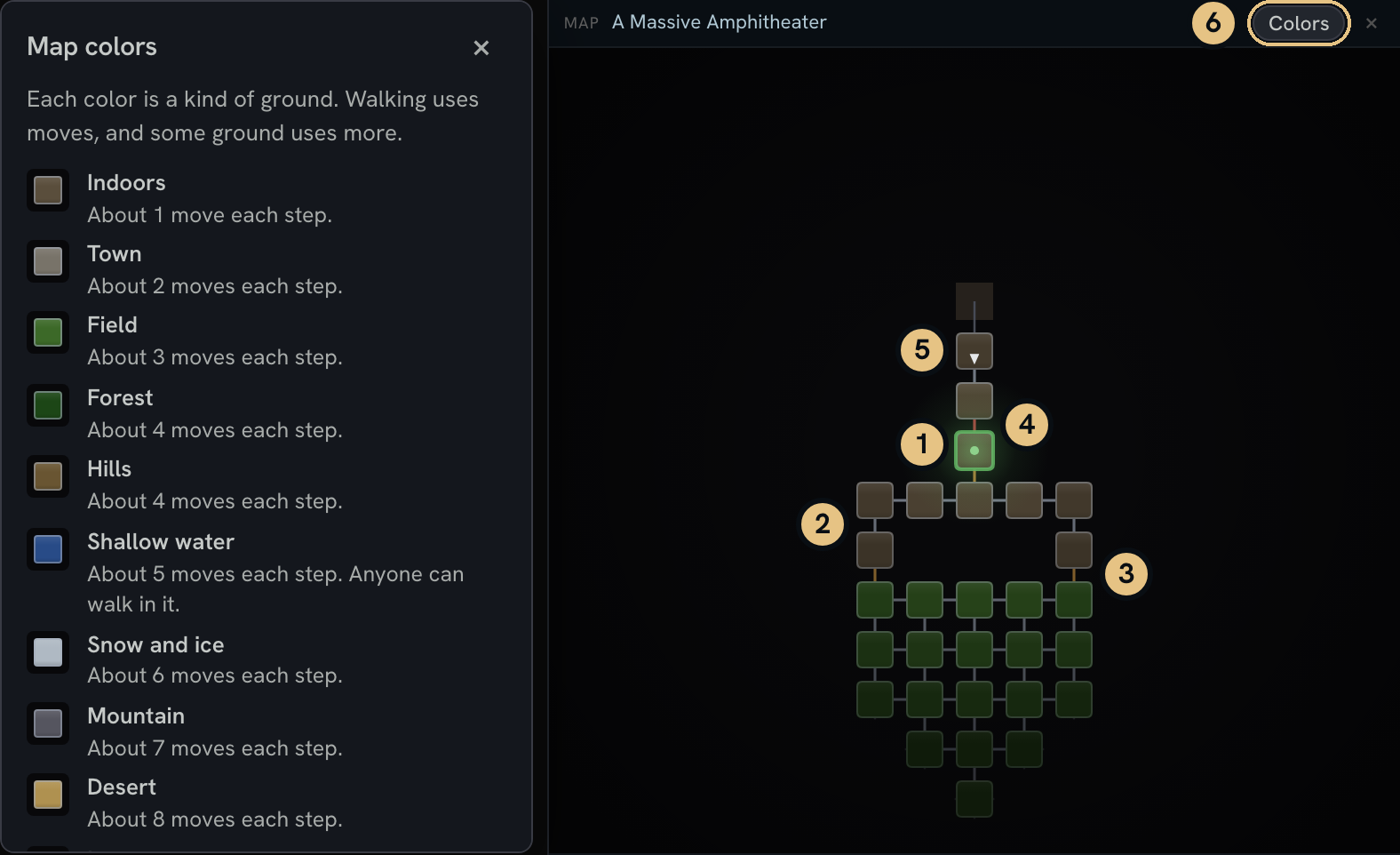
The map and the color key, in a room with a locked door to the north.
- The green square with a ring is you.
- A gray line is a path between two rooms.
- An amber line is a closed door.
- A red line is a locked door.
- ▲ and ▼ show a way up or a way down.
- The Colors button opens the color key.
Hidden ways do not show on the map.
Point at a square to see what it is. On a tablet, tap the square. On a phone, tap Map at the top first.
Each color is a kind of ground. Walking uses moves, and some ground uses more.
- Indoors About 1 move each step.
- Town About 2 moves each step.
- Field About 3 moves each step.
- Forest About 4 moves each step.
- Hills About 4 moves each step.
- Shallow water About 5 moves each step. Anyone can walk in it.
- Snow and ice About 6 moves each step.
- Mountain About 7 moves each step.
- Desert About 8 moves each step.
- Lava About 8 moves each step. Some lava burns you.
- Swamp About 10 moves each step. This is the slowest ground.
- Deep water About 5 moves each step. You need a boat, or you must fly. Storm Giants can walk it without the need for a boat.
- Open air About 1 move each step. You must fly to go here.
These numbers can be modified in a number of ways. Flying, haste, and being mounted make each step cost fewer moves. Minimum 1.
Spells such as enfeeble, slow, and paralyze will increase it. Not all movement bonuses and penalties are created equal.
Rooms far from you look darker.
Your character also carries paper maps. Type look map to read one.
Health, mana and moves

The bar at the bottom of the screen. In a wide window it is one line.
- HP is your health. If it runs out, you die.
- MN is mana. Spells use it.
- MV is moves. Walking uses them. When they run out, you cannot walk.
- Food and water. Read more in Food and water.
- Tick counts the seconds since the last game tick. A tick comes about every 30 seconds, and you heal a little on each one.
- Help button. It opens the tour and more help.
Type rest or sleep to heal faster. Type stand when you want to walk again.
On a phone the bars have no labels. In the bottom row, the first bar is health, the second is mana and the third is moves. The fork and the glass show food and water.
Food and water
Your character must eat and drink. When you get hungry or thirsty, the game tells you, and the bar at the bottom shows it.
- To eat, type
eatand the name of the food, likeeat chicken. - To drink, find a fountain and type
drink. - To carry water, buy a water bag. At a fountain, type
fill bag. Later, typedrink bag. - To buy food, go into a shop and type
listto see what it sells. Then typebuyand the name of the item, likebuy chicken.
In the Sanctum of Genesis, Eadronus sells food and water bags in the Castle Market. The Central Courtyard has a fountain.
Before level 10, hunger and thirst cannot hurt you. They only make you heal more slowly. From about level 10 they can hurt you, and they can kill you. Carry food and water when you travel.
In the game, help eat and help list tell you more.
Getting help
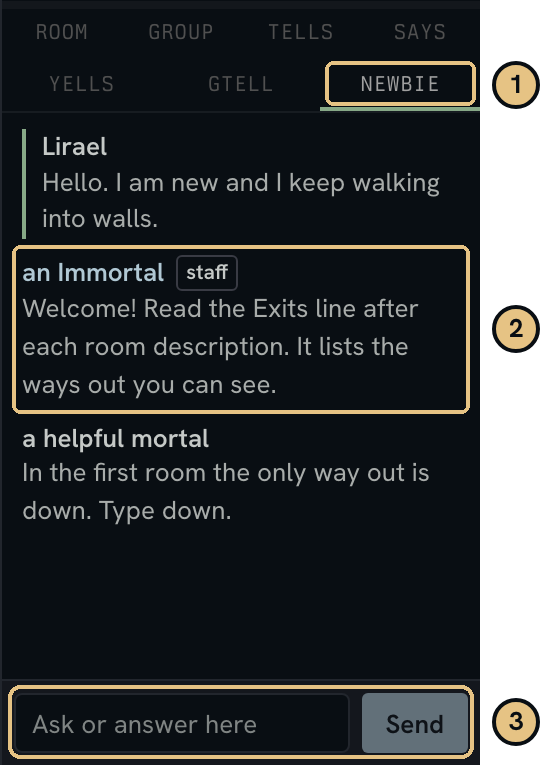
The newbie tab.
- The newbie tab.
- An answer from staff.
- The box to ask or answer.
Type newbie and your question, then press Enter. For example, type newbie where can I buy food? Everyone on the newbie channel sees it, and anyone can answer.
Answers show in the game text and in the newbie tab. You can answer from the tab too. On a phone, tap Chat at the top.
Answers from staff show the name an Immortal. Answers from experienced players show a helpful mortal.
Always type a message after
newbie. If you typenewbiealone, the channel turns off. Typenewbiealone again to turn it back on.
To read older questions and answers, type replay newbie.
For the game's own help, type help and a word, like help eat.
You can also ask on the forum.
Playing on a phone
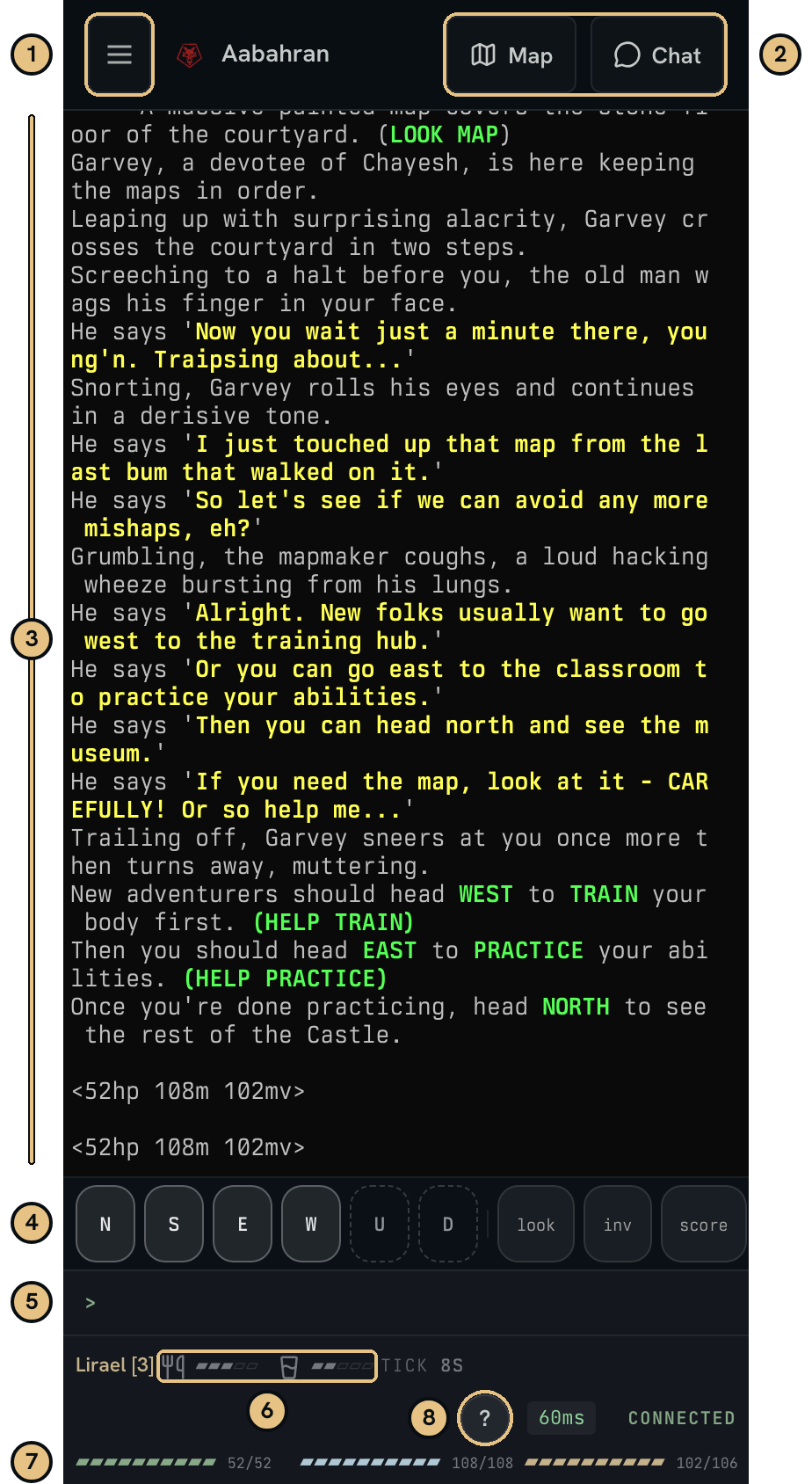
The game on a phone.
- Menu. It opens the site menu.
- Map and Chat. They open the map and the chat tabs.
- Game text.
- Quick buttons. The first six walk. Bright ones are the ways out that you can see. The buttons after them, like
lookandinv, are common commands. - Typing box. Tap it to type. Your keyboard opens.
- Food and water.
- Health, mana and moves.
- Help button.
Turn your phone sideways to see longer lines of text.
Settings
- Prefs holds your settings. On a computer, it is at the bottom of the site menu. On a phone, type
/prefsand press Enter. - Under Behavior in Prefs, you can turn off New player help, the walk buttons and the newbie tab. New player help shows short tips above the typing box.
- Pop out opens the game in its own window.
- Theme, in the site menu, changes the colors of the site.
How To Connect lists other ways to play!